Dealer Auction Condition Reports: How to Read Between the Lines and Avoid Arbitration
Learn how to inspect a car at auction remotely by decoding condition reports, spotting red flags in photos and scan codes, and knowing when to pass.
Part of the Buying & sourcing inventory guide: How to buy at dealer auctions without getting buried
An auction condition report is the result of a visual inspection — sometimes human, sometimes tech-enabled, sometimes both — reflecting observable vehicle condition at the time of inspection. It's your primary tool when you're trying to inspect a car at auction remotely, but it's written to protect the auction and the seller, not you. The grade, the photos, the wording — all of it requires translation. A car graded "3.5" at one house can run like a 4.0 somewhere else, and two units with identical grades can differ by thousands of dollars in real recon cost. This post walks you through what to check in each section of a condition report, the red flags that should move your bid or stop it entirely, and how to decode auction condition report language before you commit.
If you're new to wholesale buying, start with our dealer auction buying guide for the full process. For what happens when a unit you bought turns out worse than advertised, see our auction arbitration dispute guide.
Why the condition report isn't a guarantee
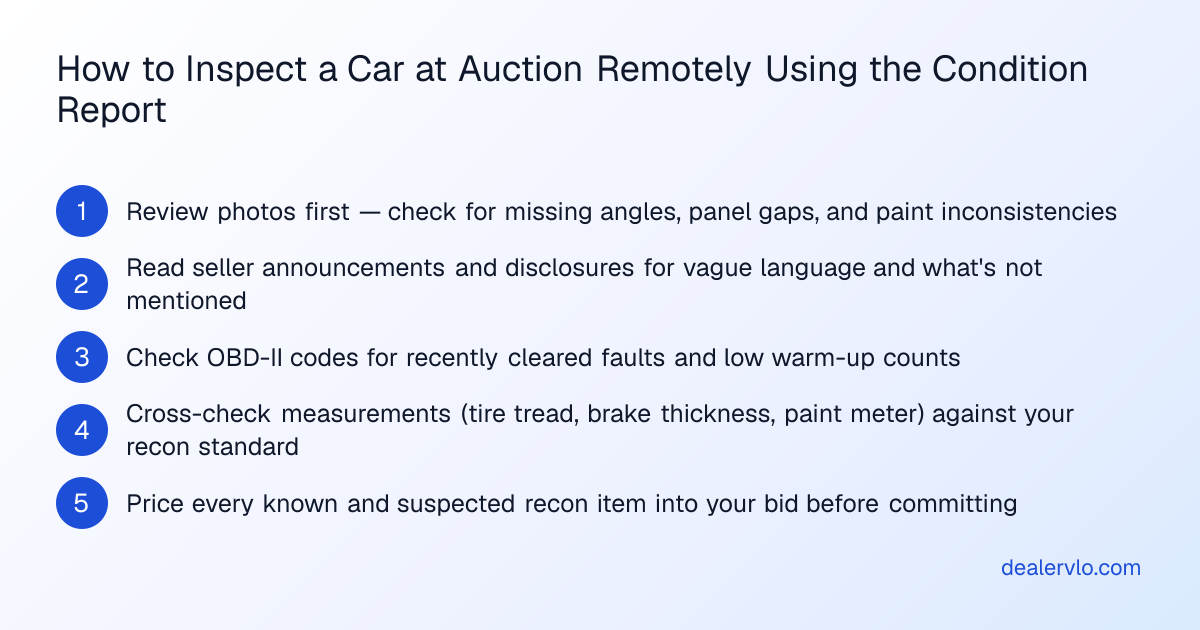
Condition reports provide a snapshot based on visible inspections at the time of listing. Hidden mechanical issues or internal damage may not always be noted, and the inspector isn't tearing down the engine or pulling carpet. The report tells you what was observable — emphasis on observable — which means silence on a system can be as telling as a disclosure. A thorough report will address paint, panel gaps, rust, mechanical function, and interior wear. Noticeable silence on any one of those areas is worth a direct question to the seller or a lower bid to cover the unknown.
Most auction houses use some form of numeric or letter grading system to summarize overall condition, but these scales are relative to the house issuing them and aren't standardized industry-wide. Two cars with the same grade can differ enormously in actual condition, so always read the accompanying written notes rather than relying on the grade alone.
What to check in the photo set — and what's missing
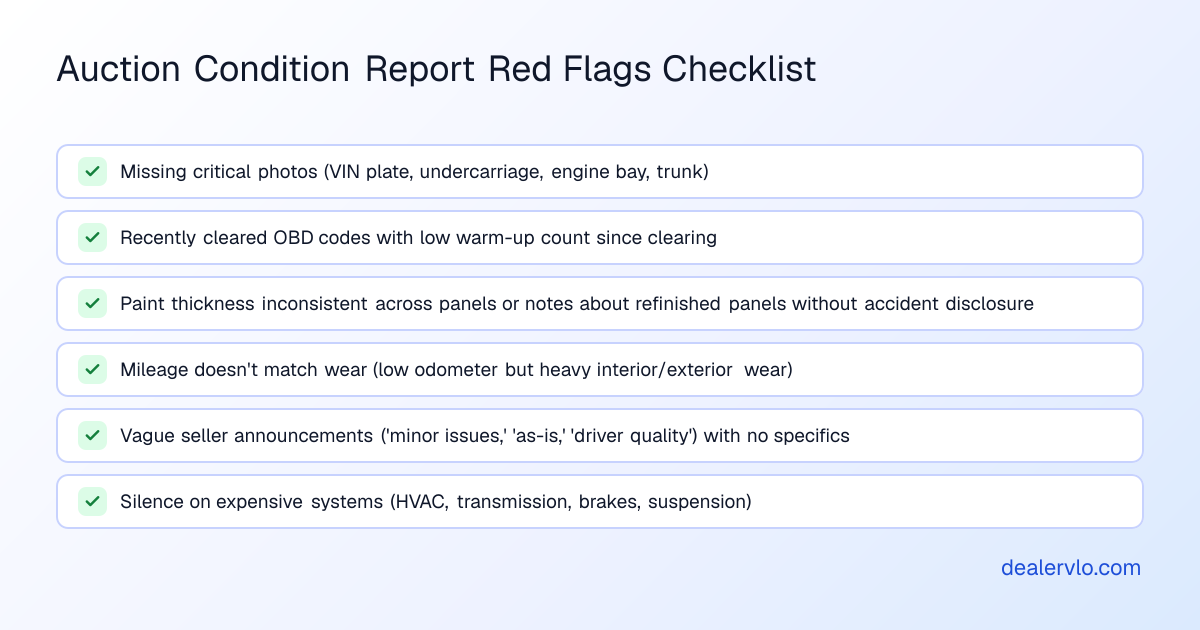
Photos lie by omission. No undercarriage shots, no engine bay close-ups, or a suspiciously clean engine bay on an otherwise worn vehicle are all massive auction condition report red flags. Missing photos of the VIN plate, interior, engine bay, or trunk often signal a deliberate choice to avoid showing damage.
High-resolution photos can reveal panel misalignment, overspray, or inconsistent paint texture that a written summary glosses over. When you're reviewing the photo set, look for:
- Missing critical angles. VIN plate, undercarriage, engine bay, trunk. If the report doesn't show them, assume the worst and price accordingly.
- Conveniently cropped shots. Photos that cut off at the rocker panel, skip the rear bumper, or avoid showing one corner usually mean that corner has damage.
- Panel misalignment and paint inconsistencies. Zoom in on door gaps, fender lines, and the texture of clearcoat. Overspray on trim or uneven orange peel between panels tells you bodywork happened.
- A too-clean engine bay. If the engine looks freshly detailed but the interior and exterior show heavy wear, you may be looking at a flood car. Water doesn't show up in photos, but the effort to hide it does.
In DealerVLO, once you decide to bid, you can add the car to inventory with VIN decode and track your all-in cost — including every recon line item you spotted in the photos — so your margin calculation reflects reality, not the grade on the report.
For a breakdown of how to read margin on a run list before the photos even load, see our guide on paper spread vs. real gross.
14-day free trial, then $29/mo · Cancel anytime
OBD-II scan codes: what they say and what recently cleared codes mean
Some platforms now add OBD-II emissions codes directly to the condition report in a clean table format, pulled at the point of inspection. This is useful — when the data is there and when you know how to read it. Basic OBD-II scanners can only scan codes from the Engine Control Unit; most cars have between 30 and 50 control units, so a "clean" scan that only shows engine codes tells you almost nothing about transmission, ABS, airbag, or body-control-module faults.
One critical field to check if it's included: warm-ups since DTC cleared. This number counts the engine warm-up cycles since the error codes were last cleared by the previous owner or a service tech. A seller might have recently cleared fault codes to turn off the dashboard warning lights — a tactic often used to make a vehicle appear healthier than it is. A "clean" scan with very few warm-ups since clearing is suspicious.
When you review scan codes on a condition report:
- Check whether codes are present at all. Not every platform includes them yet.
- Look for recently cleared codes. Low warm-up count with no explanation is a red flag.
- Ask whether it's a full-system scan or just engine. A unit can have serious faults in modules the basic scan never touched.
- Watch for pending codes, not just active ones. Pending codes haven't triggered the check-engine light yet, but they will.
If the report shows multiple stored codes even if not currently active, or codes recently cleared with a low warm-up count, bid lower or pass. You're buying the problem the seller tried to hide.
Paint-meter readings and body notes: finding hidden accident repairs
Some wholesale auctions provide paint thickness numbers right on the vehicle's report. This is one of the most valuable pieces of data you can get, because it reveals bodywork the seller may not have disclosed. Original factory paint typically shows a variance of around 10 to 40 micrometers from a baseline measurement taken on the roof — the roof is the reference because it's the least likely panel to have been in an accident. Extremely high or low thickness readings indicate where previous repairs have occurred.
When a paint meter can't get a reading at all, or the reading spikes well above normal, it usually means heavy body filler covering damage. If the report shows refinished or repainted panels without a corresponding accident disclosure, you're looking at undisclosed collision history.
What to check:
- Whether paint thickness readings are included. If they are, compare them across all panels.
- Uniformity. Factory paint is consistent. Big variance = bodywork.
- Notes about refinished panels. If the report says "repainted" but the announcement doesn't mention an accident, ask why.
- Readings that won't register or spike very high. Both indicate filler, and filler indicates impact.
DealerVLO doesn't do paint-meter scans, but once you know a car needs paint or body time, you can track that recon work line by line in the vehicle record so your all-in cost and margin stay accurate. For more on using comparable pricing data to price a unit after you know its true condition, see our post on how to read MMR and Black Book auction pricing.
Tire and brake readings: judge them against your recon standard, not state minimums
Condition reports often include tire tread depth in thirty-seconds and sometimes brake pad or rotor measurements. These numbers are useful, but only if you judge them against your own recon standard — what you'd have to replace before you could retail the car — not against what a state inspection might allow. Your standard should be higher.
What to check:
- Tread depth across all four tires. Uneven wear suggests alignment issues, suspension problems, or deferred maintenance you'll inherit.
- Mismatched tire brands. Four different brands usually means emergency replacement of one tire at a time, which is a maintenance red flag.
- Brake measurements if provided. If pads are at or near minimums, factor a full brake job into your bid.
- Wear patterns. Inside-edge wear, cupping, or feathering all point to expensive suspension or alignment work ahead.
If the report shows tires at minimums or uneven wear, you're buying tires and an alignment at minimum, and possibly ball joints, struts, or control arms. Price it in or pass.
In DealerVLO, recon costs — tires, brakes, alignment, anything else — go into the vehicle record line by line and roll up into the all-in cost automatically, so the deal math in the jacket reflects what you actually have in the car.
For a worked example of pricing recon into your bid, see our auction profit calculator.
Before you authorize the work: see whether a repair earns back its cost plus the holding days it adds.
Open the Recon ROI CalculatorSeller announcements and the language that protects the seller, not you
The written notes on a condition report use abbreviations and vague language designed to protect the auction, not you. Phrases like "older restoration" or "driver quality" are doing a lot of work, often signaling wear or dated cosmetics without stating so directly. When you see vague language — "minor issues," "as-is," "sold where-is" — translate it to mean the seller knows there's a problem and doesn't want to own it in arbitration.
What to check:
- What's not said. Silence on common problem areas for that make and model can be as important as disclosures. If the report doesn't mention HVAC function, transmission condition, or rust on a northern car, don't assume those systems are fine.
- Inconsistencies between the announcement and the photos. If the seller says "clean," but the photos show mismatched paint or a cracked bumper, trust the photos.
- Protective weasel words. "Minor," "typical," "age-appropriate," "driver quality" — all of these let the seller avoid specifics.
- Announcements buried in fine print. Important disclosures should be prominent. If you have to hunt for them, someone didn't want you to find them.
When a seller announcement is suspiciously vague on known problem areas, or the language contradicts what you see in the photos, bid lower or walk. For a list of the broader mistakes dealers make when buying at auction, see our post on auction buying mistakes that quietly kill your gross.
14-day free trial, then $29/mo · Cancel anytime
What the report doesn't say — and why that matters
A condition report reflects observable condition at the time of inspection, which means the inspector only documents what they can see or hear in a quick walk-around and test drive. If critical information is missing — no brake measurements, no tire tread depths, no mention of major systems — it may mean those items weren't inspected, or the seller didn't want them disclosed.
Red flags in what's missing:
- Absence of routine disclosures. If similar units on that platform usually include certain measurements or notes and this one doesn't, ask why.
- Silence on expensive systems. No note about transmission shifting, HVAC function, or suspension noise doesn't mean those systems are fine. It means they weren't addressed.
- Unusually brief reports. If the report is a paragraph and a grade when others from the same auction run two pages, you're not getting the full picture.
- No undercarriage or frame photos. Rust, frame damage, and flood history all hide underneath. If you can't see it, don't bid like it's clean.
When critical information is missing and you can't get it before the sale, price the unit as if the missing system needs work. You'll either win it cheap enough to cover the repair or you'll lose the bid to someone who didn't read the report. Either outcome is fine.
DealerVLO won't fill in what the auction left out, but once you know what a car needs, you can price it accurately: add the VIN, decode it, log every recon item, and see the real all-in cost and margin before you ever list it. For more on deciding whether a marginal unit should go back through the auction or get retailed, see our break-even decision tree.
How to inspect a car at auction remotely when you can't be there in person
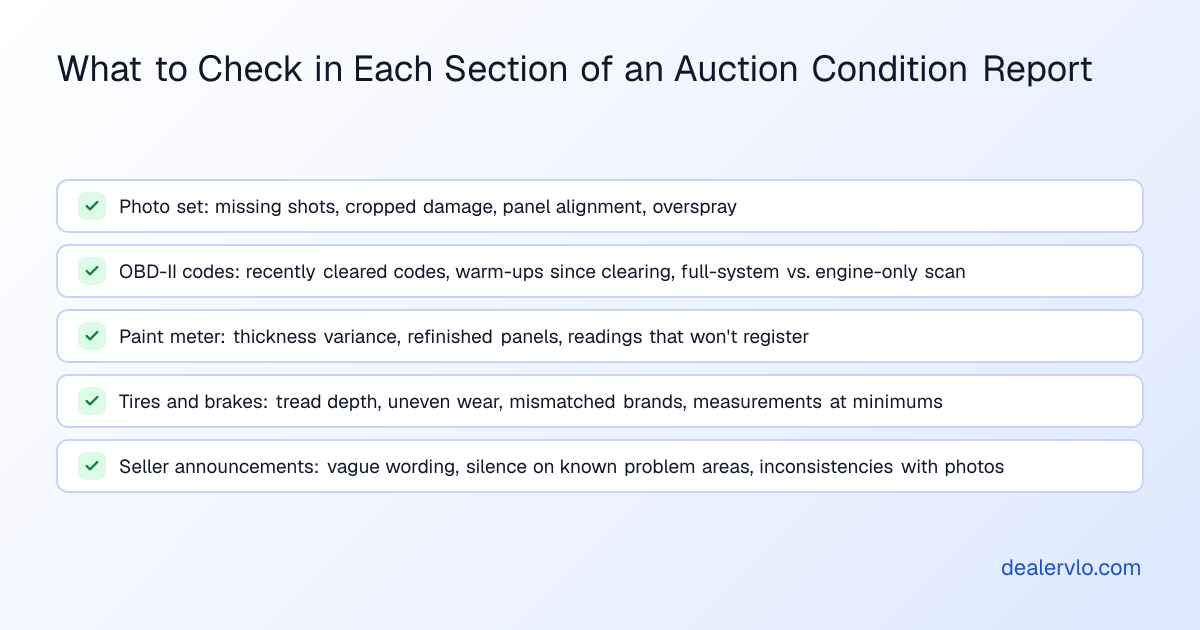
When you're buying from a lane you can't visit, the condition report and photos are your only eyes on the car. That puts pressure on every detail. Here's the process:
- Read the report in order: photos first, then disclosures, then codes and measurements. Don't start with the grade.
- Cross-check everything. Does the mileage match the wear? Do the seller's claims match the photos? Does a "clean" scan match a low warm-up count since codes were cleared?
- Note what's missing. Missing photos, missing measurements, missing notes — all of those cost you money if you ignore them.
- Translate vague language. Every time you see "minor," "typical," or "as-is," assume the worst and price it in.
- Run your recon math before you bid. Tires, brakes, paint, alignment, the work you see in the photos and the work you're guessing at because the report didn't mention it — add it all up and see if the number still works.
For five units from the September 23 Greater Atlanta sale with the recon and ROI math worked through, see 5 cars that penciled in Atlanta.
What DealerVLO does once you decide to bid
DealerVLO doesn't write condition reports or pull OBD codes, but it handles everything that comes after you win the car. Add the VIN and DealerVLO decodes it. Log every recon item — the tires you saw in the photo, the brakes that measured at minimums, the alignment you're assuming it needs, the paint correction — and those costs roll into the vehicle's all-in cost automatically. When you open a deal on that car, the deal jacket shows your real margin: sale price minus what you actually have in it, front-end and back-end gross computed live.
DealerVLO also tracks days in inventory on every car and flags units at 60-plus days so you know when to reprice. The AI price suggestion pulls live comparable listings and shows a target price for selling in about 30 days, which is useful when you're trying to recover from a unit that turned out worse than the condition report promised.
Every dealer who runs DealerVLO pays $29 a month flat, unlimited users, no per-deal or per-form fees. The 14-day free trial requires a card but doesn't charge until the trial ends, and you can cancel any time. It runs in a browser — nothing to install.
When to pass, when to bid lower, and when auction arbitration avoidance starts with the report
Auction arbitration avoidance starts before you bid. If the condition report has multiple red flags — missing photos, recently cleared codes, vague announcements, silence on expensive systems — and you bid anyway, you're buying a fight. Whether a problem you could have spotted in the report is still arbitrable depends on the auction's own rules — see the arbitration guide — so don't count on arbitration to rescue a buy the report already warned you about.
Pass when:
- Critical photos are missing and you can't get them before the sale.
- The seller announcement is vague or contradicts the photos.
- Paint-meter readings show multiple repainted panels with no accident disclosure, and you can't confirm the history.
- Scan codes were recently cleared with no explanation.
- Wear doesn't match mileage, suggesting odometer issues.
Bid lower when:
- The car is solid but needs known work — tires, brakes, paint — that the report disclosed or showed in photos.
- The grade is decent but the notes reveal deferred maintenance you can fix cheaply.
- You can see the problem, price it accurately, and still make money.
For the mechanics of filing and winning an arbitration claim when a car does turn out worse than disclosed, see our full arbitration documentation and dispute tactics guide.
Frequently asked questions
What are the biggest auction condition report red flags dealers miss?
The biggest red flags are what's missing, not what's disclosed. Missing undercarriage photos, no engine bay shots, silence on major systems like HVAC or transmission, and recently cleared OBD codes with low warm-up counts all signal problems the seller didn't want to put in writing. Mismatched mileage and wear — low odometer reading but heavy interior wear — is another major red flag that often indicates odometer tampering or inaccurate reporting.
How do I inspect a car at auction remotely if I can't be there in person?
Start with a thorough review of the condition report and photo set. Check for missing critical angles like the VIN plate, undercarriage, and engine bay. Cross-check the seller's claims against what the photos actually show — panel gaps, paint texture, tire wear, and interior condition. Review OBD-II codes if provided and look for recently cleared codes. Note what the report doesn't say; silence on brakes, tires, or mechanical systems often means they weren't inspected or the seller avoided disclosure. Price every known and suspected recon item into your bid before you commit.
What does it mean when OBD codes were recently cleared on an auction car?
When a condition report shows low warm-ups since diagnostic trouble codes were cleared, it usually means the seller or a service tech cleared fault codes shortly before the inspection to turn off dashboard warning lights. This tactic makes a vehicle appear healthier than it is. A clean scan with very few warm-ups since clearing is suspicious and often indicates recurring faults the seller tried to hide. Bid lower to cover the repair or pass entirely if multiple codes were cleared recently with no explanation.
Should I trust the overall grade on an auction condition report?
No. Most auction houses use numeric or letter grading systems, but these scales are relative to the house issuing them and aren't standardized industry-wide. Two cars with the same grade can differ enormously in actual condition and recon cost. Always read the accompanying written notes, review the photos, and check the measurements rather than relying on the grade alone. The grade is a summary; the details determine whether the car pencils.
How can I tell if a car has hidden body work from the condition report?
Look for paint thickness readings if the report includes them. Original factory paint typically shows a variance of around 10 to 40 micrometers from the roof baseline; extremely high or low readings indicate previous bodywork. Check the photos for panel misalignment, inconsistent paint texture, or overspray on trim. If the report notes refinished or repainted panels but the seller announcement doesn't mention an accident, that's a red flag for undisclosed collision history. When paint-meter readings won't register or spike very high, it usually means heavy body filler covering impact damage.
What should I do if critical information is missing from the condition report?
If critical photos, measurements, or system notes are missing and you can't get them before the sale, price the unit as if the missing system needs work. Either win it cheap enough to cover the unknown repair or lose the bid to someone who didn't read carefully. When routine disclosures that similar units usually include are absent — tire depths, brake measurements, undercarriage shots — treat the omission as a red flag and adjust your bid or pass entirely.
Bottom line
An auction condition report is written to protect the auction and the seller, not you, and every dealer who buys sight-unseen needs to read it that way. The photos, the codes, the paint readings, the seller's language, and especially what the report doesn't say all tell you whether a unit will pencil or become an arbitration fight. Decode auction condition report details before you bid, price every known and suspected recon item into your number, and pass when the red flags stack up. Most of what goes wrong in a wholesale buy was visible in the report if you knew where to look.
DealerVLO tracks your auction buys, logs every recon cost line by line, and shows your real all-in cost and margin so you know whether a car works before you ever list it. Start your free 14-day trial and run your next auction buy through a system that keeps the math honest.
Dump it at auction now or retail it? Compare the two nets and find the break-even day.
Open the Wholesale vs. Retail Calculator