Studio car photos in one click — no photographer, no booth
Shoot the car on your phone the way you always would. Click Enhance, and DealerVLO drops it onto a clean studio backdrop — white, dark, or showroom — with a soft shadow and floor reflection, in about four seconds. It changes the background and the lighting; it never touches the car. Built into the flat $29/month — no per-image fee.
The photo is the click — everything else is downstream
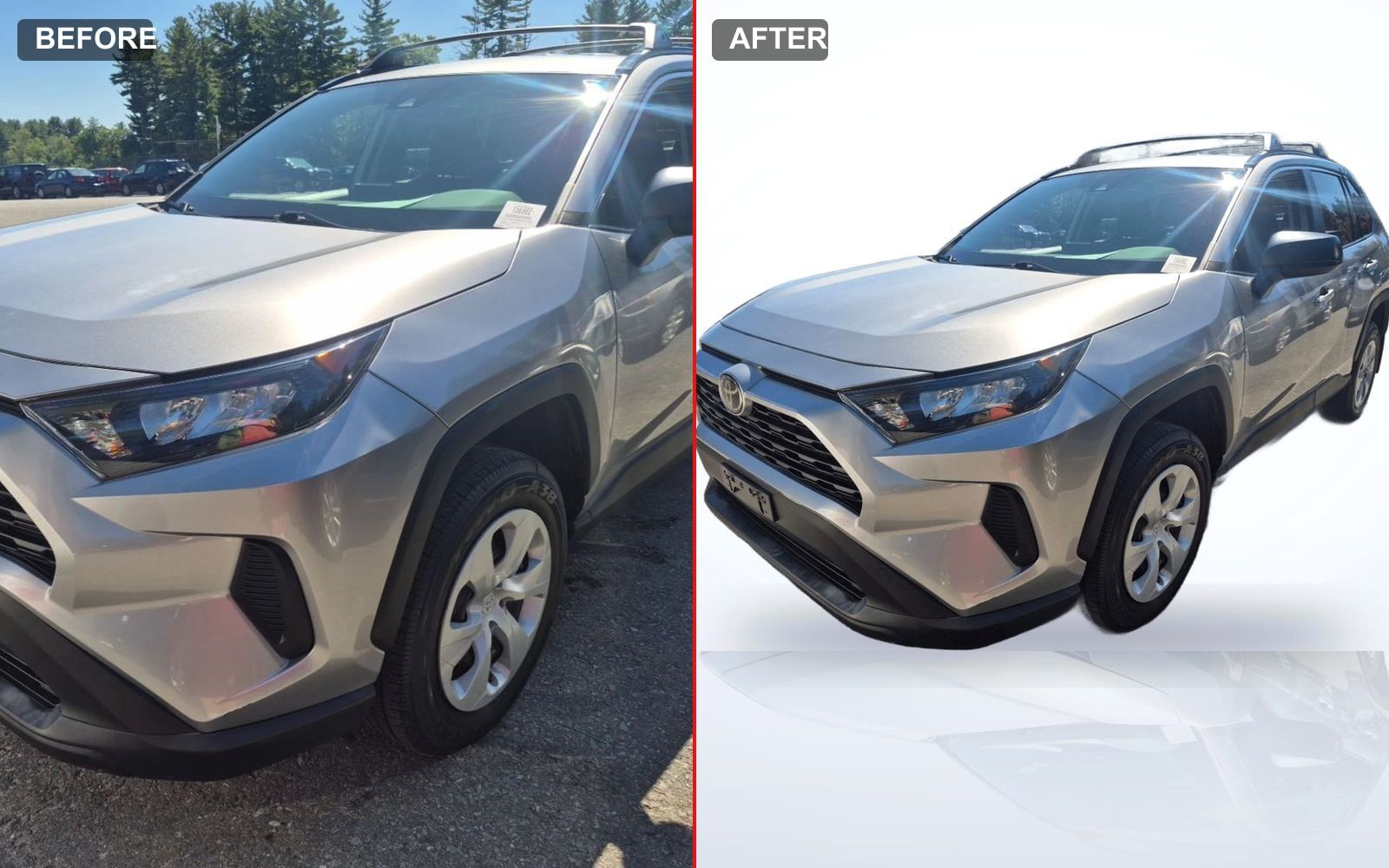
A shopper meets your car as a thumbnail the size of a business card, sitting in a grid next to thirty others that cost about the same. In that half-second, the photo decides whether they click — and your price, your mileage, and your clean title are all behind the click. A lot photo shot in harsh midday sun, with the auction lane or another dealer's sign in the background, loses that half-second. Here's the same used RAV4 before and after one click:
How it works
No editing software to learn, no backdrop to hang, no app to export to and back. It lives on the vehicle's photo manager, right where you upload.
Shoot it the way you already do
A quick walk-around on your phone between customers — no lightbox, no backdrop rig, no photographer. The lot photo you'd take anyway is the input.
Click Enhance
One click. The car is cut out and dropped onto a clean studio backdrop with a soft floor shadow and reflection — in about the time it takes to read this sentence.
Pick the look, set it as primary
White, dark, or showroom. Your original photo always stays; the enhanced version is just another photo you can set as the listing's primary shot.
It fixes the photo. It never fixes the car.
Editing software can do anything now — including erase a dent, smooth a scratch, or swap a set of curbed wheels for clean ones. The moment an edit changes the car instead of the photo, you've crossed from merchandising into misrepresentation, and it backfires the instant the buyer shows up. So we built the line into the tool:
DealerVLO's enhancement only replaces the background and evens the lighting. It cannot regenerate, smooth, or alter the vehicle itself, because it never touches those pixels — it isolates your actual car and re-places it on a clean backdrop. Every dent, every scratch, every bit of curb rash that's on the car is still on the enhanced photo. That's not a limitation; it's the point.
Keep your edits on the honest side of that line and you get the best of both: listings that look sharp and a walk-around that matches, so the buyer arrives already trusting you. More on where the line sits in your listing photos are the whole sale.
One click per photo, built into the flat price. No photographer, no booth, no per-image fee — and the car is never altered. $29/month, free to try — cancel any time.
Why it moves the needle on a small lot
The franchise stores read as professional because every car sits on the same clean background. Enhance each unit as you list it and your inventory page reads as one operation that has its act together — the thing buyers feel but can't name.
Photos are the cheapest lever you have for clicks and leads, and the one most small lots leave on the table — precisely because a real shoot is a project. This turns it into a click you do while you're already uploading the car.
It's part of the flat $29/month — the same price whether you enhance one photo or your entire lot. No separate photo-editing subscription, no credits to buy.
Set it as the primary shot and it's live on your included dealer website and your syndication feeds — no exporting, re-uploading, or re-touching anywhere else.
Car dealer photo software FAQ
Do I need a photographer or a photo booth to get professional car photos?
No. A photo booth is how the big franchise stores get a clean, consistent background on every car, but it costs real money and floor space a small lot rarely has. DealerVLO does the same job in software: shoot a normal walk-around on your phone, click Enhance, and it drops the car onto a clean studio backdrop in a few seconds — no photographer, no studio, no editing skills. The point isn't a booth; it's a clean, uniform look across your whole inventory.
Does it change or fake the car?
No — and that's the whole design. The enhancement only replaces the background and evens the lighting. It never regenerates the car itself, so it can't smooth a dent, hide curb rash, or swap a set of wheels. The honest line — improve the photo, never the car — is built into the tool, not left up to willpower. Every flaw that's on the vehicle is still on the enhanced photo.
What backdrops can I use?
Three: a clean white studio, a dark studio, and a showroom look. Each adds a soft floor shadow and a subtle reflection so the car reads as intentionally shot, not cut out. Use one consistently and your whole inventory page looks like one professional operation instead of a scatter of lot photos shot in different light.
Does it cost extra per photo?
No. Photo enhancement is part of the flat $29/month — there's no per-image fee, no separate photo-editing subscription, and no credit meter. Enhance every car on the lot as you list it; it's the same price whether you do one photo or a thousand.
What happens to my original photo?
It stays. The enhanced image is added alongside it as another photo on the vehicle, and you choose which one is the primary listing shot. Nothing is overwritten, so you can always fall back to the original or re-enhance a different photo.
Do better photos actually sell cars faster?
Online, the photo is what earns the click — and the click is the only way a shopper ever sees your price, your mileage, or your clean title. A clean, bright, well-framed lead image gets more people onto the listing, and more eyes on a car is what shortens the time it sits. It isn't magic: a bad unit priced wrong won't sell no matter how it's shot. But on two otherwise-equal cars, the one with better photos almost always gets more attention.
Enhance your first car on the trial
Add a vehicle, upload a phone photo, and click Enhance — watch it land on a clean studio backdrop in seconds. $29/month, flat. 14-day free trial, cancel any time.
More of what DealerVLO does
- Used-car dealer software (the all-in-one DMS)
- Dealer website included, on your domain
- Dealer paperwork software (50-state forms)
- See pricing
More on merchandising your inventory: how to shoot used cars, how many photos a listing needs, and writing listings that sell.
Bond amounts, fees, and form rules change. Get a short email when your state does. No spam, unsubscribe anytime.