How Many Photos Does a Used Car Listing Actually Need in 2026?
Listings with 40+ photos get 65% more VDP views. Learn the minimums, best practices, and what to shoot for used car listings that convert.
The Short Answer: 30-40 Photos, With 12 Non-Negotiables
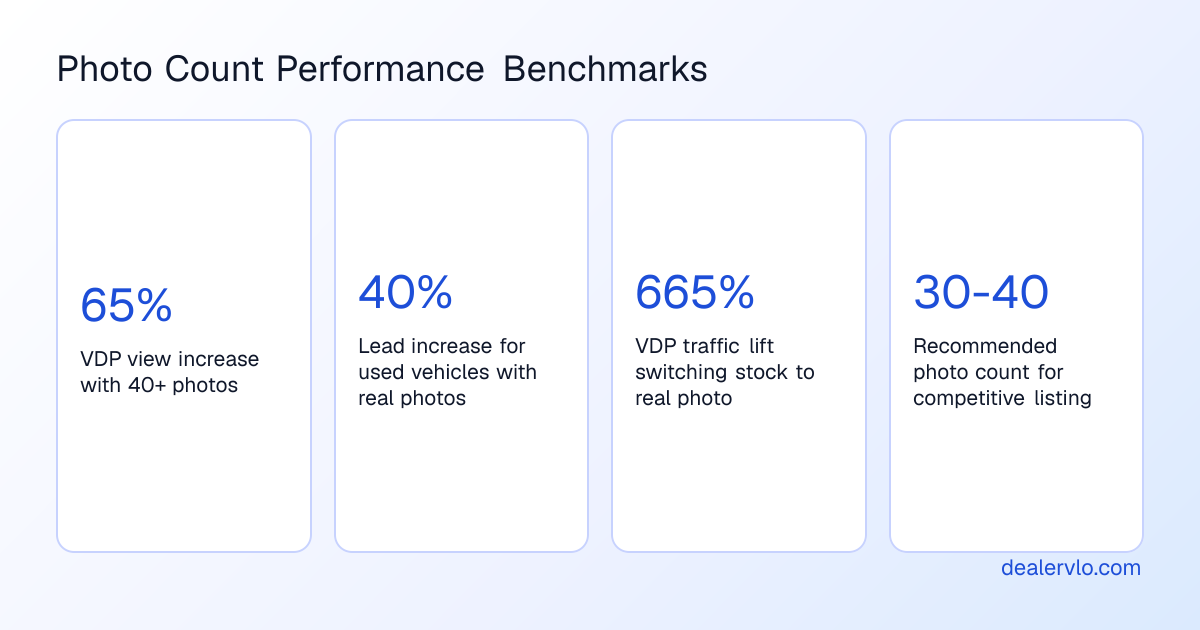
The data-backed sweet spot for a used car listing in 2026 is 30 to 40 photos. Cox Automotive's merchandising research shows that listings with 40 or more custom images get 65% more vehicle detail page (VDP) views than those with fewer photos. That lift translates directly to lead volume, and every dealer competing for the same buyer pool knows it.
Below 15 photos, your listing looks incomplete. Above 50, you're burning time for diminishing returns unless you're selling a collectable on Bring a Trailer. The operational standard for high-volume independent dealers sits at 20 to 30 photos—enough to answer every buyer question without ballooning your photo-shoot time past what a small lot can afford.
This isn't about technique or lighting gear—we cover that in the photography guide. This article is about how many photos you need, which angles are non-negotiable, and what wear points and details to document so your listing competes on AutoTrader, Cars.com, and CarGurus without leaving money on the table.
Quick disclaimer: This article covers merchandising best practices, not legal requirements. Photo counts and marketplace standards change; confirm current minimums with each platform before you publish.
Why Photo Count Matters: The VDP View Lift Is Real
AutoTrader's search algorithm gives preference to listings with more photos and higher resolution. That's not a subjective editorial choice—it's baked into how their search results rank. Dealers who upload 20 or more images at 1200 pixels or wider consistently see better search placement than those uploading the minimum at 640 pixels.
The reason is simple: shoppers engage with well-merchandised listings, and the platforms know it. Cox Automotive reports that new car listings using real photos are 30% more likely to generate leads; that figure jumps to 40% for used or certified vehicles. In one Dealer.com UX analysis, swapping stock photos for multiple custom, real photos boosted click-throughs to new-car VDPs by 133%.
Strong Automotive tracked client accounts and found that switching from a stock photo to a good lot photo drove VDP traffic up 665%. Going from a low-quality real photo to a high-quality one added another 172% on top of that. The pattern is consistent: more photos, better placement, more eyeballs, more leads.
At a benchmark holding cost of around $46 per car per day, a five-day delay in publishing a complete listing burns roughly $230 in gross per unit—before you even account for the lead-volume lift complete coverage delivers. Missing angles suppress VDP views, increase bounce rate, and push qualified buyers to a competitor's listing within the same hour.
Put a real dollar-a-day number on every unit sitting on your lot.
Open the Holding Cost CalculatorThe Minimum: 15-20 Photos (And Where Marketplaces Draw the Line)
Industry consensus puts the floor at 15 photos—ideally 20 to compete. AutoTrader requires a minimum of 4 photos to publish, but listings with fewer than 10 are flagged as low quality. Most converting dealer listings on AutoTrader have 15 to 20 photos covering all four exterior sides, interior, dashboard with odometer, rear seat, and cargo.
A used car listing should have at least 11 photos to compete on AutoTrader, where 11 or more photos generate 205% more VDP views than 10 or fewer. That's a hard threshold—10 photos might publish, but it won't show up where buyers are looking.
Cars.com is more forgiving on the low end but rewards higher counts aggressively. Listings with 20 or more photos generate significantly more engagement than those with 5 or fewer. CarGurus doesn't publish strict minimums, but their "great deal" badges and top-of-search placement correlate with photo count and completeness.
What 15-20 photos gets you:
- You clear the marketplace minimums and avoid low-quality flags.
- You answer the basic buyer questions: exterior condition, interior layout, odometer reading, cargo space.
- You're competitive with other small-lot dealers who are doing the minimum.
What it doesn't get you:
- Preference in search results when you're competing against a listing with 30+ photos at the same price.
- Coverage of wear points, tire condition, tech features, and accessories that answer the questions buyers ask over the phone anyway.
If you're running a high-turnover lot and every unit sells in five days regardless of photo count, 15-20 might be enough. For everyone else, it's leaving leads on the table.
The Sweet Spot: 30-40 Photos
The operational standard for dealers who treat online merchandising as a profit center is 30 to 40 photos. This is where the data converges: enough coverage to document condition transparently, showcase features that justify the ask, and rank well in search without burning an hour per car.
At 30 photos you can cover:
- 12 core angles (detailed in the next section): front three-quarter hero, both side profiles, rear three-quarter, straight-on front and rear, dashboard, front seats, rear seats, cargo, odometer, and infotainment screen.
- Wear points and transparency shots: every scratch, dent, curb rash, seat wear, or paint chip that a buyer will ask about or discover on arrival.
- High-value features: wheel packages, badging, roof rack, tow hitch, sunroof, upgraded audio, cargo accessories, floor mats—anything that differentiates the unit from the next one in search.
- Tire condition: close-ups of tread depth on at least two tires, ideally all four if there's uneven wear.
- Engine bay: clean, well-lit shot so the buyer knows you're not hiding fluid leaks or a mess of zip-tied hoses.
At 40 photos you hit the Cox Automotive benchmark and give yourself headroom to document a truck bed, third-row seating, or a loaded luxury interior without cutting corners. Cars.com allows up to 100 photos per listing, but the practical sweet spot remains 25 to 40—above that, you're repeating angles or shooting details that don't move the needle.
AutoTrader allows 30 photos in free private-seller listings and 50 in Premium dealer accounts. If you're paying for premium placement, use the full allotment; if not, aim for 30 and make every shot count.
The 12 Non-Negotiable Angles
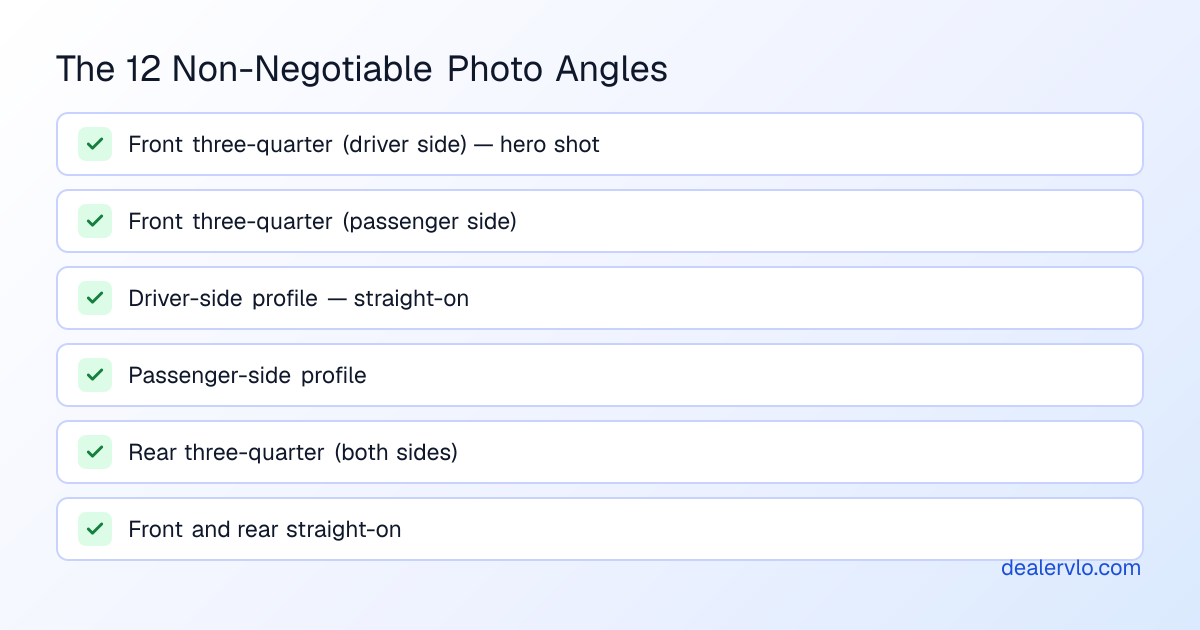
A car dealership listing in 2026 requires twelve angles to compete: front three-quarter hero, passenger-side front three-quarter, both side profiles, rear three-quarter, front straight-on, rear straight-on, dashboard, front seats, rear seats, cargo area, odometer, and infotainment screen. These twelve form the baseline used by Cars.com, AutoTrader, and CarGurus top-performing listings.
Every angle on this list exists because it answers a specific buyer question that, left unanswered, becomes a bounce. Here's what each one does:
-
Front three-quarter (driver side): The hero shot. This appears as the listing thumbnail in search results and drives the highest VDP click-through. Shoot from the front corner at roughly 45 degrees so the buyer sees the grille, headlights, wheels, and the full side profile in one frame.
-
Front three-quarter (passenger side): The mirror image. Buyers want to see both corners to check for asymmetric damage or mismatched paint.
-
Driver-side profile: Straight-on side view, wheels parallel to the camera. Shows body lines, rocker panels, and door gaps. One of the most-viewed exterior angles after the hero shot.
-
Passenger-side profile: Same angle, opposite side. Don't skip this—curb rash and door dings live here.
-
Rear three-quarter (driver side): Shows the taillights, rear bumper, and rear wheel. Critical for trucks and SUVs where the rear end carries visual weight.
-
Rear three-quarter (passenger side): Completes the exterior circuit.
-
Front straight-on: Grille, headlights, license plate, front bumper. Buyers use this to check for grille damage, aftermarket lights, or a misaligned bumper cover.
-
Rear straight-on: Taillights, exhaust tips, hitch receiver, rear bumper. Truck buyers look here for tow equipment and bumper wear.
-
Dashboard and instrument cluster: Shoot from the driver's seat, wide enough to show the full dash, steering wheel, center stack, and infotainment screen. After click-through, this is the most-viewed interior angle.
-
Front seats: Show the driver and passenger seat in one frame. Buyers are checking for tears, wear on the bolster, and whether the seats are cloth, leather, or synthetic.
-
Rear seats: Full view of the back bench or captain's chairs. Include the floor so buyers can see legroom and condition.
-
Cargo area / trunk: Opened and empty. Show the spare tire, cargo tie-downs, and the full depth. SUV and truck buyers will scroll past a listing that doesn't show bed or cargo capacity.
Proof shots that belong in every listing but aren't always counted in the core twelve:
- Odometer close-up: Clear, readable mileage. Some states require this in the listing; even if yours doesn't, buyers expect it.
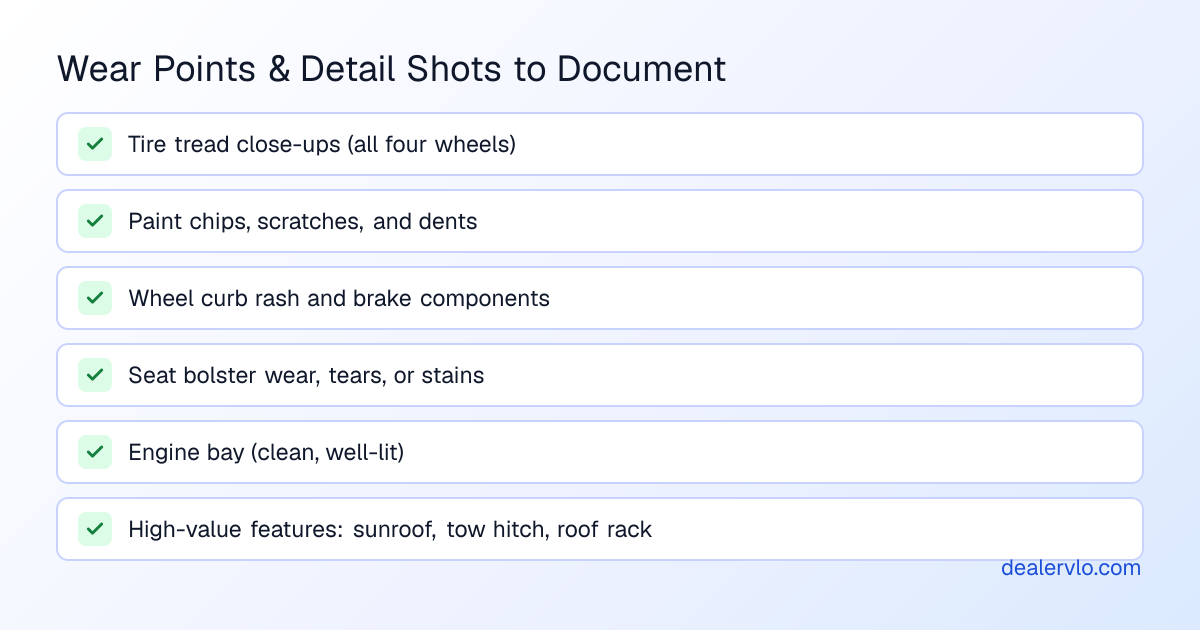
- Tire tread: A wheel close-up highlights the rim, tire, and brake components. For used car buyers, wheel photos provide valuable clues about maintenance. A good way to show tread remaining is by holding a quarter in the tread with Washington's head pointed down—if you can see the top of his head, the tire is below 4/32nds and due for replacement.
- Engine bay: Buyers want to see that it's clean, the belts aren't cracked, and there's no visible fluid leakage. One well-lit shot from above is enough.
What Else to Shoot: Wear Points, Tech, Accessories
Transparency Shots: Every Scratch, Every Dent
One of the biggest mistakes in car dealership photography is failing to show scratches, dents, or wear. Hiding imperfections leads to lost trust and customer complaints, especially for online buyers who depend on transparent listings. Industry surveys show that 62% of shoppers have arrived at a dealership and found the car didn't match the listing. That's a bounce, a bad review, and a buyer who tells ten friends.
By maintaining transparency and providing as many details as possible about the dashboard, engine, bumper, tires, and body panels, you set realistic expectations and minimize post-sale disputes. Buyers are often concerned about a used car's wear and tear, and a high-resolution photograph helps them gauge condition effectively. Capture everything from minor scratches to tire condition, dents, and paint chips.
What to document:
- Paint chips on the hood, bumper, or door edges
- Curb rash on wheels
- Seat bolster wear, tears, or discoloration
- Dashboard cracks or fading
- Stains on carpet or upholstery
- Stone chips on the windshield
- Rust on rocker panels, wheel wells, or undercarriage (if visible)
If it's visible in person, it should be visible in the listing. The time to manage expectations is before the buyer drives over—not when they're standing on your lot deciding whether to walk.
High-Value Features, Tech, and Cargo
Professional photo services work with dealerships to align on model-specific views, high-value options, interior technology, wheel packages, badging, cargo space, and other details shoppers use to compare vehicles online. That means capturing the right exterior angles, interior details, high-value features, mileage, tires, cargo areas, wear points, and condition-related visuals when needed.
What buyers look for in feature shots:
- Infotainment and screens: CarPlay/Android Auto connectivity, navigation, screen size. Shoot the screen powered on, showing the home menu.
- Climate controls: Dual-zone, tri-zone, or rear climate controls justify a higher ask on family SUVs.
- Sunroof or moonroof: Interior shot looking up, and an exterior shot from the roof rail if it's a panoramic.
- Upgraded audio: Brand badge (Bose, Harman Kardon, JBL, etc.) and speaker grilles.
- Cargo accessories: Roof rack, cargo cover, tonneau cover, bed liner, tow hitch, bike rack mounts.
- Floor mats, all-weather liners, and included extras: Buyers want to know what comes with the car. If you're including a second set of wheels and tires, shoot them.
- Third-row seating: Show the seats both folded and upright, and the cargo space in both configurations.
For trucks and SUVs, shoot the bed or cargo area from multiple angles: looking in from the tailgate, from above showing the full floor, and close-ups of tie-downs, toolboxes, or bed liners. These aren't filler shots—cargo space is a primary purchase driver for this segment, and buyers will bounce to a listing that shows it if yours doesn't.
If you're listing a vehicle with advanced driver-assist features (adaptive cruise, lane keep, blind-spot monitoring), shoot the dashboard icons or steering-wheel buttons that activate them. Buyers shopping for safety tech want proof it's there.
Where Overkill Begins: 60+ Photos
The universal answer is 20 to 40 photos. Below 12 looks incomplete; above 50 has diminishing returns except on Bring a Trailer (where 80 to 150 photos is standard) and high-end Cars & Bids auctions (40 to 70 photos).
If you're selling a $60,000 low-mileage luxury SUV or a collectable with documented history, 60 photos might be justified—undercarriage shots, service records, window stickers, every panel gap, every interior stitch. For a $12,000 Camry with 85,000 miles, it's overkill. The buyer isn't going to scroll past photo 45.
When more photos make sense:
- High-dollar inventory ($40,000+) where buyers expect exhaustive documentation.
- Enthusiast vehicles where the audience wants to see every modification, bolt, and badge.
- Certified or low-mileage units where the condition is the differentiator and you're competing on pristine presentation.
- Marketplace maximums: Cars.com allows up to 100 photos per listing, and if you're paying for premium placement on a flagship unit, using 60 to 80 slots can justify the ask.
When more photos don't make sense:
- You're repeating angles or shooting filler details that don't answer a buyer question.
- Your lot shoots photos in-house and you're trying to turn 12 cars a week—spending 90 minutes per car on photos eats into everything else.
- The unit is priced to move and will sell in three days regardless of whether you shot the spare tire from two angles.
Respect your own time. If you're a one-person shop running a small lot, 25 to 30 well-chosen photos beats 50 rushed ones. Writing a strong description that calls out the condition, service history, and features in plain language does as much for conversion as the last 20 photos.
Marketplace-Specific Standards: AutoTrader, Cars.com, CarGurus
Each marketplace has its own photo requirements and ranking signals, and knowing where the thresholds sit helps you allocate effort where it matters.
AutoTrader:
- Minimum: 8 photos required; 24+ recommended for premium placement.
- Quality threshold: Listings with fewer than 10 photos are flagged as low quality.
- Search ranking: AutoTrader's algorithm gives preference to listings with more photos and higher resolution. Their search results now factor in merchandising quality—photos, video, vehicle details, custom comments, and pricing—so well-merchandised vehicles rank higher on the search results page.
- What converts: Most converting dealer listings have 15 to 20 photos covering all four exterior sides, interior, dashboard with odometer, rear seat, and cargo.
Cars.com:
- Minimum: No hard floor, but fewer than 12 photos suppresses engagement.
- Maximum: Up to 100 photos per listing (the most generous limit among major marketplaces).
- Practical sweet spot: 25 to 40 photos. Cars.com actively encourages high-resolution uploads and rewards them in search.
- What to emphasize: Cars.com buyers tend to be further along in the shopping journey and use filters aggressively. Strong feature coverage (tech, cargo, tires, wear) helps your listing surface in filtered searches.
CarGurus:
- No published minimum, but their "great deal" and "good deal" badges correlate with completeness—photo count, price competitiveness, and days on market.
- Best practice: 20 to 30 photos to stay competitive with other dealers in your market.
- Search behavior: CarGurus shoppers sort by deal rating and distance. If two units are priced the same and yours has 12 photos while the competitor has 28, theirs gets the click.
The common thread: every marketplace rewards completeness. The floor is 15 photos, the ceiling is 50, and the sweet spot is 30 to 40. Shoot more if the unit and your workflow allow it; cut back to 25 if you're turning inventory fast and time is the constraint.
Real Photos Beat Stock Photos by a 665% Margin
Research shows that 90% of shoppers prefer real, high-quality photos over stock images. When dealerships replace poor or generic visuals with crisp, lot-shot images, VDP engagement can spike by as much as 675%. According to one May 2024 survey, 95% of car buyers say professional-looking images significantly boost perceived vehicle value, while 87% would click on well-lit, framed photos over blurry ones.
This isn't about hiring a photographer or buying a light tent—though those help. It's about taking the time to shoot every unit you stock with the same 12-angle checklist, the same attention to wear points, and the same commitment to transparency. Stock photos and placeholder images signal to the buyer that you haven't bothered to look at the car yourself, and they'll bounce to a dealer who did.
Cox Automotive's 2025 Car Buyer Journey Study confirms that "mostly digital buyers"—those completing over 50% of the process online—report the highest satisfaction. These are the buyers who spend thirty minutes scrolling through your photos at 11 PM before they ever call. If your listing answers their questions, they call. If it doesn't, they move to the next one.
If you're still using stock images or uploading the bare minimum, look at the AI tools available to independent dealers that can help with background removal, lighting correction, and faster editing. But nothing replaces shooting the actual car with enough angles to document condition and features.
How to Build a Workflow That Doesn't Burn Half Your Day
Shooting 30 to 40 photos sounds like a lot if you're doing it one car at a time with no system. Here's how small lots keep it efficient:
-
Print a checklist and tape it to your clipboard. The 12 core angles, plus tire close-ups, odometer, engine bay, and wear points. Check them off as you shoot. You'll forget the passenger-side rear three-quarter every time until you don't. Our used-car photo checklist covers the workflow in more detail.
-
Shoot exterior first, in order. Walk the car clockwise: front three-quarter, driver profile, rear three-quarter, rear straight-on, passenger rear three-quarter, passenger profile, passenger front three-quarter, front straight-on. Then wheels, tires, engine bay. Ten minutes if the lot is clean and the lighting is good.
-
Interior next, same sequence every time. Dashboard, front seats, rear seats, cargo, odometer, infotainment screen. Another five minutes.
-
Condition last. Walk the car again looking for anything you didn't catch the first time—scratches, dents, wear. Shoot everything. Three minutes.
-
Upload and tag immediately. Don't let photos sit on an SD card or your phone for two days. Upload them to your DMS or listing platform the same afternoon so the car goes live that night. Every day a unit sits without a complete listing costs you in holding cost and lost leads.
If you're running DealerVLO, photos upload directly to each listing and propagate to your website and syndication feeds. If you're using a different system, confirm how many photos each feed accepts—some CRMs cap syndication at 24 photos even if the marketplace allows 50, and you won't know until you check the live listing.
When to Shoot Fewer Photos (And When to Shoot More)
Shoot fewer photos (20-25) when:
- The unit is priced under $8,000 and will sell to the first qualified buyer regardless of photo count.
- You're turning inventory in under seven days and holding cost isn't a concern.
- The car is clean, low-mileage, and has no condition issues worth documenting.
- You're a solo operator and shooting 40 photos per car would mean you can only photo three cars a day.
Shoot more photos (40-50) when:
- The unit is priced above $25,000 and you're competing with franchise CPO programs that shoot 50+ as standard.
- The vehicle has high-value features, accessories, or options that justify the ask—third-row seating, tow package, panoramic sunroof, upgraded wheels.
- There's visible wear or damage that needs transparent documentation to set expectations and reduce comebacks.
- The car has been on your lot for more than 21 days and isn't getting VDP views—adding more photos and re-merchandising can reset the search ranking.
If a unit isn't moving and you're confident it's priced right, the first thing to check is photo count and completeness. Adding ten photos and re-uploading can trigger a ranking refresh on some marketplaces, and the VDP lift from 18 photos to 35 is measurable.
Building This Into Your Recon and Listing Workflow
Photo count is part of recon, not a separate task you do when you have time. If your workflow is buy → detail → photo → list, you're adding days to time-to-market. The better sequence is buy → detail → photo while it's clean → list that afternoon.
At a 20-car lot turning a unit a week, you can't afford to let cars sit unshot for five days while you batch photo sessions. The holding cost burns faster than you can recover it, and the first three days a car is live online generate the highest VDP views and lead volume. Missing that window because the photos aren't done yet costs you real gross.
If you're reconditioning in-house, shoot the exterior before the car goes into the shop and the interior after it's detailed. If you're outsourcing recon, shoot everything the day it comes back. Build the time into your calendar—Tuesday afternoon is photo day, every week, no exceptions.
Tracking your recon costs by vehicle type helps you budget time as well as dollars. If you know a crossover takes an average of $1,200 and three days to recon, you also know you have one afternoon to shoot and list it before the holding cost compounds.
If you're using a DMS that auto-populates listings and syndicates to multiple marketplaces, confirm that your photo allotment matches what each platform accepts. Most modern DMS platforms built for independent dealers handle syndication and photo feeds automatically, but you still need to verify the first time you publish to each marketplace that all 35 photos made it, not just the first 12.
Frequently Asked Questions
How many photos should a used car listing have in 2026?
The data-backed sweet spot is 30 to 40 photos. Listings with 40 or more custom images get 65% more VDP views, according to Cox Automotive's merchandising research. The operational standard for high-volume independent dealers is 20 to 30 photos—enough to cover all angles, wear points, tech features, and cargo without burning excessive time per unit.
What are the minimum photo requirements for AutoTrader and Cars.com?
AutoTrader requires a minimum of 8 photos, but listings with fewer than 10 are flagged as low quality and suppressed in search. Most converting dealer listings have 15 to 20 photos. Cars.com has no hard minimum, but fewer than 12 photos suppresses engagement. Cars.com allows up to 100 photos per listing and rewards high-resolution uploads with better search placement.
Do I need to photograph scratches and dents in a used car listing?
Yes. One of the biggest mistakes in dealership photography is failing to show wear. Hiding imperfections leads to lost trust and customer complaints—62% of shoppers report arriving at a dealership and finding the car didn't match the listing. Capture every scratch, dent, curb rash, seat wear, and paint chip. Buyers will discover it anyway; the time to manage expectations is before they drive over.
What angles are non-negotiable in a used car listing?
The 12 core angles are front three-quarter hero, passenger-side front three-quarter, both side profiles, rear three-quarter, front straight-on, rear straight-on, dashboard, front seats, rear seats, cargo area, odometer, and infotainment screen. Every angle answers a specific buyer question. Skipping any of them increases bounce rate and suppresses VDP views.
How long does it take to shoot 30 to 40 photos per car?
With a checklist and a consistent workflow, 30 to 40 photos takes about 20 minutes per car—ten minutes for exterior angles, five minutes for interior, and five minutes for condition and detail shots. Shooting in the same order every time and uploading immediately keeps the process efficient. The time invested pays back in faster lead volume and better search placement.
Does photo count affect how fast a car sells?
Indirectly, yes. More photos drive more VDP views, which generate more leads. At a benchmark holding cost of around $46 per car per day, a five-day delay in publishing a complete listing burns roughly $230 in gross per unit. Listings with 20 or more photos rank higher in marketplace search algorithms, which shortens days to first inquiry and improves the likelihood of a same-week sale.
The Bottom Line
Thirty to forty photos is the standard in 2026, and the data show it works. The 12 core angles are non-negotiable—they answer the buyer questions that turn a scroll into a call. Everything beyond that—wear points, tech features, tires, cargo—is about transparency and setting expectations so the buyer who shows up is ready to buy.
If you're shooting fewer than 20 photos, you're leaving VDP views and leads on the table. If you're shooting more than 50 on a $15,000 sedan, you're burning time that could go toward getting the next unit to market. Build a checklist, shoot every car the same way, and upload the same day. The lift in search placement and lead volume pays for the time investment in the first week.
Before you authorize the work: see whether a repair earns back its cost plus the holding days it adds.
Open the Recon ROI Calculator