Remote Car Sales: How a Small Lot Sells to a Buyer It Never Meets (Without Getting Burned)
The remote car sale for dealers, start to finish: walkaround, deposit, financing, e-sign, cleared funds, title and delivery, plus the fraud traps to avoid.
Part of the Selling & your sales team guide: The In-Person Used-Car Sale: From Test Drive to Close on an Independent Lot
Your best lead this week might live four hours away. They found the car on your website, they like the price, and they want to know one thing: can they buy it without driving out? For a small lot, saying yes to a remote car sale opens up buyers you'd never see otherwise. It also opens the door to the oldest scams in the business, because a buyer you never meet is also a buyer you can't look in the eye.
This is the operator version of the remote deal: the process from lead to delivery, and the fraud controls that go with each step. It's not legal advice, and some pieces (signatures, notary rules, out-of-state tax and title) depend on the states involved, so I link to the posts that go deeper instead of repeating them here.
14-day free trial, then $29/mo · Cancel anytime
The remote car sale, start to finish
A remote deal is the same deal you'd do across the desk, stretched out over a phone, a camera and a few days. Here's the order that keeps you safe:
- Lead. Reply fast. Remote buyers are often shopping several lots at once.
- Video walkaround. Live, so they can ask you to zoom in on the rocker panel.
- Deposit. Small, refundable or not per your written policy, to hold the car while the rest happens.
- Credit application and financing. Start it now, or get their own lender's contact.
- Numbers in writing. A buyer's order with every fee, including transport. No "we'll figure out shipping later."
- E-sign. Electronically, where that's allowed.
- Funds clear. Not "the check was deposited." Final, confirmed with your bank.
- Title and temp tag. Whatever the buyer needs to drive or register it legally.
- Delivery or pickup. Condition report signed at handoff.
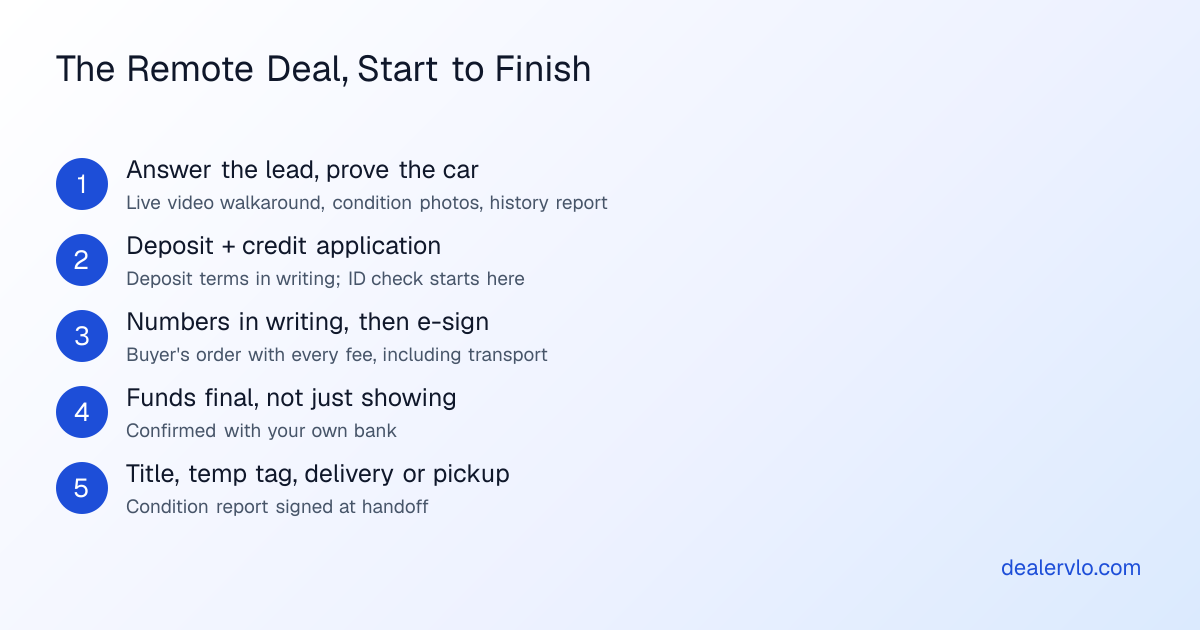
The order matters most. Steps 7 and 9 never swap: the remote-deal horror stories are usually a car that left before the money was real.
Working the lead is covered in converting online leads to appointments; for a remote buyer, the "appointment" is the video call. In DealerVLO, every car on your dealer website shows its price and a monthly payment estimate, so the out-of-area buyer already knows roughly where the deal lands. When they send an inquiry, it lands in your lead inbox with its source, and if they gave an email, they get an automatic confirmation that you received it.
Proving the car to a buyer who can't see it
The remote buyer's fear is that the car shows up worse than the pictures. Remove every surprise before they pay, and put what you said in writing.
- Live video walkaround. Start it cold, show the dash, and point the camera at the flaws yourself. The video walkaround post has the script and the gear.
- Condition photos. Close-ups of every scratch, curb-rashed wheel and worn seat, not just the glamour shots.
- History report. Send the one you pulled.
- Pre-purchase inspection. Offer to let a local shop of their choosing inspect it, at the buyer's expense, before they commit.
- Expectations in writing. "Sold as-is, condition as shown in the video and photos dated..." in the buyer's order or an email the buyer replies to. Your FTC Buyers Guide still goes on the deal.
To be clear, DealerVLO doesn't record or host video, so the walkaround happens on your phone. What it does handle is the photos: you upload them per car, drag them into order so the best one shows first on your website, and you can use the optional photo enhance to put a car on a clean backdrop without altering the car itself. For a remote buyer, keep the plain, unenhanced condition shots in the set too.
Verifying a buyer you've never met
Identity fraud on a remote deal tends to look like someone financing with another person's information, or paying with money that isn't theirs. You won't catch everything, but a few plain checks catch a lot:
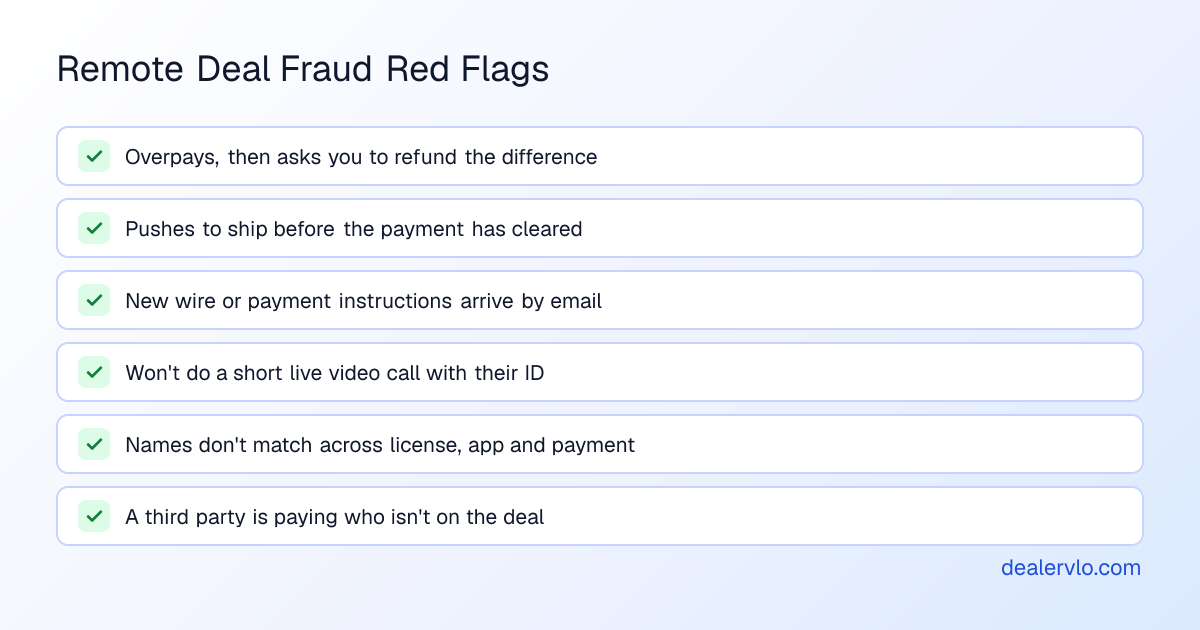
- A copy of the driver's license, plus a short live video call where they hold it up.
- Names that match across the license, the credit application, the payment and the title paperwork.
- A callback to a phone number you looked up or verified yourself, not one from the latest email.
- Their insurance card for the car before it leaves.
If you arrange financing, you may be covered by rules that make this formal. The FTC's Red Flags Rule guide describes a written identity theft prevention program, and its example red flags include ID that "looks altered or forged" and an address that doesn't match the credit report. Whether and how it applies to your lot is a question for your compliance advisor. The FTC Safeguards Rule post covers the data-security side of storing what you collect.
DealerVLO's optional online credit application deliberately doesn't collect a Social Security number. You get the SSN by phone or in person before you pull credit, which on a remote deal doubles as an identity conversation. Applications are encrypted, only owners, admins and finance managers can open them, and every view is logged. Each deal also has a compliance checklist where you record that the OFAC screen and Red Flags review were done. It's a checklist you complete, not a screening service, so the checks themselves are still yours.
Remote car sales paperwork: e-signatures, notaries and out-of-state title
Most of a remote deal can be signed electronically. The federal E-SIGN Act says a signature or contract in interstate commerce "may not be denied legal effect, validity, or enforceability solely because it is in electronic form" (15 U.S.C. 7001), and that covers a lot of what's in a deal jacket. The exceptions are where remote deals stall: some states still want a wet signature or a notary on certain title or power-of-attorney documents, and the rules vary. Check your state's dealer board or DMV, and the buyer's state too. The e-signatures and e-titling by state post shows how this breaks down, so you know which documents to mail and which to send as a link.
Out-of-state buyers add tax, temp tag and title questions: whose sales tax, how the buyer drives it home legally, where the title goes. That's a whole post on its own, the out-of-state car sale checklist, so I won't repeat it here.
This is the step DealerVLO is built for. The deal jacket computes the total, trade equity and payment as you type, including the doc fee you set once in Settings and a separate labeled line for something like a transport fee. From the deal it auto-fills the FTC Buyers Guide and the state title and registration paperwork, using the official state PDF where DealerVLO fills it, and a print-ready worksheet of the deal's values where the state issues its form through a portal or as a controlled paper form. Then you click Sign on a document and email the buyer and co-buyer each their own signing link. The signed copy files back into the deal jacket. More detail in the e-signatures post.
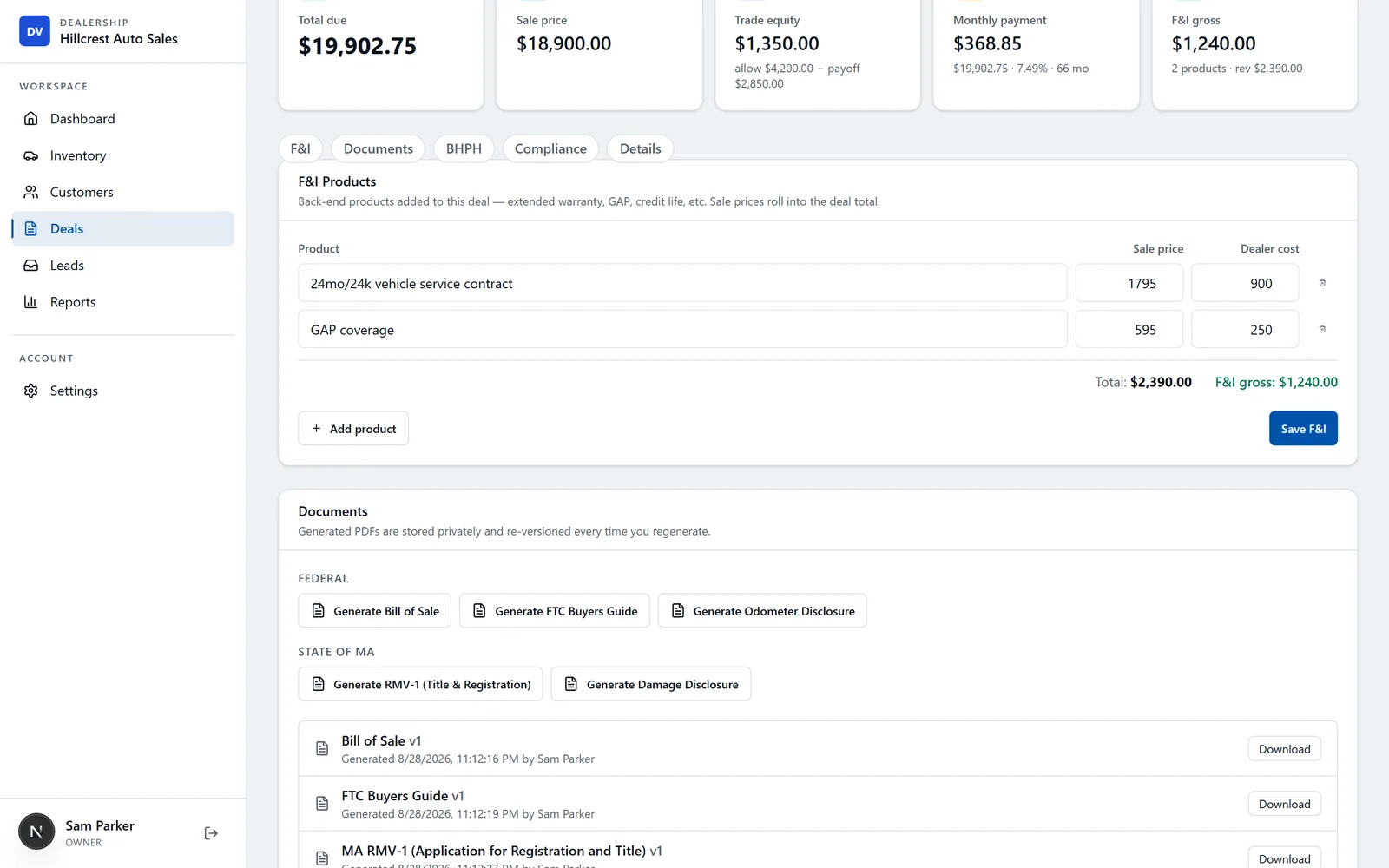
That's the paperwork half of the remote deal: the buyer's order and the forms come out of one deal, and the buyer signs from their phone.
14-day free trial, then $29/mo · Cancel anytime
The money: deposits, payments and the fraud traps
Deposits first. The deposits and down payments post covers card fees, chargebacks and how to word a deposit policy. On a remote deal, the deposit also tells you how serious the buyer is: someone unwilling to put a small refundable amount down is often not going to close.
The final payment is where remote deals get burned. Three patterns are widely documented:
Fake checks and overpayment. The FTC's page on fake check scams is blunt: fake checks can look like cashier's checks and "look just like real checks, even to bank employees," and they "can take weeks to be discovered." Banks make deposited funds available quickly, so money showing in your account doesn't mean the check is good. The classic version on a car deal: the buyer sends more than the price and asks you to wire the difference to their "shipper." When the check bounces, you're out the refund and maybe the car.
Wire-instruction phishing. A hijacked or look-alike email account sends "updated" payment instructions, and money goes to the wrong account. This runs both ways: a buyer can be tricked into wiring your funds to a scammer, and so can you when paying a transporter. The FBI's IC3 advises using "secondary channels" to verify any request to change account information (IC3 public service announcement). In practice: give your wire instructions on a call, tell the buyer they'll never change by email, and call a known number before acting on any change.
Stolen-identity financing. Covered above. The lender may fund, and the fraud surfaces months later.
The rule that covers all three: don't release the car until your bank confirms the funds are final. Not "pending," not "available," final. Ask your bank what that means for each payment method you accept, and write it into your deal process.
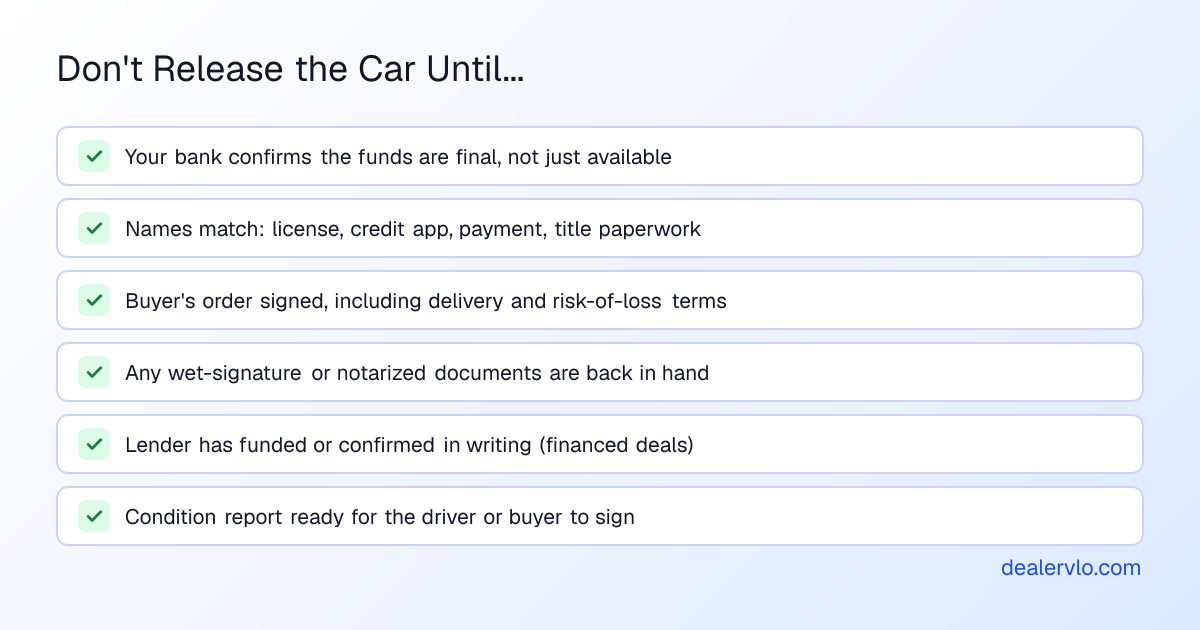
DealerVLO doesn't take payments, verify funds or verify identity. What DealerVLO gives you is one total due on the deal, so the amount you confirm with your bank matches the signed paperwork to the dollar.
Delivery, shipping and the dealer delivery fee
The buyer can fly in and drive home, send their own transporter, or have you arrange one. Settle which before anyone signs.
- Transport quotes. Get them before the buyer's order is final.
- Who pays. If you arrange shipping and pass the cost through, list it as its own line, not buried in the price. If you charge a car dealer delivery fee for handling it, show it separately and check that your state allows it and how it must be disclosed.
- Bill of lading and condition at pickup. The carrier's driver should note the car's condition on the bill of lading when they load it. Do your own condition report and photos at the same time.
- Risk of loss. When does the car stop being your problem: when it leaves your lot, or when it arrives? That depends on what you agree to, and possibly on your state. Put it in the buyer's order, and ask your insurer what your policy covers while the car is with a carrier.
DealerVLO doesn't book shipping or find carriers. It does keep the transport cost honest: add it as a labeled fee on the deal and it rolls into the total the buyer signs.
Build the whole deal — price, tax on the right base, doc, title, minus trade and down — into the out-the-door number and the monthly payment.
Open the Out-the-Door Price CalculatorRun the out-the-door math with the transport line before you send a remote buyer that first number.
Where DealerVLO fits in a remote deal
End to end, here's what DealerVLO does on a remote car sale, and what you use for the rest:
- Getting found: a dealer website with every car priced, a payment estimator on each car, and a Financing page you can turn on or off.
- The lead: website inquiries land in the lead inbox with their source, the dealership gets an email, and the buyer gets an automatic confirmation.
- Financing: an optional online credit application with no SSN online, encrypted and access-logged, that prints as a PDF with a blank SSN line. DealerVLO doesn't pull credit or send apps to lenders, so you submit to your lenders the way you already do.
- The deal: the deal jacket computes totals, trade and payment live. The FTC Buyers Guide and state title and registration paperwork fill from it (official PDF where available, worksheet where the state uses a portal or controlled form).
- Signing: e-signatures on deal documents, by emailed link for remote buyers.
- Compliance: a checklist on each deal to record the OFAC screen and Red Flags review.
What it doesn't do: video calls (use your phone), payments and funds verification (your bank and processor), identity verification (your own checks above), credit pulls and lender submissions (your lender portals), and shipping (a transport company). It's $29 a month, flat, with unlimited users, and runs in a browser.
Frequently asked questions
Can you buy a car remotely from a dealership?
Yes. Plenty of dealers sell to buyers who never visit: the buyer sees the car on video and in photos, puts down a deposit, applies for financing, signs the paperwork electronically where that's allowed, pays with funds the dealer verifies, and then picks the car up or has it shipped. Some documents may still need a wet signature or a notary depending on the states involved, so the dealer may mail a small packet.
What are the 7 steps of the car sales process?
Trainers word it differently, but the classic version runs roughly: greet, find out what the buyer needs, pick the car, demo or test drive, present the numbers, close, and deliver. In a remote deal the same steps happen over the phone and online: the lead reply is the greeting, the video walkaround is the demo, the written buyer's order is the numbers, the e-signature is the close, and delivery waits until the money has actually cleared.
Do car dealerships use DocuSign?
Some do. Many dealers use a general e-signature service like DocuSign, and many DMS platforms have e-signatures built in so the deal documents don't have to be uploaded somewhere else. DealerVLO has e-signatures on deal documents: you can have the buyer sign in person or email each signer their own link. Either way, check whether any document in your deal still needs a wet signature or a notary in the states involved.
How do dealers avoid fake check scams on remote deals?
Don't release the car until your bank confirms the funds are final, not just showing in your account. The FTC warns that fake checks, including cashier's checks, can look real even to bank employees and can take weeks to be discovered. Never refund an overpayment until the original payment has truly cleared, and treat any buyer who overpays and asks for the difference back as a scam until proven otherwise.
Who pays to ship a car on a remote deal?
Whatever you and the buyer agree to in writing. Some buyers arrange and pay their own transporter, some dealers arrange it and pass the cost through as a separate line on the buyer's order, and some buyers fly in and drive home. Put who pays, who books the carrier, and when the car becomes the buyer's responsibility in the buyer's order before anyone signs.
Can a dealer verify a remote buyer's identity without meeting them?
You can get a long way: a copy of their driver's license, a short live video call where they hold it up, names that match across the license, the credit application, the payment and the title paperwork, and a call back to a phone number you verified yourself. If anything doesn't match, slow the deal down. Some lenders and some states have their own requirements, so ask them.
Bottom line
A remote deal is a normal deal with the steps stretched out. Prove the car on video, put every number in writing, check that the names match, and hold the keys until your bank says the money is final.
I built DealerVLO for my own lot in Tewksbury, and it handles the paperwork half of the remote deal: the priced website, the lead inbox, the deal math, the filled forms and the signing links. Try it on your next out-of-area lead.
14-day free trial, then $29/mo · Cancel anytime
Paste a VIN, the buyer, and the price — see the title & registration form filled in for 50 states, free, no signup.
Open the State Form Auto-Fill