Inventory Aging Alerts and Markdown Rules: A Weekly Routine That Keeps Cars From Rotting on the Lot
A simple weekly routine for aged used-car inventory: when to look, what to check, when to cut the price, and how to run it without an enterprise repricing tool.
Part of the Inventory, pricing & aging guide: Inventory Turn Rate for Used Car Dealers: Benchmarks, Formula & How to Improve
Switching from another DMS? Compare DealerVLO to DealerCenter, Frazer, or Lot Wizard, or see what DealerVLO's car dealer management software includes.
Every lot has the car that won't go. The damage usually isn't that one car. It's that nobody really looks at it until it's 90 days old, the floor-plan interest has eaten the gross, and the only move left is the auction lane. By then you're not making a pricing decision anymore; you're cleaning up after not making one.
The big stores solve this with repricing software that marks cars down on a schedule. Most independent lots don't need that. What you need is a short weekly routine with three numbers in front of you for every aging car: how long it's been here, what it cost you all-in, and where its price sits against the live market. Here's the routine I run on my own lot, the rules of thumb I start from, and how I run it in DealerVLO.
14-day free trial, then $29/mo · Cancel anytime
Aging is a cash problem, not a calendar problem
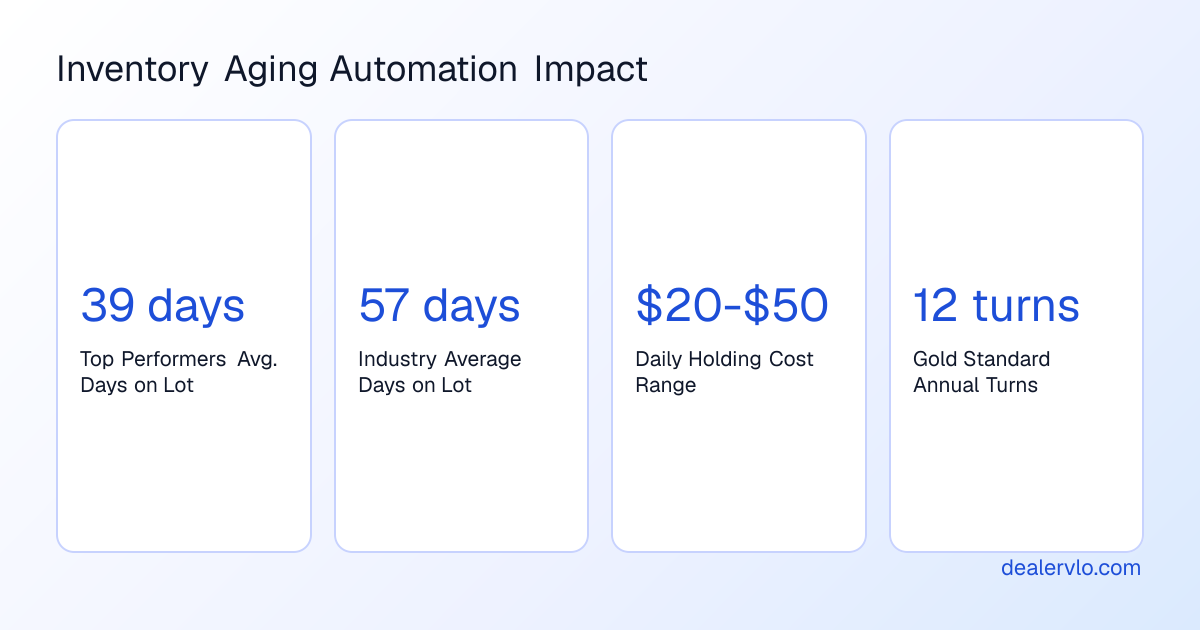
A car sitting on the lot isn't neutral. If it's floored, it's costing you interest every single day. As an example, at an illustrative 7% annual floor-plan rate (yours may be higher or lower), a $10,000 unit costs about $1.92 a day in interest alone ($10,000 × 7% ÷ 365). Over 60 days that's about $115, and that's before lot overhead, insurance, and the value the car keeps losing while it sits. If you want the real number for your lot, the holding-cost calculator does it with your own inputs, and how dealer floor plans work covers the curtailment side.
The upside of taking it seriously adds up fast. Call your all-in holding cost $30 a day to keep the math simple. Selling a car two weeks sooner is worth about $420 (14 × $30). Do that across 200 cars a year and it's roughly $84,000 that stays in your pocket instead of going to interest and depreciation. You don't have to hit that on every car; getting your slowest cars moving is where most of it comes from. Gross profit versus holding costs walks through where the break-even lands.
Put a real dollar-a-day number on every unit sitting on your lot.
Open the Holding Cost CalculatorThe weekly aging routine
Pick one time a week and protect it. Monday morning works for me, before the lot gets busy. It takes about as long as a cup of coffee once it's a habit.
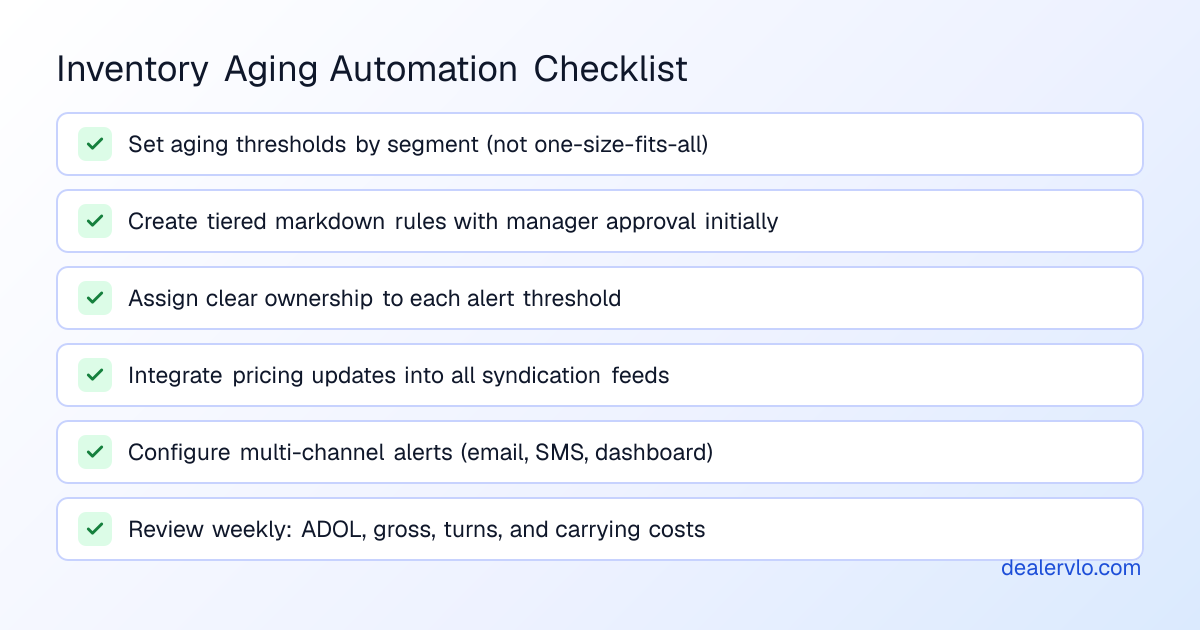
- Pull the aged list. Every unit past your review gate. If you've never done this, start with everything over 60 days so the list is short enough to actually work. In DealerVLO, the dashboard shows that count the moment you log in.
- Check each car against the market. Not against what you paid or what you hoped to get. Against what comparable cars near you are listed for right now. DealerVLO's price suggestion pulls those live comps for you.
- Decide: re-merchandise, reprice, or wholesale. One decision per car, and write it down. The cars that rot are the ones nobody decides about.
- Make the change once. Update the price or the listing in one place and let it flow everywhere you advertise. In DealerVLO, that one place is the vehicle page; your website and listing feeds pick it up from there.
- Review the numbers. How many units are past your gate this week versus last, and what gross you're making on aged sales versus fresh ones.
Step 3 is where most money is saved or lost, and the first question isn't "how much do I cut?" It's "is price actually the problem?" A car priced right that isn't getting looks usually has a listing problem: dark lot photos, a spec-sheet description, a lead photo that doesn't earn the click. Fix that before you give away gross. Your listing photos are the whole sale covers why, and DealerVLO's one-click photo enhancement turns a phone photo into a clean studio listing shot without touching the car itself.
14-day free trial, then $29/mo · Cancel anytime
Setting your gates and your markdown ladder
You need two sets of rules: when a car gets looked at, and how hard you move once it does.
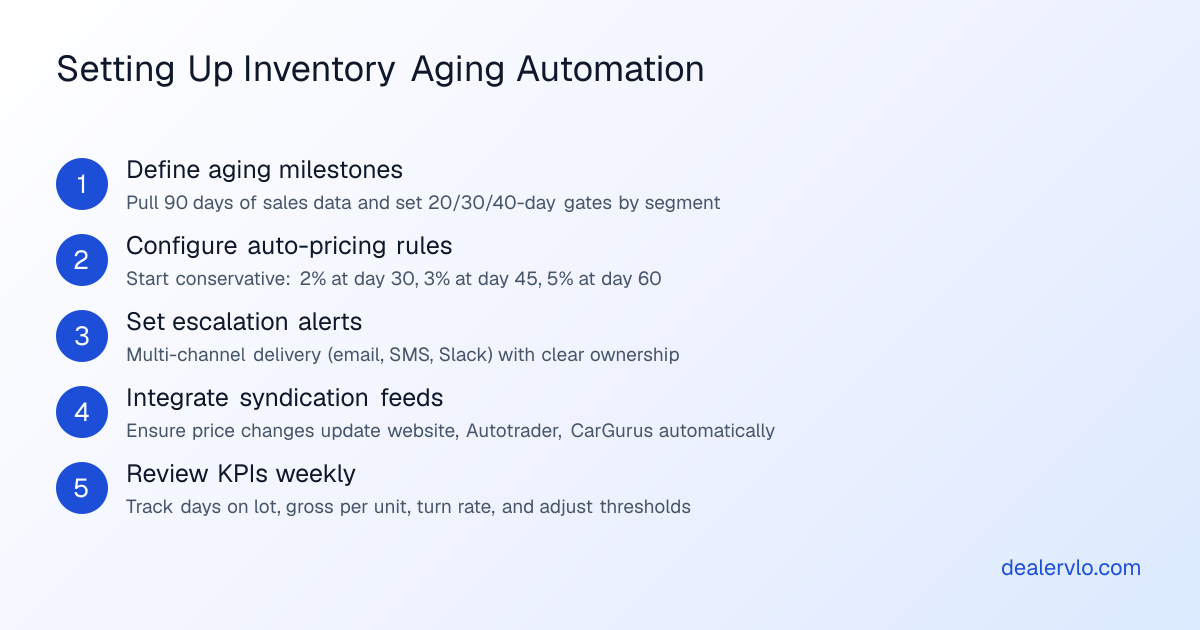
Gates. A reasonable starting rule of thumb is to review a car around day 30, act by day 45, and make a keep-or-wholesale call by day 60. Then tune it to your own sales. Look at how long your cars actually take to sell by type; a clean commuter sedan and a lifted truck don't age at the same speed. The inventory turn calculator and our guide to inventory turn help you find your own numbers.
The ladder. A conservative starting point is roughly 2% around day 30, 3% around day 45, and 5% around day 60, then a wholesale decision. Treat that as a starting point, not a law. Three things matter more than the calendar:
- Where the car sits against the market. A car priced above comparable listings at day 20 needs a cut sooner. One already priced below the market needs merchandising, not another discount.
- What the car is. High-value and specialty units deserve their own decision every time; don't run a diesel truck and an economy sedan on the same ladder.
- Your floor-plan terms. Know your curtailment schedule and your payoff on each unit before you cut, so a markdown doesn't turn into a loss you didn't plan for.
DealerVLO doesn't enforce a ladder for you, and that's on purpose: it shows each car's days on the lot, all-in cost, and margin at the current price side by side, so you can see what a 3% cut does to that car's gross before you make it.
For a deeper, day-by-day version of the ladder, see our inventory aging markdown playbook.
Running the routine in DealerVLO
I built DealerVLO for my own lot, and this routine is how I use it. It doesn't mark cars down on its own or text you aging alerts. What it does is put the three numbers you need in one place, so each decision takes a minute instead of a spreadsheet.
- The aged list finds you. When you log in, the dashboard shows how many units have been on the lot 60 days or more, with a Review link to your inventory.
- See whether it's one car or a pile-up. The Reports page breaks your inventory into 0–30, 31–60, 61–90, and 90+ days, so you can tell a single problem car from a buying or pricing problem.
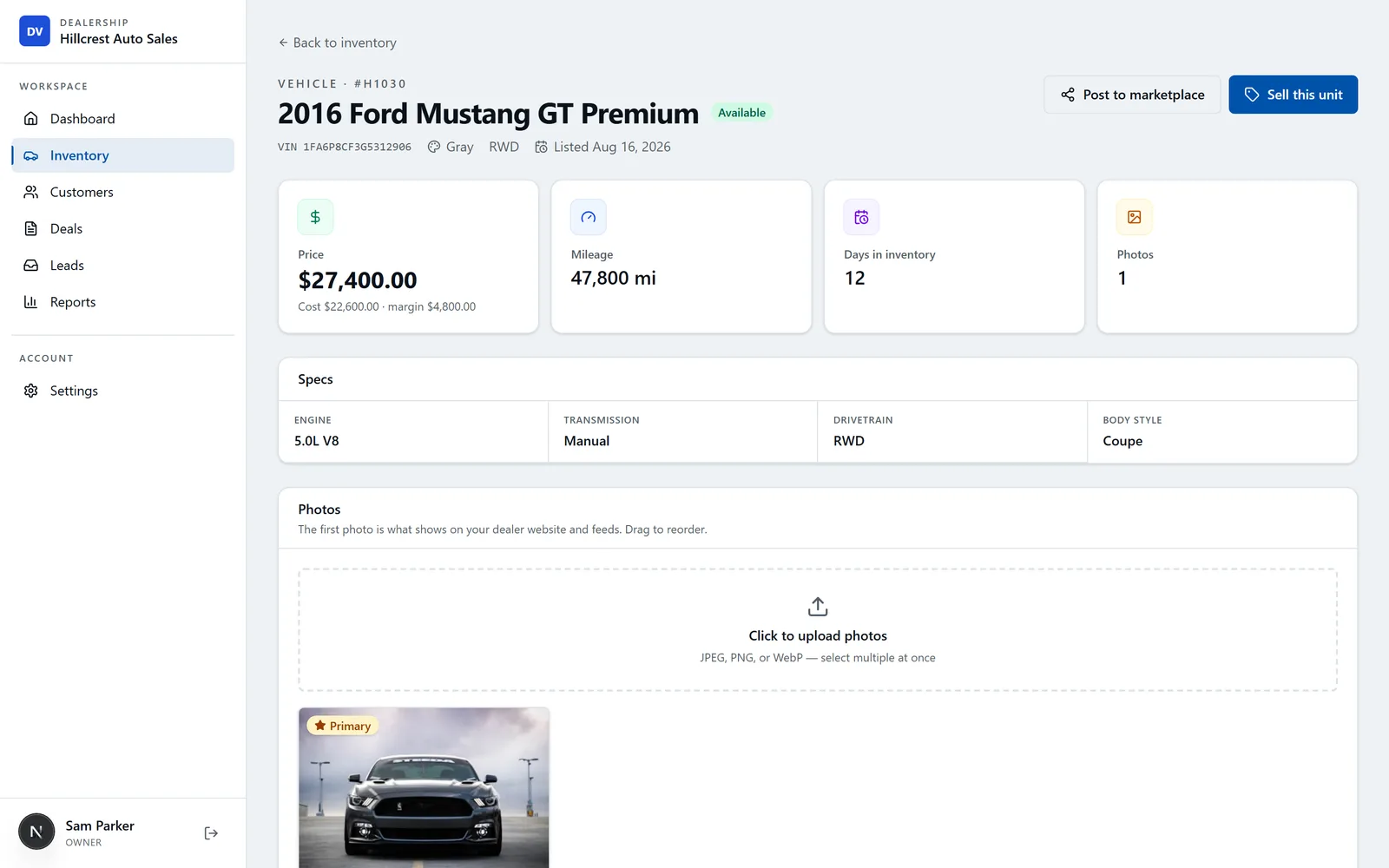
- Know what a cut does before you make it. Every vehicle page shows days in inventory, with an "Aging — consider repricing" flag at 60+ days, right next to the car's all-in cost (purchase plus itemized recon) and its margin at the current asking price.
- Check it against the market in one click. The AI price suggestion looks up real comparable listings near you, with links you can click through, and gives you an asking range plus a target aimed at selling in about 30 days, along with what's pushing the number up or down. It's a starting point you check, not an appraisal; the price is always yours. More on the method in how to price a used car from live market comps.
- Change it once. When you update the price, your included dealer website shows it within about a minute, and the listing feeds you've turned on (CarGurus, Cars.com, AutoTrader, and Carfax.com) pick it up on their next feed update, usually within a day. You enroll with each marketplace first; CarGurus, Cars.com, and AutoTrader each assign you a Dealer ID.
If you're not on DealerVLO, the routine still works with a spreadsheet and some discipline. The free lot health grader is a quick way to see where your lot stands on aging and turn today.
14-day free trial, then $29/mo · Cancel anytime
Mistakes that keep cars on the lot
- Looking for the first time at day 90. By then the gross is gone. The weekly look is the whole point.
- Cutting a car that's already priced below market. You're paying to fix the wrong problem. Fix the listing.
- Small cuts with no market check. Three quiet $200 drops over six weeks give away the same $600 as one real move, and the car sat six weeks longer.
- One ladder for every car. Your fast segments and your slow ones need different gates.
- Never checking the result. If you don't compare gross on aged sales with fresh ones, you can't tell whether your gates are too tight or too loose.
Frequently asked questions
Do I need automated repricing software to manage aged inventory?
Not on most independent lots. What stops cars from rotting is a short weekly routine with three things in front of you: how long each car has been on the lot, what it cost you all-in, and where its price sits against the live market. Automated repricing tools can help at higher volume, but they still need someone deciding which cars follow the rules. DealerVLO doesn't mark cars down on its own; it puts the aged list, each car's cost and margin, and a live market price range in one place so each decision takes a minute.
When should a used car count as aged?
A reasonable starting rule of thumb is to review a car around day 30, act by day 45, and make a keep-or-wholesale decision by day 60. Then tune it to your own lot: look at how long your cars actually take to sell by type, and move the gates earlier for segments that normally turn fast. If your floor-plan costs are high, earlier gates pay for themselves.
How much should I cut the price on an aged car?
Start small and let the market decide, not the calendar. A conservative starting point is roughly 2% around day 30, 3% around day 45, and 5% around day 60, then a wholesale decision. But a car already priced below comparable listings doesn't have a price problem; fix the photos, description, and listing first. And don't run high-value or specialty units on the same ladder as your commuter cars.
What does it cost to keep a car on the lot another month?
Work it out with your own numbers. As an example, at a 7% annual floor-plan rate, a $10,000 unit costs about $1.92 a day in interest ($10,000 × 7% ÷ 365), or about $58 over 30 days. Interest is only part of it: add lot overhead, insurance, and the value the car loses while it sits. The free holding-cost calculator does the math for your own lot.
Can I reprice floored units whenever I want?
Usually, but read your floor-plan agreement or ask your lender first. Curtailment schedules mean you owe principal on aging units whether they sell or not, and you shouldn't sell a unit below its payoff without knowing how your lender handles it. Knowing each car's payoff and all-in cost before you cut keeps a markdown from turning into a loss you didn't plan for.
Bottom line
Aged inventory isn't a software problem; it's a habit problem. Look at the aged list every week, check each car against the market, make one decision per car, and fix the listing before you give away gross. Do that and most cars never reach the day where the auction lane is the only option.
DealerVLO puts the aged list, each car's all-in cost and margin, and a live market price range on one screen, and a price change flows to your website and listing feeds on its own. Start a free trial and run your first weekly aging review with your own inventory.
14-day free trial, then $29/mo · Cancel anytime