Facebook Marketplace Posting Tools for Car Dealers, Compared: Prices, How They Post, and Who Clicks Publish
AutoLister Pro, AutoPosting Pro, CARVID, AutoLander, Lotly and more: published prices, how each posts, who clicks Publish, and what DealerVLO's extension does.
Part of the Listings, photos & merchandising guide: Where to list your cars for leads — and how to be on every site at once
Switching from another DMS? Compare DealerVLO to DealerCenter, Frazer, or Lot Wizard, or see what DealerVLO's car dealer management software includes.
If you've looked for a way to stop typing every car into Facebook Marketplace by hand, you've found a crowded market. There are Chrome extensions, desktop apps, and services that run Facebook accounts from their own servers, priced anywhere from free to more than $800 a month. They all promise more listings for less work, and they're all a little vague about how they get there.
I checked the pricing pages of the tools dealers see most and wrote down what each one says it does, what it costs, and the question that matters most: does the tool click Publish, or do you? Prices are as listed on each vendor's own page on November 16, 2026. DealerVLO has its own tool in this space, a free Chrome extension that fills Facebook's form for one car, so it's in the comparison too, and I've tried to be as fair to the others as to ours. For the safety side, what Meta's terms say about automation and which ban "rules" are folklore, read our Marketplace auto-poster post first.
14-day free trial, then $29/mo · Cancel anytime
First: every tool posts the same way
Meta ended dealer partner feeds to Marketplace in 2021 and vehicle listings from business Pages on January 30, 2023. There's no public API for creating a free Marketplace vehicle listing, and none of the vendor sites I checked claims one. So every tool here does some version of the same thing: it gets your car's details into Facebook's "Sell a vehicle" form inside a logged-in Facebook session.
What differs is where that happens and how much the tool does on its own:
- Browser extensions (AutoLister Pro, AutoPosting Pro, Lotly Pulse, Post My Deal, Marketplace QuickPost, DealerVLO) run in your Chrome, under the Facebook profile you're logged into.
- A desktop app (AutoLander) runs on your computer, through your own logged-in Facebook session.
- Server-side services (Relay Autos) run the posting from the vendor's own systems.
Whichever it is, the account doing the posting is someone's personal Facebook profile. That's the profile at risk if Meta decides the activity looks like spam, which is why "who clicks Publish" and "how fast it posts" matter more than any feature list.
The tools, side by side
As listed on each vendor's own page, November 16, 2026:
| Tool | How it posts | Who clicks Publish | Published price |
|---|---|---|---|
| AutoLister Pro | Chrome extension | The tool ("1-click auto publish"; Autopilot does several cars per click) | Salesman $119/mo (was $199, labeled limited-time); Personal Website $169; Total Access $299; Dealership from $899/mo |
| AutoPosting Pro | Chrome extension, runs while Chrome is open and you're signed in | Runs in the background; the page doesn't spell out the publish step | Individual $9.90 first month, then $29.90/mo; Studio $99.90; Dealership $499/mo per location (10 people); Dealership AI $799 |
| CARVID | Not stated on its pricing page (it also has an iOS app) | You, on the free Lite plan (manual posting); the tool, on paid plans | Lite $0; Solo $249/mo (1 user); Growth $499 (5 users); Enterprise $799 |
| AutoLander | Desktop app, your logged-in session | Posts a queue at a pace you set | Starter $39/mo (5 posts a day); Growth $59; Pro $79; Dealer Plan from $117/mo (3 seats) |
| Lotly Pulse | Chrome extension | You ("you stay in control of the publish button," per its Web Store listing) | Starter $99/mo (125 posts a month); Unlimited $199/mo |
| Marketplace QuickPost | Chrome extension that runs in your browser | Not stated on its page | Starter $39/mo (30 listings); Growth $99 (75); Pro $139 (150); Volume $199 (300); or $4 a listing |
| Post My Deal | Chrome extension | You confirm a preview, per its how-it-works steps | Free plan; paid salesperson, manager and annual dealer plans |
| Relay Autos | Vendor's servers, from your DMS or feed | The tool, on a schedule | Not listed (demo only) |
| DealerVLO Post to Facebook | Free Chrome extension | You. It never clicks Next or Publish | Included in DealerVLO's $29/mo |
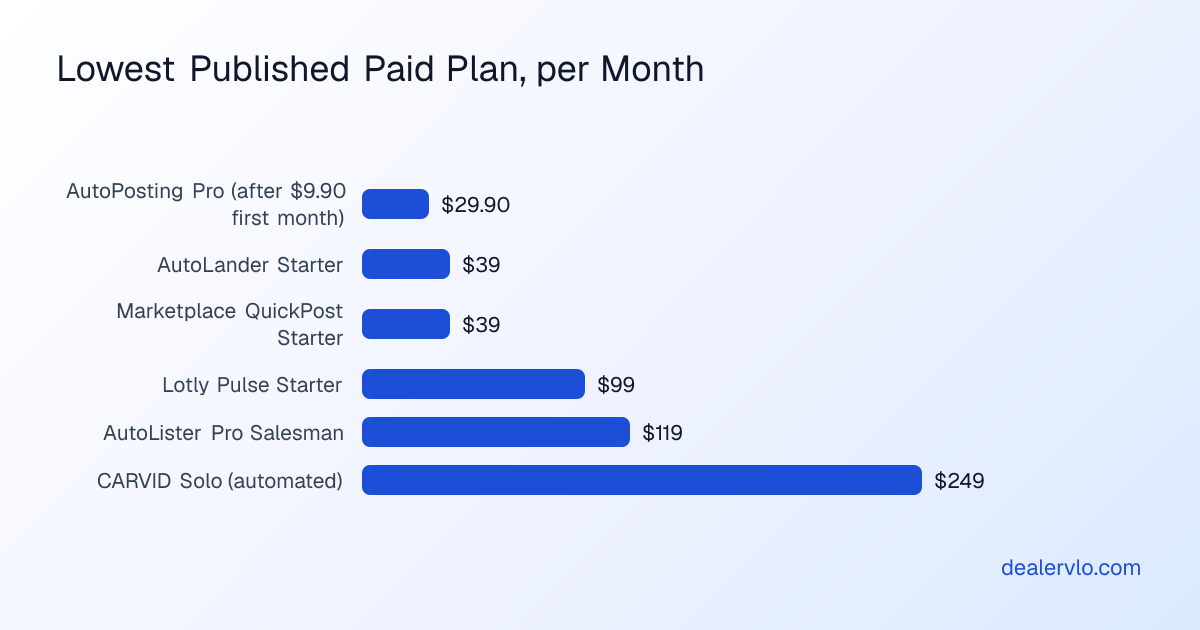
A few things the table can't show:
- Per-seat pricing adds up. Several of these price per salesperson. If three people on your lot each post from their own profile, multiply by three before you compare.
- "Limited-time" prices move. AutoLister Pro labels its current prices as limited-time rates, and third-party listings show different numbers for the same tools. Check the vendor's page on the day you buy.
- Some DMS vendors used to do this. DealerCenter's own blog says it can no longer push inventory to Marketplace automatically. Dealer Car Search advertises an automatic posting tool but doesn't publish a price.
What the full auto-posters do that a form-filler doesn't
To be fair to them: the tools that publish for you do more than fill a form, and some of it is useful work. Going by the vendors' own pages:
- Renew or repost older listings, so a car that's been up for weeks shows up fresh (AutoLister Pro, AutoPosting Pro, CARVID).
- Remove or mark sold when a car leaves your inventory (AutoPosting Pro, CARVID, AutoLander, Lotly on sync).
- Sync price changes to the Marketplace listing (AutoPosting Pro, AutoLander).
- Answer messages with AI (AutoPosting Pro's Dealership AI, CARVID's AI Inbox, Relay Autos).
- Read your inventory without a feed, by scraping your website or reading your DMS export (AutoLister Pro, Post My Deal).
- Run several Facebook accounts or post to other cities (Relay Autos, Post My Deal on dealer plans).
The trade is risk. Each of those automated jobs is more activity in a personal profile that a person didn't directly do. Meta's spam policy targets actions taken "either manually or automatically, at very high frequencies," and its Commerce Policies say Marketplace "is intended for consumer-to-consumer sales." None of the vendors I checked promises you'll never be restricted, and the careful ones say so: AutoPosting Pro's page says Facebook controls Marketplace access. The full reasoning, with Meta's own wording, is in our auto-poster post.
How to pick one
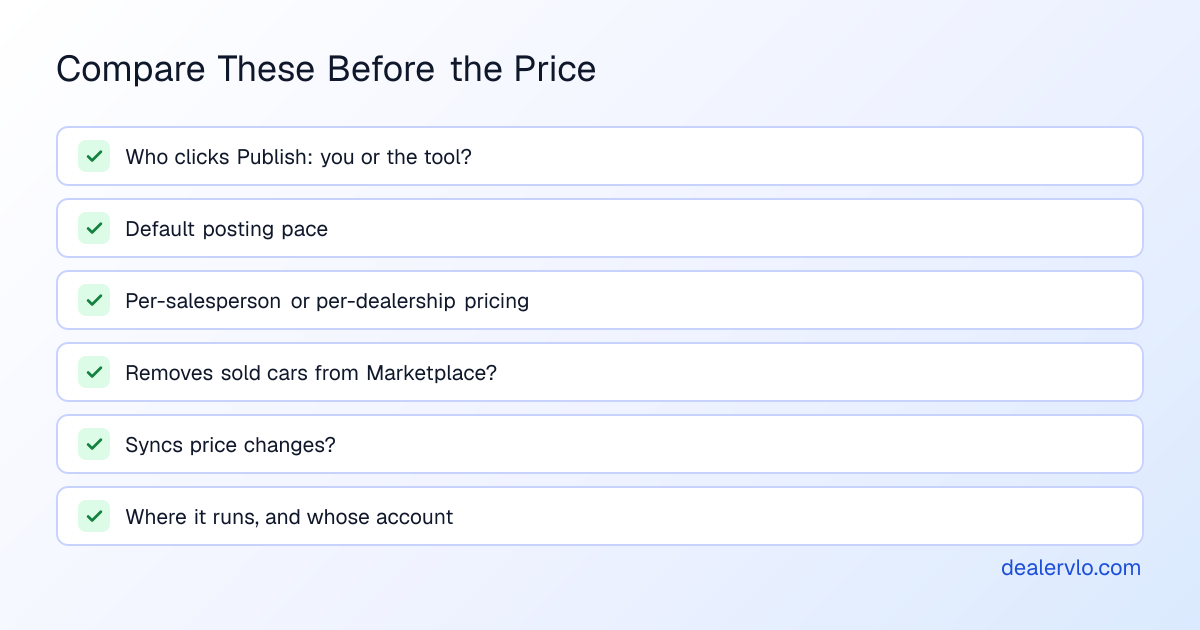
Start from the job, not the price:
- Decide who clicks Publish. If one personal profile carries most of your Facebook leads, think hard before letting a tool publish from it on its own. If you'd rather keep the last click, look at form-fillers.
- Check the default pace. A tool that posts your whole lot Monday morning looks very different from one that posts a few cars a day. Several vendors publish daily caps on their plans; that's the pace their own customers run at.
- Price it per seat. Count who will actually post, and price the plan for that many people.
- Ask what happens when a car sells. Somebody has to take the listing down. Either the tool does it or a person does, every time.
- Ask whose account and where. A tool running on your computer under your login is different from a service logging into your account from its own servers.
- Count cars sold, not listings. Whatever you pick, judge it after 60 to 90 days by cars sold from Marketplace against what it cost. Our post on whether Marketplace is worth it walks that math.
Turn your ad spend into a cost per car sold and a real ROI — and see how many units the spend has to produce just to break even.
Open the Marketing ROI CalculatorHow DealerVLO's Post to Facebook works
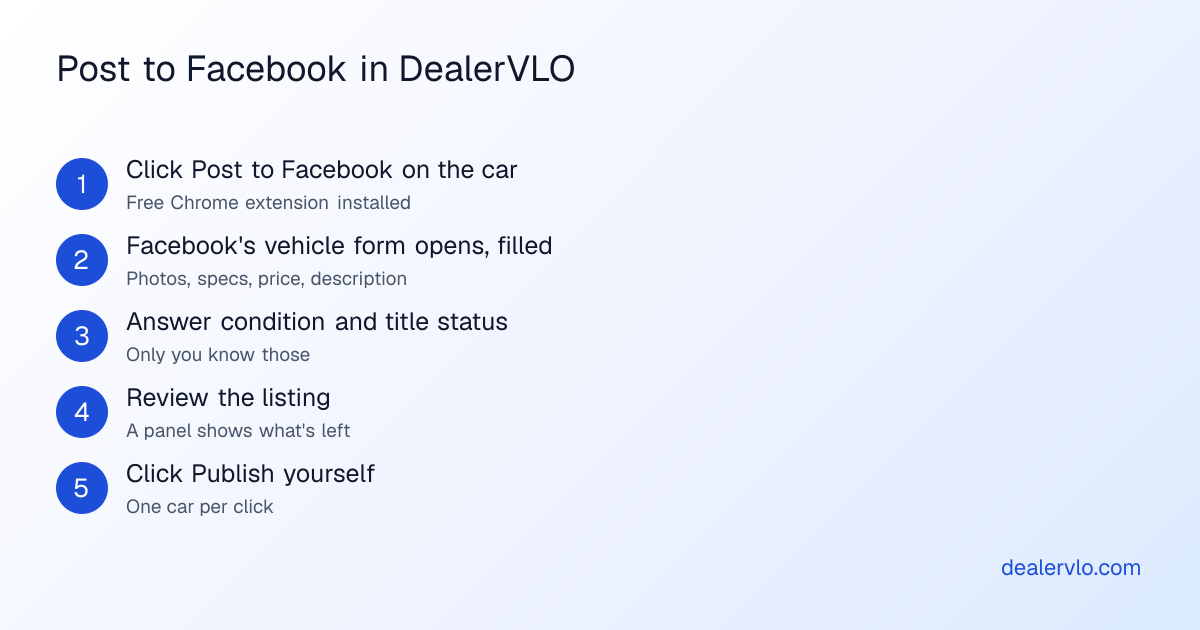
I built ours for the dealer who wants the typing gone but wants to keep the Publish click (see what it fills). Here's the whole flow:
- Install the free DealerVLO: Facebook Marketplace helper from the Chrome Web Store. It works in Chrome and Chromium browsers like Edge on a computer. Phones, Safari and Firefox can't run it.
- Open a car in DealerVLO and click Post to Facebook. The button only shows when the extension is installed.
- Facebook's "Sell a vehicle" form opens in a new tab with that car filled in: photos, year, make, model, mileage, price, body style, exterior color, interior color if you've entered it, fuel type, transmission and the description.
- A panel shows what it filled and what's left. Condition and title status are always left for you, because only you know them. A value it can't match to Facebook's options, like an unusual color, is left blank rather than guessed.
- You check it and click Next and Publish yourself.
What it doesn't do, on purpose: it never clicks Publish, never posts in bulk or on a schedule, never asks for your Facebook password, doesn't touch your existing listings, and sends nothing back to DealerVLO. It does fill the form with script-generated input inside your logged-in profile, the same basic technique the other extensions use, so it isn't risk-free. If you want no automation near your profile at all, every car also has a Post to marketplace kit: every photo in one download and each field ready to copy, which takes a couple of minutes a car. Our step-by-step posting guide walks both.
The data comes from the car's record, so the listing matches your inventory: the same price your website and listing feeds use, the photos you already shot, and a description built from that car's specs and features, with an optional AI rewrite before you post.
14-day free trial, then $29/mo · Cancel anytime
Where DealerVLO is the better fit
- You want the typing gone, not the judgment. One car per click, and you publish. Good for a small lot posting a few cars a day.
- You don't want another subscription. The extension and the kit are included in DealerVLO's $29 a month, with no per-car or per-user fees, alongside the rest of the system: inventory, deals and paperwork, BHPH, your dealer website, and listing feeds to CarGurus, Cars.com, Autotrader and Carfax.com.
- You want Marketplace leads next to the rest. Log a Marketplace lead with the source Facebook, follow-up dates and a Converted status in the same lead inbox your website's leads land in.
- You run paid inventory ads. DealerVLO also generates the Facebook vehicle catalog feed for Meta's automotive inventory ads, which run in your own ad account.
Frequently asked questions
What's the best Facebook Marketplace posting tool for car dealers? It depends on how much you want automated. If you want a tool to post, renew and remove listings for you, AutoLister Pro, AutoPosting Pro, CARVID and AutoLander all sell that, at published prices from about $30 to several hundred dollars a month. If you'd rather click Publish yourself on each car, Lotly's Pulse and DealerVLO's free Chrome extension fill the form and leave the last click to you. Every one of them posts from someone's personal Facebook profile, because Meta has no free listing feed for dealers.
How much do Facebook Marketplace posting tools cost? As listed on the vendors' own pages on November 16, 2026: AutoPosting Pro from $29.90 a month after a $9.90 first month, AutoLander from $39, Marketplace QuickPost from $39 (or $4 a listing), Lotly Pulse from $99, AutoLister Pro from $119 per salesperson, and CARVID's automated posting from $249. Dealership plans run from about $117 to $899 or more a month. Prices change often, so check the vendor's page before you buy.
Is there an AutoLister Pro alternative that doesn't auto-publish? Yes. Lotly's Pulse extension says you stay in control of the publish button, and DealerVLO's free Chrome extension fills Facebook's vehicle form for one car and never clicks Next or Publish.
Does any posting tool use an official Facebook Marketplace API? None of the vendor sites we checked claims one. Meta has no public API for creating free Marketplace vehicle listings. The tools work through a logged-in Facebook session, either as a browser extension, a desktop app, or on the vendor's own servers, and the account doing the posting is a person's own profile.
How does DealerVLO's Post to Facebook work? Install the free DealerVLO Chrome extension, open a car in DealerVLO, and click Post to Facebook. Facebook's "Sell a vehicle" form opens in a new tab with that car's photos, year, make, model, mileage, price, body style, colors, fuel type, transmission and description filled in. You answer condition and title status, check it, and click Publish. It works in Chrome and Edge on a computer and is included in DealerVLO's $29 a month.
Bottom line
Every Marketplace posting tool works through a personal Facebook profile, so the real choice is how much you let the tool do in it. The full auto-posters renew, sync and remove listings for you, at published prices from about $30 to $900 a month. Form-fillers do the typing and leave Publish to you. Price per seat, check the default pace, and judge any of them by cars sold after a couple of months.
If you want the typing gone without another subscription, DealerVLO's Post to Facebook fills the form from your inventory one car at a time, and it comes with the whole system, your website and your listing feeds for $29 a month. Start your 14-day free trial at /signup.
14-day free trial, then $29/mo · Cancel anytime