Car Dealer CRM: What It Does and When a Small Lot Actually Needs One
A car dealer CRM tracks every shopper and the next follow-up. What it does, how it differs from a DMS, and when a small used-car lot really needs one.
Part of the Choosing dealer software guide: The best car dealership software in 2026: 14 DMS options for independent lots, with real prices
Switching from another DMS? Compare DealerVLO to DealerCenter, Frazer, or Lot Wizard, or see what DealerVLO's car dealer management software includes.
A car dealer CRM is the system that remembers every shopper for you: who asked about which car, what you said, and when you're supposed to call back. On a big store it runs a whole sales floor. On a 20-car lot, the honest question is whether you need one at all, or whether you need a better habit and a calendar.
I should tell you where I stand before you read further. I run a small lot in Tewksbury, Massachusetts, roughly a deal a week on a good week, and I'm the one answering leads at night. I also built DealerVLO, which has a simple CRM built in and is not a full sales system. So this post covers what a real CRM does, when it's worth paying for, and exactly where my own software stops.
What a car dealer CRM actually is
CRM stands for customer relationship management. Stripped of the marketing, it's a database with one record per shopper and a to-do list attached. A dealership CRM usually adds the pieces specific to selling cars: the vehicle of interest, the lead source, a trade-in, and connections to the listing sites that send you leads.
The part that makes it a CRM is the next action. A list of names is just a list. A CRM says "call Maria about the Accord on Thursday" and keeps nagging until somebody does it or marks it dead. If a product can't put a due date on a follow-up, it's a lead inbox, whatever the brochure says.
14-day free trial, then $29/mo · Cancel anytime
What it does on a used-car lot
Most dealer CRMs follow the shopper through the same five stages.
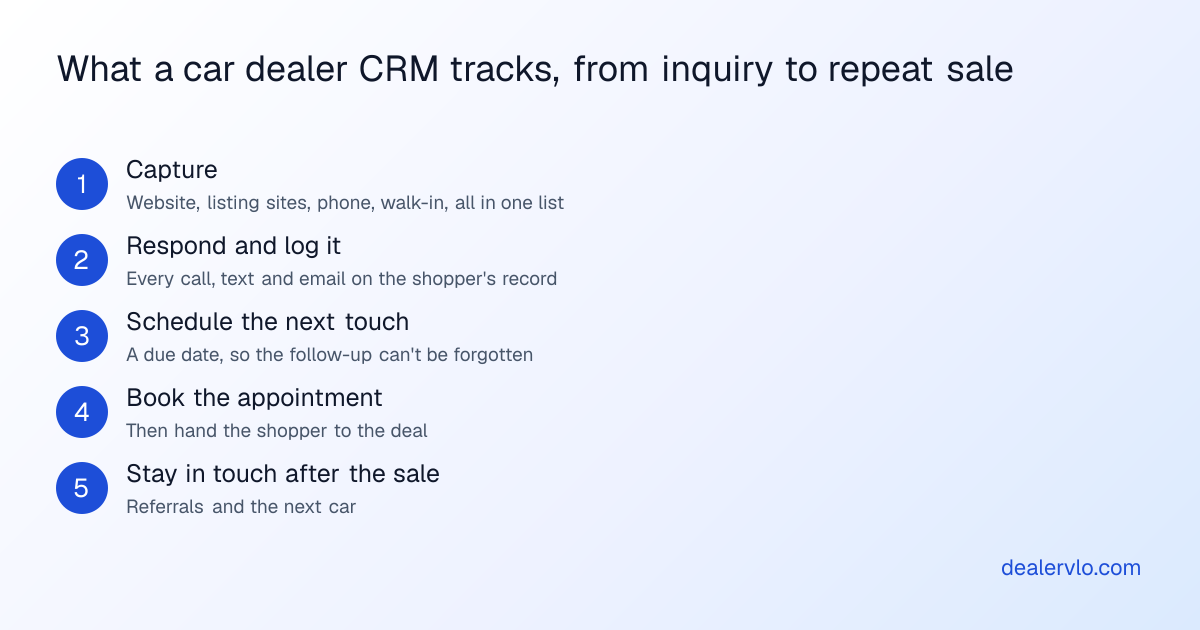
Capture. Website forms, CarGurus, Cars.com, Autotrader, Facebook messages, the phone, and the guy who walked in Saturday all go in one place. Listing sites commonly send leads in a format called ADF, which dealer CRMs read directly.
Respond and log it. Calls, texts and emails get attached to the record, so whoever picks up the shopper next can see the history. Better systems text from a store number instead of a salesperson's own phone, which matters the day that salesperson quits.
Schedule the next touch. This is the stage small lots lose the most money in. The first reply usually happens. The fourth attempt, a week later, usually doesn't. We laid out what that sequence can look like in how to work dead leads.
Book the appointment. A lead's job is to become a person on your lot, so the CRM tracks shows and no-shows. If you're working on this stage, start with turning online leads into appointments.
Stay in touch. Birthday notes, trade-up offers and referral asks. On a small lot this can be the cheapest source of deals you have, which is why repeat and referral business deserves its own plan.
CRM vs DMS vs lead inbox
These three get blurred constantly, partly because vendors like the longer feature list.
| Lead inbox | Dealer CRM | DMS | |
|---|---|---|---|
| Main job | Catch inquiries | Work every shopper to a sale | Run the cars and the deals |
| Follow-up due dates | Usually no | Yes | Only if a CRM is included |
| Texting and sequences | Usually no | Usually yes | Only if a CRM is included |
| Inventory and deal jacket | No | Limited or by integration | Yes |
| Tax, title and state forms | No | No | Yes |
A CRM can't replace your DMS, because it doesn't produce the paperwork. If you're still sorting out that side, read what a dealer management system does first. And when a DMS vendor says "CRM included," ask to see the follow-up screen. That phrase covers everything from a full sales system to a contact list.
Does a small lot need one? Do the math on yours
Skip the vendor's ROI slide and use your own numbers. As an example: say you get 40 leads a month, and a real follow-up process saves two deals a month that would otherwise have died. At $1,500 of gross per car, that's 2 × $1,500 = $3,000 a month. Now change the inputs. At 10 leads a month and one saved deal every other month, the same math gives you $750 a month, and a CRM with a real monthly bill and setup time gets much harder to justify.
Be honest about the "saved deals" number, because it's the one you're guessing. The way to get a real figure is to count for a month: how many leads got a reply within the hour, how many got a second attempt, and how many got a third.
Turn your ad spend into a cost per car sold and a real ROI — and see how many units the spend has to produce just to break even.
Open the Marketing ROI CalculatorPast the math, these are the signs you've outgrown a simple inbox:
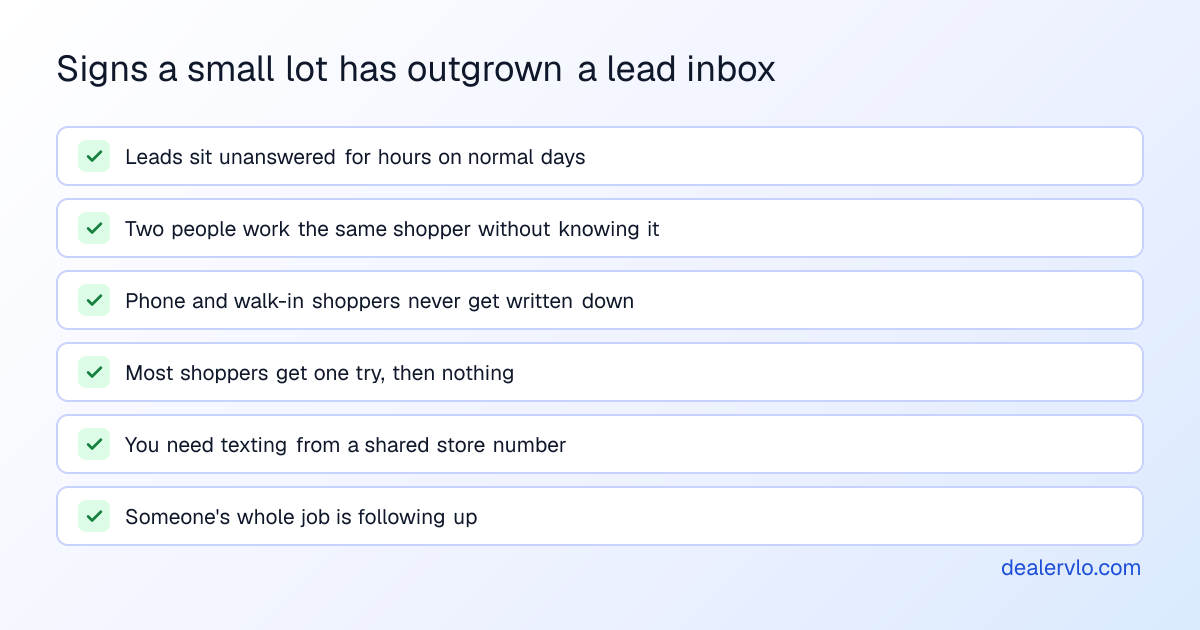
One or two of those can be fixed with a habit. Four or more, and you're paying for the missing CRM in lost deals. If you have someone dedicated to the phones, how a BDC is set up and measured is the next thing to read.
Running follow-up without a big CRM
If the math says not yet, you still need a system. A simple one that works for a lot with one or two people on leads:
- Check new leads at set times every day, including the end of the night.
- Reply to each one the first chance you get, and write down what you said.
- Put a date on the next attempt before you close the lead. No date means it won't happen.
- Make several attempts spread over a couple of weeks, then mark the lead lost so your list stays honest.
- Write down phone and walk-in shoppers the same day, even if it's a name and a number.
DealerVLO has simple car dealer CRM software built in for exactly this routine. Leads from your dealer website land in one inbox with their source and the car they asked about, and you get an email when one comes in. Add lead takes the phone calls and walk-ins: a name, a phone or email, the car if there is one, where they came from, and a follow-up date.
Each lead has a status (New, Contacted, Qualified, Converted or Lost), internal notes and a next follow-up date, which you can type or set with Tomorrow, 3 days or 1 week. A Due view lists what's due, most overdue first. The dashboard's "Needs attention" list counts new leads and follow-ups due, and on days something is due, the owner gets one email listing those leads.
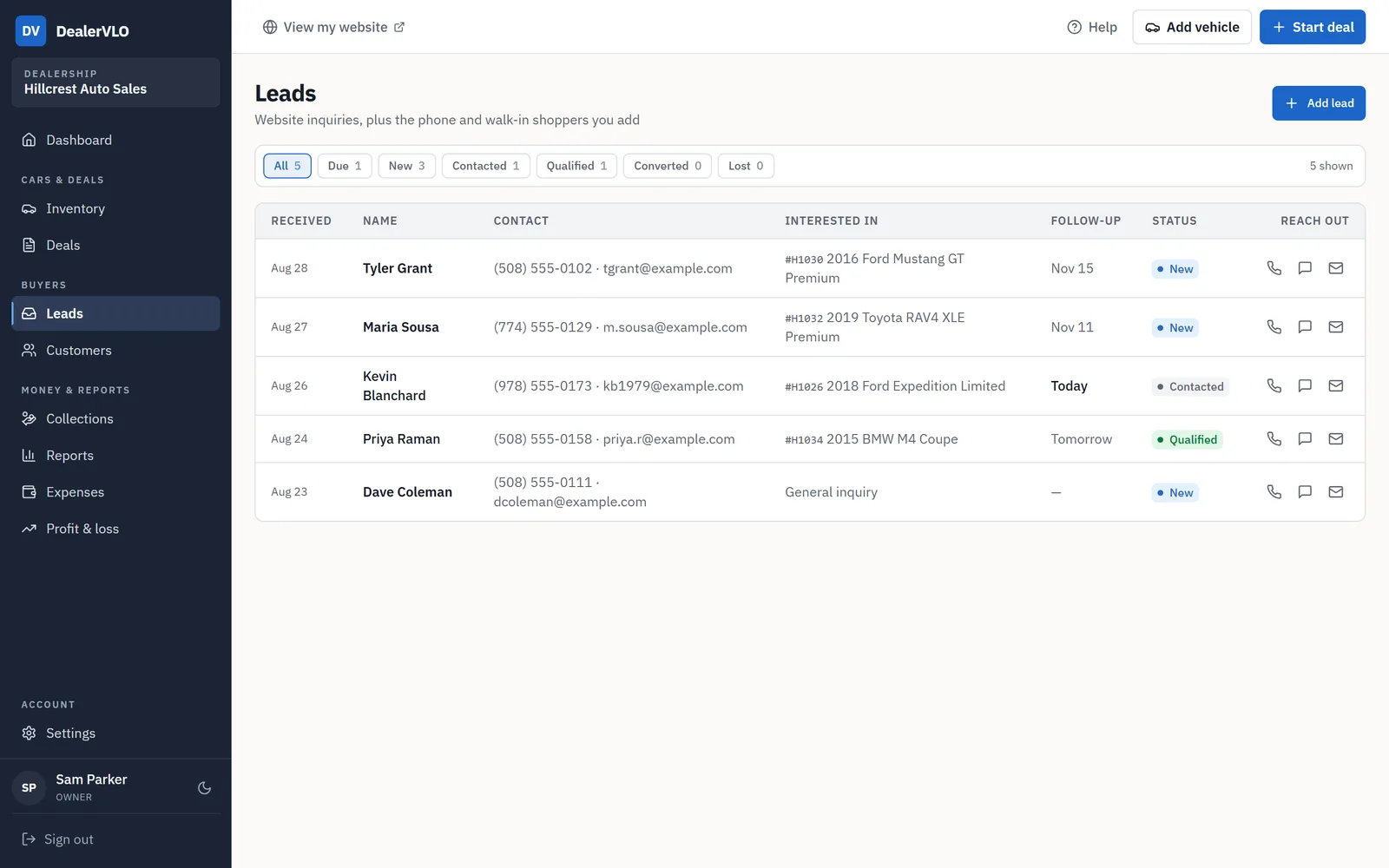
When a shopper is ready, "Convert to deal" creates the customer, or matches an existing one by email, and opens a new deal with their car already on it. There's no retyping. It's $29 a month flat with unlimited users, as part of the used-car dealer software that also runs your inventory and paperwork.
14-day free trial, then $29/mo · Cancel anytime
Where DealerVLO stops
If any of these is what you came here for, DealerVLO isn't your CRM today:
- No built-in texting or calling. The Email, Call and Text buttons open your own email app and phone, so messages don't come from a store number.
- No campaigns or drip sequences. Nothing goes to shoppers in bulk or on a schedule. A buyer who leaves an email on your website gets one automatic confirmation, and that's it.
- No listing-site import. CarGurus, Cars.com and Autotrader leads don't flow in. You type those into Add lead.
- No lead assignment or contact history. Each lead has one notes field and one next follow-up date, not a log of every call, and the daily email goes only to the owner.
You can run a dedicated CRM alongside DealerVLO for the lead side and write the deal in DealerVLO. There's no integration between them, so you'd enter the customer in both places or move them by CSV, and customers export from DealerVLO any time.
The kinds of dealer CRM, and who they fit
Built for independents. AutoRaptor and Selly Automotive are the names that come up most for used-car stores. These focus on the lead-side work: texting, follow-up workflows and lead routing.
Bundled with a DMS. DealerCenter, AutoManager, DealersCloud and Get My Auto all sell a CRM alongside their DMS, some as an add-on. One vendor means fewer logins, but check whether the CRM is included in the plan you'd actually buy.
Built for franchise and multi-rooftop stores. VinSolutions, CDK CRM (formerly Elead), DriveCentric, Tekion and DealerSocket are the big platforms, though DealerSocket also sells to independents. A small lot usually pays for scale it won't use.
General business CRMs. Salesforce, Zoho and monday all market to dealers. They can work, but expect to build the vehicle fields and lead connections yourself or pay someone to.
For a ranked shortlist by lot type, see our best CRM for independent used-car dealers.
What to pin down before you sign
Demos show the good screens. Get these answers in writing:
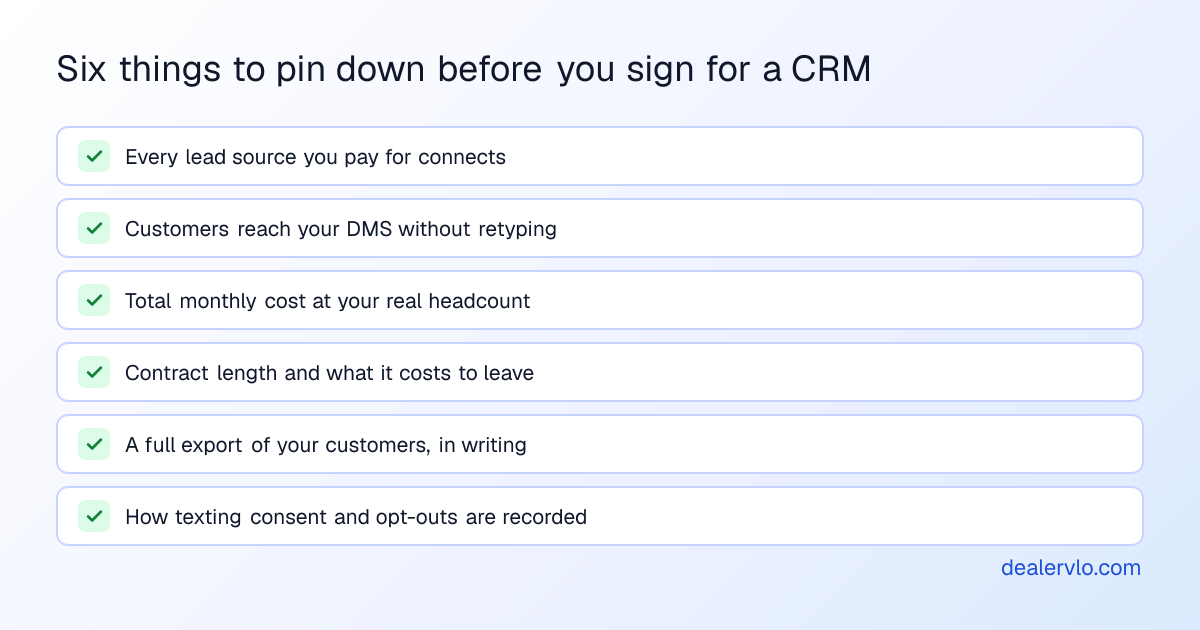
Two of those deserve extra attention. Texting shoppers comes with consent rules, so ask how the CRM records permission and honors a STOP reply, and read our texting consent policy guide before you switch it on. A CRM also holds customer information that your security program has to cover, so make sure it fits your FTC Safeguards plan.
14-day free trial, then $29/mo · Cancel anytime
Frequently asked questions
What is a car dealer CRM? Software that keeps one record for every shopper: who they are, where they came from, which car they want, every call, text and email, and the next follow-up that's due. Its job is to make sure no shopper gets forgotten.
What is the difference between a CRM and a DMS at a car dealership? A CRM works the shopper before the sale. A DMS runs the car and the transaction: inventory, the deal jacket, tax and title paperwork, and buy-here-pay-here notes. Some products do both, so ask to see the specific screens.
Does a small used-car lot need a CRM? Not always. If one or two people answer every lead and nothing is getting forgotten, a lead inbox and a calendar can be enough. A CRM starts paying when leads go unanswered, more than a couple of people share them, or you want automated texts and sequences.
Can I use a general CRM like HubSpot or Zoho at a car lot? You can, but it doesn't know what a VIN, stock number or trade-in is out of the box, and it won't read listing-site lead formats without setup. Compare that setup work against the price difference.
Does DealerVLO include a CRM? Yes, a simple one. Website leads arrive with their source and the car, you can add phone and walk-in shoppers by hand, each lead has a status, notes and a follow-up date, and the owner gets a daily email of what's due. One click turns a lead into a customer and a new deal. It has no built-in texting or campaigns and doesn't import listing-site leads.
Bottom line
A car dealer CRM earns its cost when leads are falling through the cracks and you can put a number on what that's costing you. Below that point, a daily habit and a simple CRM tied to your deals will do the job, and a CRM bill won't fix a follow-up habit nobody keeps.
If a simple CRM tied to your inventory and paperwork is the right size for your lot, start a free 14-day DealerVLO trial and run your next lead through it.