Switching from Desk2Deal: How to Move Your Inventory, Customers and Deals Without Losing a Week
A practical migration playbook for dealers leaving Desk2Deal: what to export, contract terms to check, and how to cut over to DealerVLO in a weekend.
Part of the Choosing dealer software guide: The best DMS for independent used-car dealers in 2026 — an honest list from a dealer
Switching from Desk2Deal to another DMS requires a weekend and some advance planning. Most of the stress comes from discovering too late that something you needed didn't export. This guide covers what exports, what stays behind, and how to make the cut-over without losing a week.
14-day free trial, then $29/mo · Cancel anytime
Check your Desk2Deal contract and notice period before you export
Desk2Deal's pricing page advertises month-to-month billing, but check your agreement and get these answers from Desk2Deal support in writing before you submit cancellation: how much notice it needs, how long you'll have access after you cancel, whether there's a fee to export data, and how long Desk2Deal retains your data after your account closes. Then plan to export, verify, and archive your data before your access ends.
Request a full data export from Desk2Deal and test it before you cancel
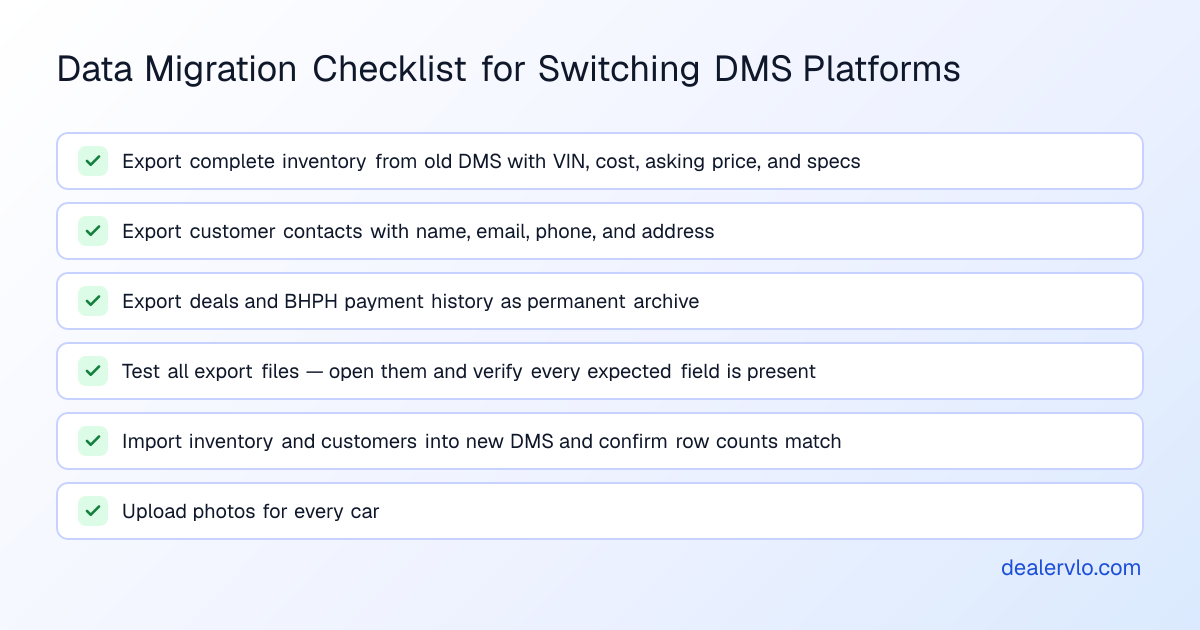
Before you cancel or start your DealerVLO trial, contact Desk2Deal support and ask for:
- A complete inventory export with VIN, stock number, year, make, model, trim, body style, color, mileage, transmission, drivetrain, fuel type, asking price, internet price, cost, and status.
- A complete customer export with name, email, phone, address, and lead source.
- A complete deal export with sale date, vehicle sold, customer, sale price, down payment, trade details, and financing terms.
- If you run buy-here-pay-here, a complete BHPH loan export with principal balance, interest rate, payment schedule, payment history, and outstanding balance.
What moves into DealerVLO — and what doesn't
DealerVLO imports two things by CSV: inventory and customer contacts. It does not import past deals, deal documents, or buy-here-pay-here loan balances and payment history.
Inventory: imports cleanly
DealerVLO's inventory import reads from the Import CSV tool on the Inventory page. Every row needs a valid 17-character VIN, and the import pulls stock number, year, make, model, trim, body style, color, mileage, transmission, drivetrain, fuel type, asking price, internet price, cost, and status from your file's columns.
The import does not decode VINs — year, make, model, and all the specs come from the columns in your CSV, so your Desk2Deal export must include them.
Photos do not import. After your cars are in DealerVLO, you'll upload photos for each one. If you have a large inventory, budget time for that — it's the most manual part of the migration.
Customers: import as contacts
DealerVLO's Settings → Import data tool reads customer rows with a first or last name; duplicate emails are skipped. The import brings in name, email, phone, and address.
Past deals and BHPH loans: archive them, don't import them
DealerVLO does not import historical deals or buy-here-pay-here loan balances and payment history. Archive a complete export of deals and BHPH data in Excel or CSV and store it somewhere permanent.
14-day free trial, then $29/mo · Cancel anytime
Map your Desk2Deal export columns to DealerVLO's import format
Open your Desk2Deal inventory CSV and compare the column headers to what DealerVLO expects. DealerVLO recognizes common column names automatically, but it looks for: VIN (required), Stock number, Year, Make, Model, Trim, Body, Exterior color, Mileage, Transmission, Drivetrain, Fuel type, Asking price, Internet price, Cost, and Status.
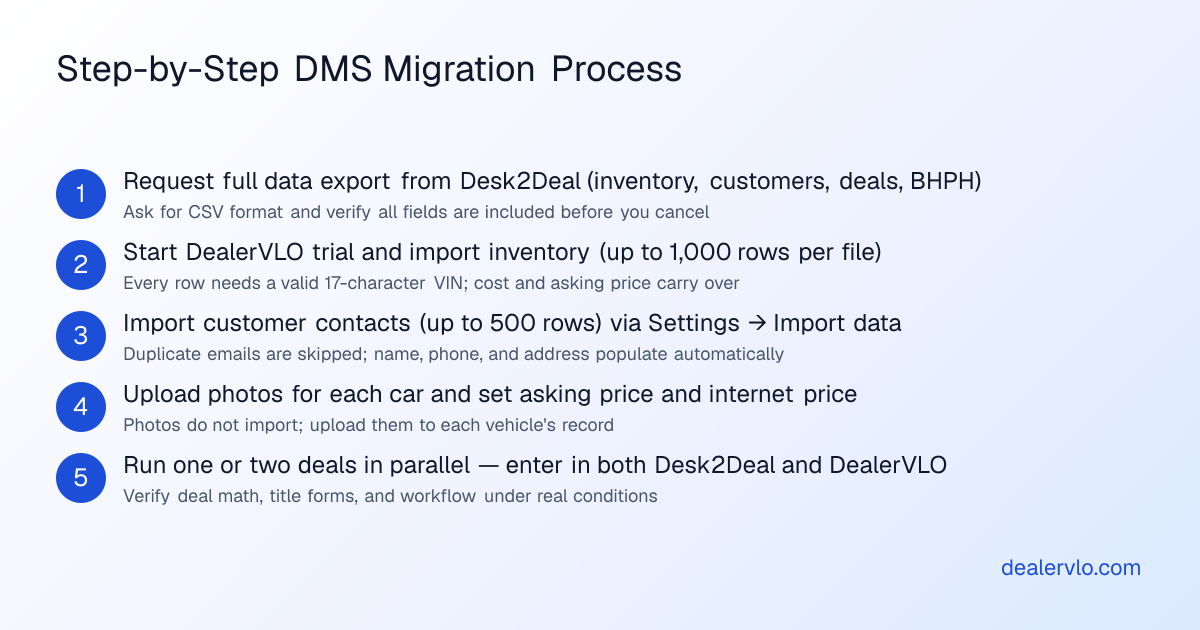
Start your DealerVLO trial and import inventory before you cancel Desk2Deal
Start your DealerVLO trial while you still have active Desk2Deal access, import your data, and confirm everything looks right before you submit cancellation notice.
DealerVLO's 14-day trial gives you full access to inventory, deal workflow, paperwork, and reporting.
Here's the step-by-step:
- Sign up for DealerVLO and go to the Inventory page.
- Click Import CSV and upload your Desk2Deal inventory file.
- Run the import. When it's done, every car appears on your Inventory page with cost, asking price, and specs from your file.
- Check the result: the import lists any rows it skipped and any column headers it didn't recognize. Rename those headers in your CSV and import again; cars already imported are skipped by VIN.
- Upload photos for each car.
- Import customers: go to Settings → Import data and upload your Desk2Deal customer CSV.
Now test it. Pick a car, open a new deal, add a customer, fill in the sale price and down payment, and let DealerVLO calculate the totals. Print a title form and verify it's correct.
Run both systems in parallel for one or two deals
The safest way to cut over is to run both Desk2Deal and DealerVLO for a short overlap — ideally through one or two sales. When a deal comes in, enter it in both systems to confirm the deal math works under real conditions.
Cut over on a weekend and update your listing feeds
The cleanest time to cut over is Friday night or Saturday morning. Here's the sequence:
- Friday afternoon: export one final copy of everything from Desk2Deal and save it as your permanent archive.
- Friday night or Saturday morning: if you haven't already imported inventory and customers into DealerVLO, do it now. Upload photos. Set your asking prices.
- Saturday or Sunday: in DealerVLO, go to Settings → Inventory syndication feeds, enter your Dealer ID for CarGurus, Cars.com, and Autotrader, and opt in (you enroll with each site and pay its fees). DealerVLO sends the three sites one combined feed once a day. Ask each site to stop the Desk2Deal feed so you don't get duplicates. If you run Meta's paid vehicle ads, there's also a Facebook vehicle catalog feed you use in your own Meta ad account.
- Monday or Tuesday: once the first daily feed has gone out, check CarGurus, Cars.com, Autotrader, and your DealerVLO dealer website to confirm your inventory is live.
14-day free trial, then $29/mo · Cancel anytime
Your first week on DealerVLO: workflow and paperwork
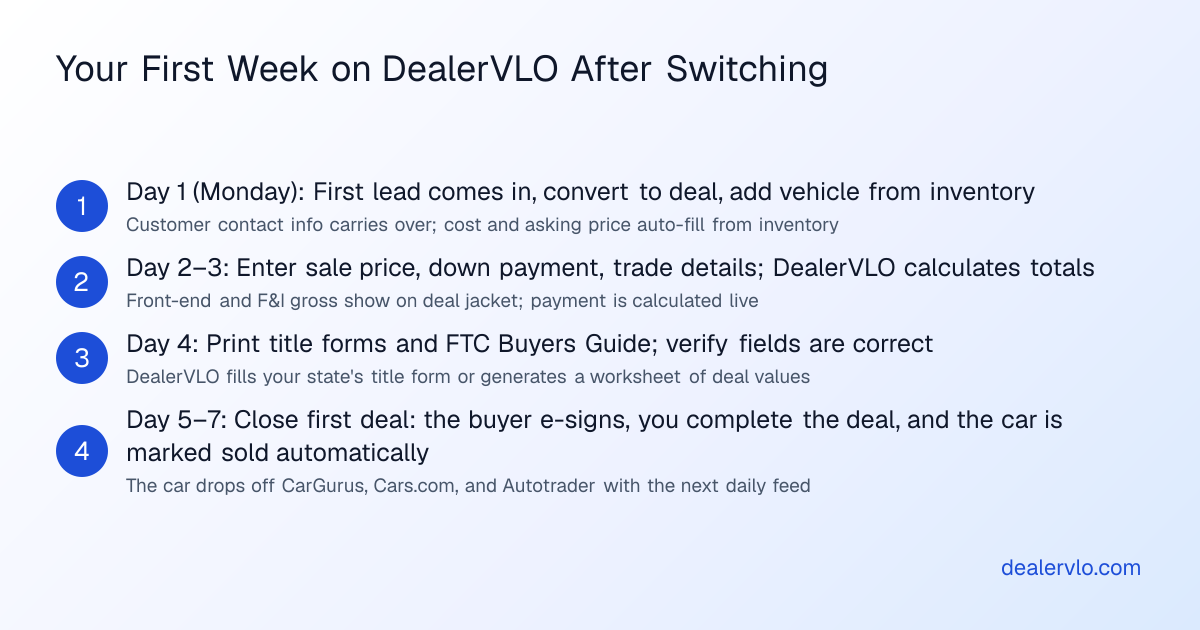
When a lead comes in through your dealer website, DealerVLO emails your dealership address and logs the lead in the inbox. Click the lead, convert it to a deal, and the customer's contact information carries over automatically.
Add the vehicle they're buying, enter the sale price, down payment, trade details, and financing terms. DealerVLO calculates the totals, tax, trade equity, amount financed, and monthly payment in real time. Front-end gross and F&I gross both show on the deal jacket.
When the numbers are set, print the paperwork. DealerVLO fills the FTC Buyers Guide and your state's title and registration paperwork from the deal: the official state PDF where DealerVLO fills it, or a worksheet of the deal's values where your state uses a portal. Expect the first deal to take longer while you learn where everything is.
What to do with your Desk2Deal archive after you migrate
Keep your Desk2Deal data exports somewhere permanent — an external hard drive, a cloud storage folder you control, or both. You'll need them for tax preparation, BHPH loan disputes, audits and compliance requests, and historical reporting.
When Desk2Deal is the better fit
Desk2Deal may be the better fit if:
- You're in the platform's Open Beta and you're working directly with the team to shape features you need.
- You rely on a built-in feature Desk2Deal offers that DealerVLO does not.
But if you're leaving because you want simpler pricing, faster deal workflow, or you're tired of fighting a system that doesn't fit the way a small independent lot actually works, DealerVLO is built for exactly that. For a detailed side-by-side, see our guide to the best DMS for independent used-car dealers.
Cost and pricing: what you'll pay before, during, and after the switch
As of September 2026, Desk2Deal's pricing page lists a Free plan alongside paid plans at $79/month (Starter), $149/month (Professional), $299/month (Business), and $399/month (Enterprise), with per-deal overage fees. Desk2Deal is in Open Beta, and it says founding dealers use it free during the beta, so check which plan you're actually on before you compare.
DealerVLO is $29 a month, flat — no per-user fees, no per-deal fees, no tiers. Unlimited users, unlimited deals, and the 14-day trial gives you time to import, test, and run a few deals before you decide.
Compliance note: data security and customer information during migration
When you export customer data from Desk2Deal, you're handling sensitive personal information. If your dealership arranges financing, the FTC Safeguards Rule requires a written information security program for that information, so treat the export files with care.
During the migration: Encrypt your export files or store them in a password-protected folder. Use secure file transfer — avoid sending unencrypted attachments through regular email. Delete temporary copies once the import is done.
For more on how the Safeguards Rule applies, see our guide to the FTC Safeguards Rule and dealer software.
Frequently asked questions
Can I export my entire Desk2Deal database, including deals and BHPH payment history?
Before you cancel, contact Desk2Deal support and request a complete export of inventory, customers, deals, and BHPH loan data in CSV format. Test the files while you still have active access. DealerVLO imports inventory and customer CSVs, but not past deals or BHPH loan history, so you'll archive those as permanent records.
How long does Desk2Deal keep my data after I cancel?
Your contract should state the data-retention period, but the only way to be certain is to ask Desk2Deal support in writing before you cancel. Pull your full data export as soon as you decide to migrate.
What happens to my listing feeds when I switch from Desk2Deal to DealerVLO?
Ask each listing site to stop the Desk2Deal feed when you turn on DealerVLO's, so you don't end up with duplicate listings. In DealerVLO, enter your Dealer ID for CarGurus, Cars.com, and Autotrader and opt in under Settings → Inventory syndication feeds. DealerVLO sends the three sites one combined feed once a day, so allow at least a day for your inventory to appear.
Will DealerVLO import the photos I uploaded to Desk2Deal?
No — photos do not import during a CSV migration. After your inventory is in DealerVLO, you'll upload photos for each car individually, so plan time for it if you carry a lot of cars.
Do I need to keep paying Desk2Deal during the migration, or can I cancel immediately?
The safest approach is to start your DealerVLO trial, import and verify your data, and confirm everything works before you submit cancellation notice to Desk2Deal.
Can DealerVLO import my active BHPH loans with current balances and payment schedules?
No — DealerVLO does not import buy-here-pay-here loan balances, payment history, or amortization schedules, and its buy-here-pay-here payment tracking covers notes on deals you write in DealerVLO. Keep servicing the loans you carry over from your complete Desk2Deal export, and keep that export as a permanent record.
Bottom line
Switching from Desk2Deal to DealerVLO requires a weekend of focused work and a clear plan. Export everything from Desk2Deal before you cancel. Import inventory and customers into DealerVLO during your trial, upload photos, and run a test deal. Run both systems in parallel for one or two sales, cut over on a weekend, and update your listing feeds. Once the first daily feed goes out, you're live on the new system.
14-day free trial, then $29/mo · Cancel anytime
Paste a VIN, the buyer, and the price — see the title & registration form filled in for 50 states, free, no signup.
Open the State Form Auto-Fill