Switching from AutoManager: How to Move Your Inventory, Customers and Deals Without Losing a Week
How to export data from AutoManager, what moves to DealerVLO by CSV, contract notice terms to check, and a cut-over checklist for the first week.
Part of the Choosing dealer software guide: The best DMS for independent used-car dealers in 2026 — an honest list from a dealer
Why dealers leave AutoManager — and what to know before you switch
Switching from AutoManager usually starts with price or product fit. As of September 2026, DeskManager starts at $88/month, WebManager at $70/month, and the DMS + website bundle at $144/month — all starting prices. DealerVLO is $29/month flat for the DMS, website, paperwork, and listing feeds (the listing sites charge their own fees).
AutoManager is built for larger operations with dedicated office staff. If you're a small lot where the same person buys the cars, writes the deal, and fills the RMV forms at night, you need something simple enough to learn quickly and run from a phone.
Before you cancel, understand what you can take. AutoManager will export inventory and some deal data, but you won't get a one-click full migration of deal history or buy-here-pay-here loan ledgers — and you need to plan that export before you give notice. Assume access ends when the subscription does, and confirm the date with AutoManager in writing.
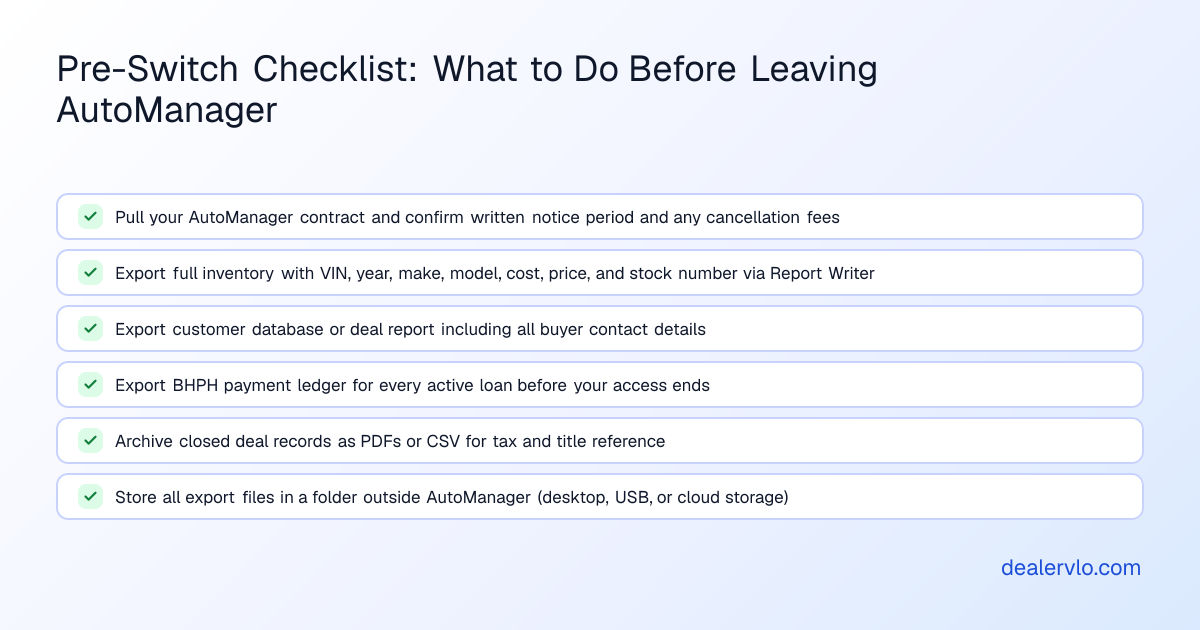
What you can export from AutoManager — and in what format
AutoManager doesn't offer a single "migration export" button.
Inventory: Use the custom Report Writer. From an individual vehicle record, you can export a custom report via FTP. Check with AutoManager support whether the Report Writer can generate a multi-vehicle CSV or Excel file in one pass. The Report Writer lets you pick the fields you need — VIN, year, make, model, mileage, cost, asking price, stock number, and photos.
Customer data and deal records: Ask support for a recommended method to export your full customer database as a CSV. Custom reports can be exported from individual deals using the same FTP method as inventory. From the Payments tab of a deal, there's an 'Export Payments' option where you choose filename, save path, and delimiter.
What you won't get: Assume that once your subscription ends, your access ends — which means you need every export finished and downloaded before the cancellation date.
Export checklist:
- Run a full inventory export with VIN, year, make, model, trim, mileage, cost, asking price, stock number.
- Export your customer database.
- If you're buy-here-pay-here, export the payment ledger for every active loan.
- Archive closed deal records for tax, warranty, or title questions.
Store all exports in a folder outside AutoManager — your desktop, a USB drive, or cloud storage you control.
What moves into DealerVLO — and what doesn't
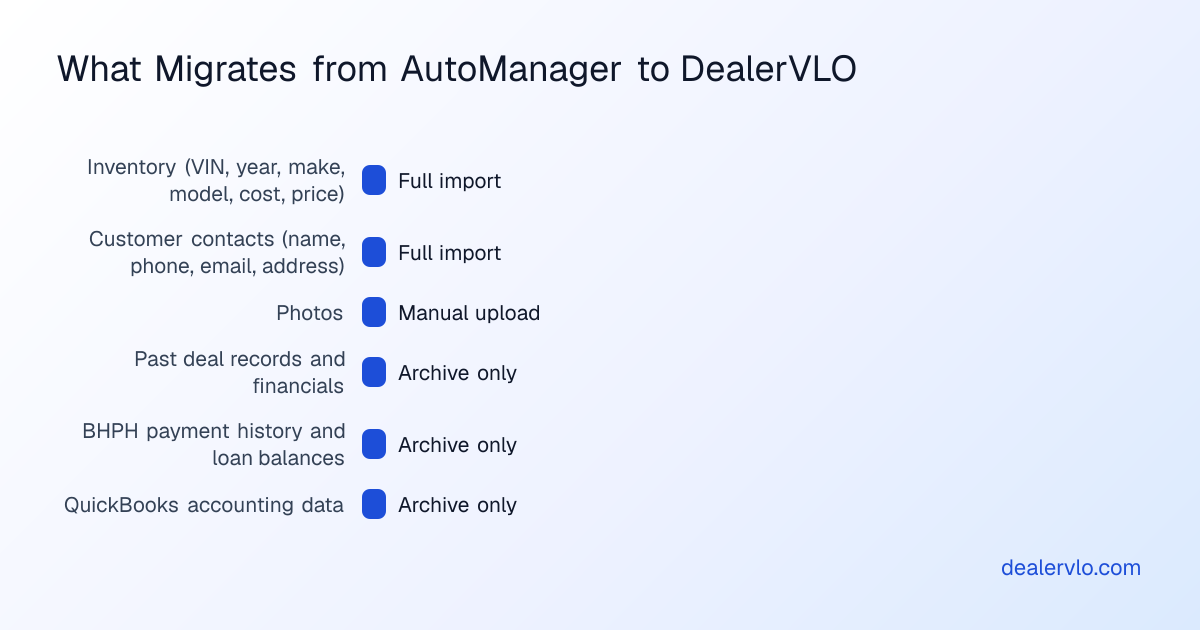
DealerVLO imports two types of data by CSV: inventory (up to 500 rows per file) and customer contacts (up to 500 rows per file). The system recognizes common column names from other platforms automatically.
Inventory import: Upload your CSV under Settings → Import data. DealerVLO skips duplicate VINs. Photos don't import via CSV — you'll upload those in DealerVLO's inventory manager after the cars are in.
What does NOT import: Past deal records, closed-deal financial history, and buy-here-pay-here loan balances and payment ledgers do not import into DealerVLO. Keep your AutoManager deal archive and BHPH payment ledgers as CSV or Excel files outside the system. Your new deals start in DealerVLO on day one; your old deals stay in the export files.
14-day free trial, then $29/mo · Cancel anytime
Running both systems during the overlap — and why you should
Use that overlap.
Start your 14-day DealerVLO trial while AutoManager is still active. Import your inventory and customer CSVs, upload photos, and set up your listing feeds. Then run both systems in parallel: when you buy a car or write a deal, enter it in both systems. The redundant entry cuts your learning curve from weeks to days.
The cut-over checklist: your last day on AutoManager
Pick a cut-over date — ideally a Sunday night or slow Monday. Here's what to do:
Two days before:
- Export one final inventory snapshot from AutoManager.
- Pull a final BHPH payment report for every active loan.
- Reconcile your AutoManager deal pipeline: close or cancel every deal still marked "in progress."
Cut-over day:
- Mark AutoManager read-only in your own process. From this moment forward, every new car, contact, and deal goes into DealerVLO only.
- Import your final AutoManager inventory CSV into DealerVLO if it's different from your earlier import.
- Update your listing feeds: in DealerVLO, open Settings → Inventory syndication feeds, enter your Dealer ID for Cars.com, Autotrader, and CarGurus, and opt in. Then ask each site to stop the AutoManager feed.
- Change your website DNS if you were using WebManager. DealerVLO gives you a subdomain immediately; if you have a custom domain, add a CNAME record at your DNS provider and enter the domain in DealerVLO's website settings.
Day after cut-over:
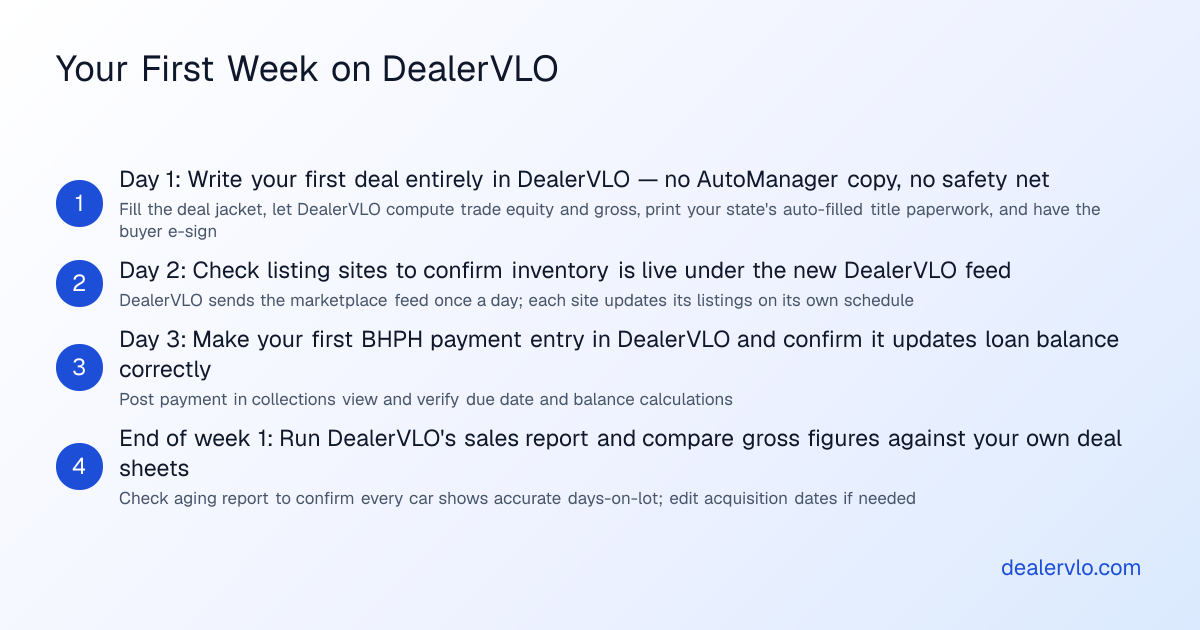
- Write your first deal entirely in DealerVLO — no AutoManager copy. Fill the deal jacket, let DealerVLO compute the trade equity and gross, print your state's title paperwork, and have the buyer e-sign.
Your first week on DealerVLO — what to expect
The first three days feel slower because you're learning where everything lives.
Deal flow: Open a new deal, pick the car from your inventory (it pulls year/make/model/VIN and your cost automatically), enter the sale price and any trade, and add fees and back-end products. The deal jacket calculates front-end gross, trade equity, amount financed, and payment in real time. Click Documents, and DealerVLO fills your state's title and registration paperwork and federal forms like the FTC Buyers Guide.
Inventory and pricing: Every car shows its days on the lot. At 60+ days, the system flags it for repricing. Click into any car and you'll see an AI price suggestion: a range from live comparable listings and a target price for selling in about 30 days. Reconditioning costs go line by line on each car's detail page — brakes, tires, detailing, inspection.
Listing feeds and leads: Once you've enrolled, DealerVLO's daily feed carries your inventory to Cars.com, Autotrader, and CarGurus; when you change a price or mark a car sold, the listing sites pick it up from the next feed. Leads from your DealerVLO website land in the lead inbox with the source tagged; you reply to them by email from the inbox.
BHPH tracking: Set up a financed car in DealerVLO's BHPH module: principal, interest rate, term, and due date. Every payment posts against the loan balance, and the collections view shows every account in one screen.
14-day free trial, then $29/mo · Cancel anytime
When AutoManager is the better fit
If your lot runs 30+ deals a month with dedicated office staff — a finance manager, a title clerk, and someone handling advertising full-time — and you're already trained on DeskManager's workflow, switching systems might not be worth the disruption. AutoManager's modules are deep: the QuickBooks Direct Interface, the Report Writer, and its marketplace exports are built for larger operations.
If you rely heavily on Selly CRM and have a large pipeline of leads being worked by a sales team, moving that pipeline mid-year can break momentum. DealerVLO has a lead inbox, but it's lighter-weight — there's no SMS, no automated follow-up sequences, and no phone integration.
How long the move actually takes — and what it costs in time
Here's a rough time budget — our estimate, not a measured average — assuming you're a one- or two-person lot running 10–20 units:
- Exporting inventory, customers, and archives from AutoManager: 2–3 hours spread over a few days.
- Starting your DealerVLO trial, importing data, uploading photos: 2–3 hours.
- Setting up listing feeds and configuring your website: 1–2 hours.
- Running both systems in parallel for 2–3 weeks: 15–30 extra minutes per deal or new car.
- Cut-over day: 2–3 hours (some of this is waiting for DNS to propagate).
Total hands-on time: by our estimate, roughly 8–12 hours spread over three to four weeks. Because you run both systems in parallel, you never stop selling cars.
Alternatives to AutoManager and DealerVLO
If you're comparing AutoManager alternatives, here are the other platforms dealers typically evaluate:
- Frazer: BHPH tools built into its plans, sold as a monthly or annual subscription (see our Frazer pricing breakdown).
- DealerCenter: Cloud DMS and website, monthly subscription, designed for small to mid-size lots.
Bottom line
Switching from AutoManager to DealerVLO is a few weeks of part-time work, and you'll run both systems in parallel so you never stop selling cars. You can export your inventory and customers from AutoManager by CSV and import them into DealerVLO by CSV; past deal history and BHPH payment ledgers stay in archived files outside the system.
The payoff is a system that does everything AutoManager did for your day-to-day work — deal jackets, state title forms, inventory tracking, BHPH payment ledgers, website, and listing feeds — for $29/month flat.
If you're tired of AutoManager's price or its complexity, start a free trial and import your inventory today.
Frequently asked questions
Can I export my full deal history and BHPH loan balances from AutoManager?
AutoManager lets you export custom deal reports and payment ledgers using the Report Writer and the Payments tab export, but there's no single-click tool to export your entire deal archive or all BHPH loan balances at once. Those exports don't import into DealerVLO — past deals and payment history stay in your archived files, and DealerVLO tracks new transactions going forward.
How long does AutoManager give me to cancel, and will I get a refund if I cancel early?
Pull your contract and confirm the exact notice period and any fees by contacting AutoManager directly in writing.
What data can I import into DealerVLO from AutoManager, and what has to stay behind?
DealerVLO imports inventory and customer contacts by CSV (up to 500 rows per file). Photos don't import via CSV — you upload those in DealerVLO's inventory manager after the cars are in. Past deal records and buy-here-pay-here loan balances do not import; you'll keep those as archived files outside the system.
Do I have to run both AutoManager and DealerVLO at the same time during the switch?
You don't have to, but it's the smartest way to cut your learning curve. Use that overlap to enter every new car and deal in both platforms — by the time your AutoManager subscription ends, you've already written three or four deals in DealerVLO and you know the workflow.
How do I move my Cars.com, Autotrader, and CarGurus listings to DealerVLO without losing visibility?
In DealerVLO, open Settings → Inventory syndication feeds, enter your Dealer ID for each marketplace you sell on, and opt in. DealerVLO sends CarGurus, Cars.com, and Autotrader a combined inventory feed once a day, so there's no feed URL to manage. Your accounts and agreements with those sites stay the same (they still charge their own fees); once your listings show up from DealerVLO, ask each site to stop the AutoManager feed.
Is AutoManager better than DealerVLO for larger dealerships or BHPH-heavy operations?
AutoManager is built for larger operations with dedicated staff. If your lot runs 30+ deals a month, has a team trained on DeskManager, and relies heavily on Selly CRM's automated lead workflows and texting, the cost difference might not justify the disruption of switching. DealerVLO is purpose-built for small independent lots where the same person does it all — it's faster to learn, lighter-weight, and significantly cheaper.
How long does it actually take to switch from AutoManager to DealerVLO, and will I lose deals during the transition?
Plan on a few weeks of part-time work: exports, a CSV import, setting up feeds and your website, and a short overlap where you enter new cars and deals in both systems. You never stop selling — every deal closes in AutoManager as your system of record until cut-over day, and you're learning DealerVLO at the same time.