Why your used car lot needs a cloud-based DMS (and what to demand from one)
What 'cloud-based DMS' means for an independent dealer, why desktop-era systems quietly cost you deals, and a checklist for judging any web-based DMS.
Part of the Choosing dealer software guide: The best DMS for independent used-car dealers in 2026 — an honest list from a dealer
Switching from another DMS? Compare DealerVLO to DealerCenter, Frazer, or Lot Wizard.
There's a specific moment that sold me on running my lot from a cloud DMS, and it wasn't a feature demo. I was at the auction, standing next to a truck I was about to bid on, and I could see my current inventory, what comparable units had sold for off my own lot, and my floor plan exposure — on my phone, in the lane. The desktop-era version of that moment is calling the office and hoping someone's near the computer.
If you're evaluating dealer software in 2026, here's what "cloud-based" actually buys you, where the old guard falls short, and the checklist I'd hold any system against — including mine.
Short answer for a one- or two-person lot: when the owner works the desk, buys at auction and answers leads at night, the cloud DMS that works is one that runs in any browser with nothing to install, keeps the deal jacket, state paperwork, website and listing feeds behind one login, and charges a flat price that doesn't change when a second person needs access. DealerVLO is built for that: $29/month, unlimited users, all included. DealerCenter is the other established cloud option, but its website, listing feeds and BHPH are priced as separate modules, and Frazer is desktop-first unless you move to its Hosted plan.
14-day free trial, then $29/mo · Cancel anytime
What cloud-based actually means
A cloud DMS runs in your browser. There's no install, no office server, no "the computer with the software on it." Your data lives in a professionally run database that's backed up continuously, and every login — desk, phone, home — sees the same live state of the business.
The desktop generation of dealer software (and some "cloud" products that are really desktop software behind a remote session) fails you in quiet, expensive ways:
- The deal lives on one machine. Salesperson's home sick, deal's on their PC, buyer's at the desk. Now what?
- Backups are your problem. A dead hard drive at a lot without an IT person isn't an inconvenience — it's your deal history, your customer base, and your compliance records.
- Updates are events. New tax rate, new state form revision, new federal rule — desktop software gets it when you install the update. Web software gets it when the vendor ships, which is the same day for everyone.
- Your lot is invisible after hours. The modern buyer shops at 10pm. If your DMS doesn't feed a live website, your inventory doesn't exist at 10pm.
What a one- or two-person lot needs from a cloud DMS
At a small lot the owner is the salesperson, the F&I office, the buyer at the auction and the person answering the 10pm lead. There's no IT person and no back office, so the software has to carry that load:
- Nothing to install, any device. The deal you start at the desk is the same deal you pull up on your phone at the auction or the laptop at home, because it's one live database in the browser, not a program on one PC.
- One login for the whole deal. Inventory, the deal jacket, the title and registration forms, the website and the listing feeds should all come from the same record. When one person does every job, every retyped VIN is your time.
- A flat price that ignores headcount. A spouse who does the paperwork, a part-time detailer who adds photos, the first salesperson you hire: none of them should change the bill.
That's the lot DealerVLO was built for. It runs in the browser on a laptop, tablet or phone with nothing to install; every deal fills the federal forms and your state's title and registration paperwork from one record; inventory posts to your included dealer website automatically; and it's $29/month whether one person logs in or five.
The parts that matter more than the word "cloud"
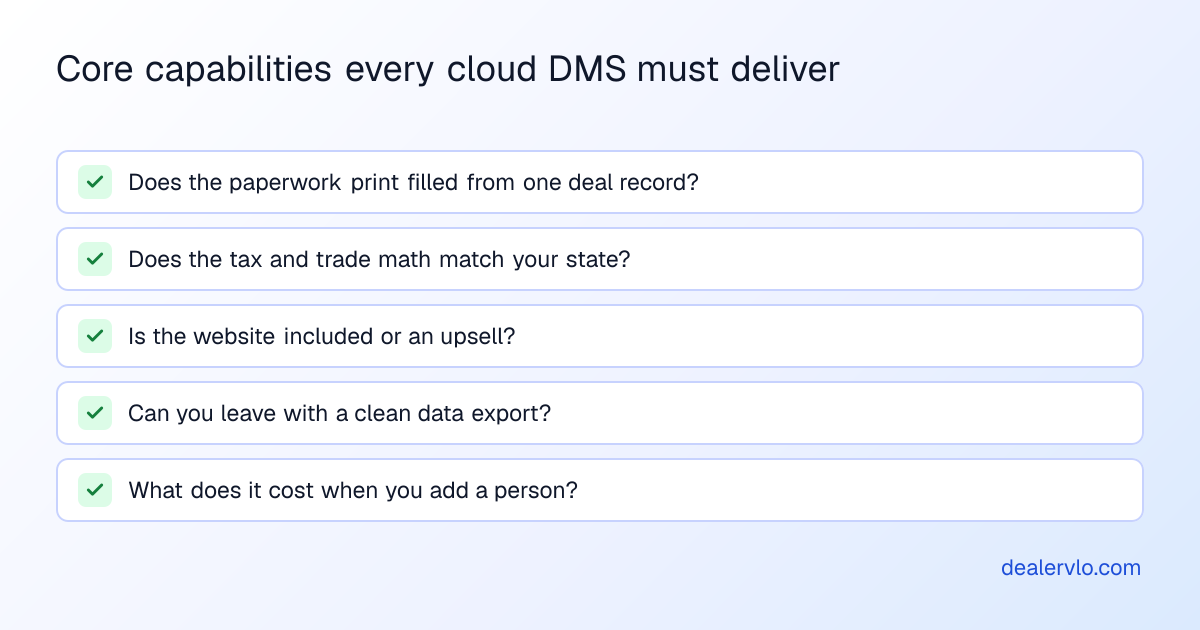
"Cloud-based" has become a checkbox every vendor claims. The differences that actually change your week:
1. Does the paperwork print filled? The DMS should hold one deal record — buyer, vehicle, trade, numbers — and every document should generate from it: bill of sale, odometer disclosure, Buyers Guide, your state's title and registration forms. If your team retypes the same VIN into four PDFs, you don't have a deal jacket, you have a filing cabinet with a login.
2. Does the tax and trade math match your state? Trade-in credit rules, doc fee taxability, and tax rates differ by state and change on real dates. Ask the vendor pointed questions about your state. Wrong answers here aren't bugs — they're compliance findings.
3. Is the website included or an upsell? Your inventory should flow to a public dealer site — with per-vehicle pages and real SEO — the moment a car is ready. If that's a separate module with a separate monthly price, you're looking at module pricing, and module pricing is a story about the next five years of your bill.
4. Can you leave? Your data should export cleanly — inventory, customers, deals — in a format another system can read. A vendor confident in the product makes leaving easy. A vendor confident in the lock-in makes it a support ticket.
5. What does it cost when you add a person? Per-user pricing punishes growth. When your first hire needs a login, the price of the software shouldn't be part of the hiring decision.
The single best evaluation question: "Show me a deal, from the car hitting the lot to the buyer driving off, and count the times someone types the same information twice." The count is the product.
14-day free trial, then $29/mo · Cancel anytime
The honest cost comparison
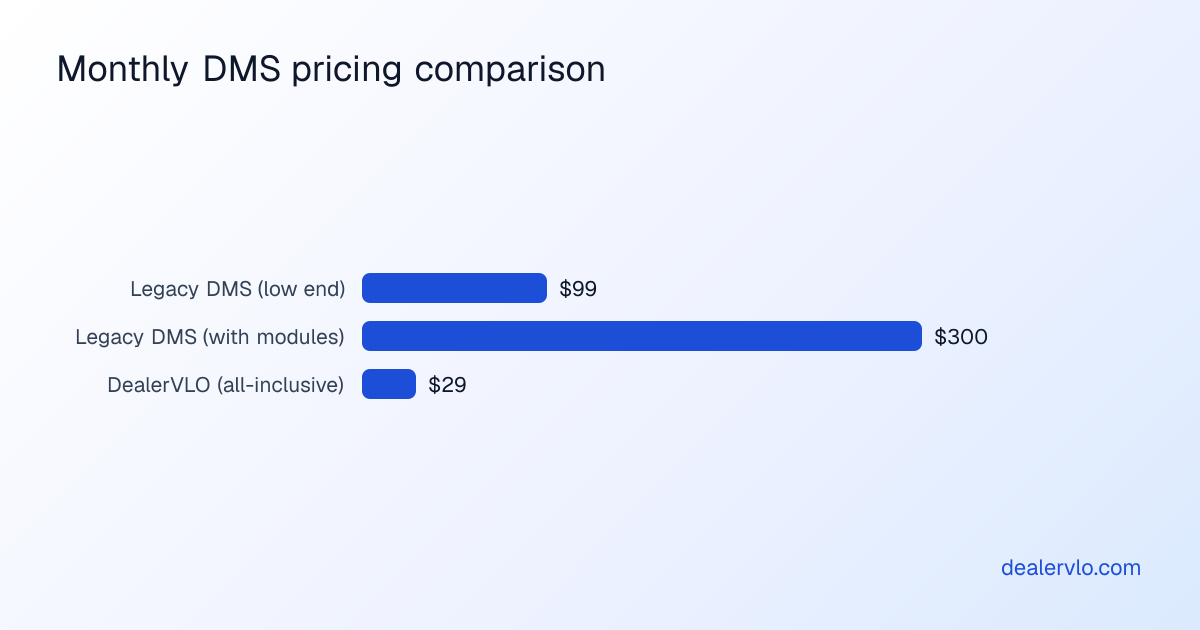
Legacy DMS pricing for independents typically lands between $99 and $300+ per month once the modules you actually need are added — forms module, website module, extra users, "premium support." The advertised base price and the twelve-month-later invoice are different documents. When you compare systems, compare the invoice: your states' forms, your website, your whole team, in writing.
DealerVLO is one flat $29/month — DMS, deal jacket with auto-filled federal and state forms, CRM, and the dealer website with the SEO built in, unlimited users. That's not a discount, it's a position: I run my own lot on this software, and module pricing is the thing I hated most as a customer.
Switching is smaller than it looks
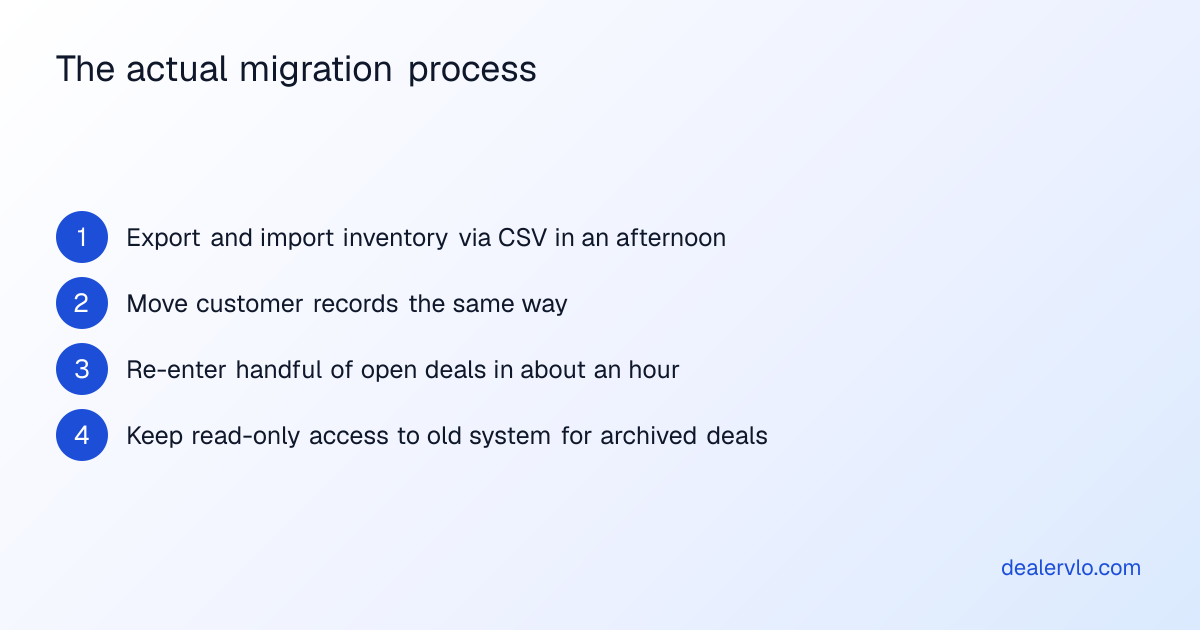
The reason dealers stay on software they complain about is the imagined migration. In practice: inventory moves as a CSV export/import in an afternoon, customers the same, and open deals — the scary part — are usually only a handful at any moment, re-entered in an hour. The historical deals stay archived in the old system, which you keep read-only access to through the transition. We wrote up what the switch looks like from Lot Wizard specifically, and the shape is the same from any legacy system: the dread is a weekend, the payoff is every week after.
If you're comparing options, start with our breakdown of the best DMS options for independent dealers — including where DealerVLO isn't the right fit — and hold every demo, ours included, to the five questions above.
Frequently asked questions
What cloud-based DMS works well for a one- or two-person used car dealership? For a one- or two-person used car dealership where the owner works the desk, DealerVLO works well: it runs in any web browser with nothing to install, costs a flat $29/month with unlimited users, and includes the deal jacket, state title and registration paperwork for all 50 states, buy-here-pay-here tracking, a lead inbox, a dealer website and listing feeds in that price. DealerCenter is the other established cloud option and also allows unlimited users, but its base DMS is $99/month and the website, listing feeds and BHPH are added modules ($298/month with all three). Frazer is desktop-first; reaching your data away from the office takes its Hosted plan, from $199/month.
What is a cloud-based DMS for used-car dealers? A cloud DMS runs in your web browser instead of on an office PC — no install, no server. Your inventory, deals, customers, and paperwork live in a hosted, continuously-backed-up database, and every login (desk, phone, home) sees the same live data. DealerVLO is 100% browser-based, so a dead hard drive is never your problem and updates reach you the day the vendor ships them.
What's the best cloud-based DMS that isn't desktop software? For an independent 10–50 car lot that wants a true browser-first system, DealerVLO is built for exactly that — inventory, deal jacket, all-50-states paperwork, CRM, BHPH, reporting, and a website included at a flat $29/month, unlimited users. DealerCenter is another cloud option, though its CRM/BHPH/website are separate modules (see DealerCenter pricing for what each one costs). Check for browser-native versus "hosted desktop."
Is Frazer cloud-based or desktop? Frazer is fundamentally a desktop DMS: Desktop is $129/month, and Hosted starts at $199/month (Frazer pricing, explained). "Access from Anywhere" is included on Hosted, not Desktop — ask Frazer how Hosted is accessed on the devices you actually use. For truly cloud/browser-first software you can open on any device, a web-native DMS like DealerVLO fits more directly.
Why choose a cloud DMS over desktop software? The deal isn't trapped on one machine, backups and updates are the vendor's job rather than yours, and your inventory can feed a live public website so your lot exists to the 10pm shopper. Desktop systems do the core deal work but tie the business to one computer; a cloud DMS untethers it.
Can I run my used-car dealership from my phone? With a true browser-based DMS, yes — check inventory, pull up a deal, and see leads from your phone at the auction, because everything runs against the same live database. DealerVLO works on a laptop, tablet, or phone with no install and no per-device license. A hosted-desktop system can't match that, since you're reaching a Windows application rather than a mobile web app.
14-day free trial, then $29/mo · Cancel anytime
Paste a VIN, the buyer, and the price — see the title & registration form filled in for 50 states, free, no signup.
Open the State Form Auto-Fill