# Used Car Window Sticker Template: What a Dealer Should Print
> A dealer's used car window sticker template: what to print next to the FTC Buyers Guide, what to leave off, and how to keep the price matched to your listing.
- Source: https://www.dealervlo.com/blog/used-car-window-sticker-template
- Published: 2026-10-08
- Updated: 2026-10-08
- Author: Chris Abouraad
- Tags: merchandising, pricing, listings, window stickers
---
A dealer on DealerVLO recently emailed support with a simple question: where do I make a price
sheet to hang next to the Buyers Guide? It's a fair question, because nobody hands you a template
when you get your license. The FTC tells you exactly what goes on the Buyers Guide. The sheet that
actually sells the car is up to you.
So here's the used car window sticker template I'd hang on my own lot in Tewksbury: what goes on it,
what to leave off, how it relates to the Buyers Guide and an addendum, and how to keep the price on
the glass matched to the price online. (This is operator guidance, not legal advice. Price and
advertising rules vary by state.)
Print a window sticker from any car in DealerVLO: start your 14-day free trial
## Buyers Guide, window sticker, addendum: three different things
People use "window sticker" for three different pieces of paper. They do different jobs.
**The FTC Buyers Guide** is the required one. The Used Car Rule (16 CFR Part 455) says nearly every
used car you offer for sale needs a completed Guide displayed on it, and it tells the shopper whether
the car is sold as-is, with a dealer warranty, or with implied warranties only. It's a legal
statement, not a sales piece. If you haven't filled one out field by field, start with
[how to fill out the FTC Buyers Guide](/blog/how-to-fill-out-ftc-buyers-guide).
**The Monroney label** is the federal sticker on a new car: MSRP, factory options, fuel economy.
Used cars don't get a new one, and the original describes the car on day one, not your price today.
**An addendum sticker** lists dealer-added items and their prices: a protection package, tint,
nitrogen, wheel locks. On a new car it sits next to the Monroney. On a used car, if you use one, it
goes next to the price sheet.
**The window sticker or price sheet** is yours. It's the one page that tells a shopper walking the
lot on a Sunday what the car costs, what it has, and how to reach you. No federal form, no required
layout.
One placement rule: the Buyers Guide has to stay readable. Hang the price sheet next to it, on
another window, never over it. If a shopper has to lift your sheet to see whether the car is as-is,
you've buried the one document the law actually requires.
## What goes on a used car window sticker
Here's the template. Everything on it should come straight from the same record as your online
listing.
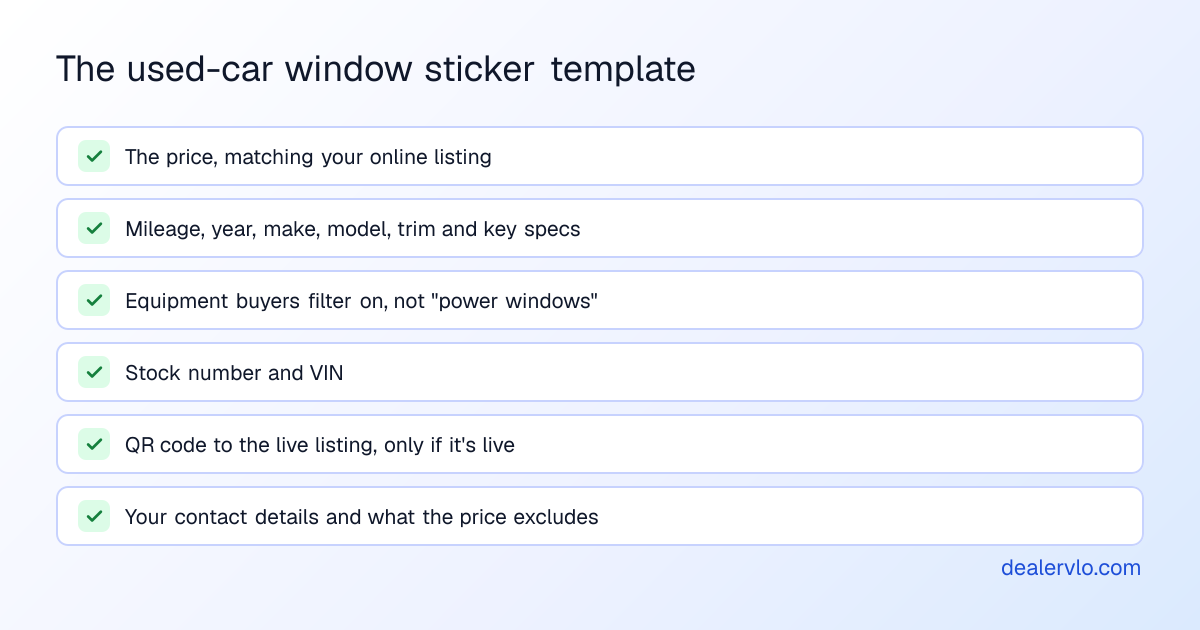
**The price, big.** Same number as your website and listing sites. More on that below.
**Mileage and the car itself.** Year, make, model, trim, then the specs buyers ask about:
exterior color, body style, engine, transmission, drivetrain, fuel type, doors and seats.
**Equipment buyers actually filter on.** This is where most homemade stickers go wrong. Nobody
chooses a car because it has power windows. They choose it for AWD, a third row, a backup camera,
Apple CarPlay or Android Auto, heated seats, a tow package, a sunroof. Group the equipment so the
good stuff is easy to find, and cut the filler before you cut the features that sell.
**Stock number and VIN.** The stock number is how your salesperson finds the keys. The VIN is how
the shopper checks the history report and how you prove the sheet belongs to this car.
**A short description.** Two or three sentences, the same ones from your listing. If yours read
like spec dumps, [how to write used car listing descriptions](/blog/how-to-write-used-car-listing-descriptions)
covers fixing that.
**A QR code to the listing.** All the photos and the full details are one scan away.
**Your contact details and what the price excludes.** Dealership name, address, phone, and one
plain line on what isn't in the price.
In DealerVLO, that's the one-page Window Sticker on each vehicle's page, next to the Buyers Guide.
It pulls the price, mileage, specs, stock number, VIN, equipment, description and your dealership
details from the car, groups the equipment by category in three columns, and trims long lists with
"+ N more" and the description to fit, so it always prints on one page. No deal needed: print it
the day the car hits the line.
## The price on the glass has to match the price online
Shoppers walk in with a screenshot. If your website says $14,995 and the windshield says $15,495,
you've started the conversation with an argument, and you'll lose it.
It's more than awkward, too. FTC staff's
[price transparency FAQs](/blog/ftc-price-transparency-faqs-used-car-dealers) say the advertised
price has to be one any buyer can actually pay, that the same price should show everywhere you advertise, and that a doc fee every buyer pays belongs inside it.
Several states regulate advertised prices and fees on top of that. California's CARS Act, in effect
since October 1, 2026, is one of them; see
[California CARS Act dealer compliance](/blog/california-cars-act-dealer-compliance-2026). Check
your own state's rules before you settle on a format.
The practical rule: one price per car, entered once, printed from the same place your listing reads
it. Retype it and sooner or later you'll typo it.
In DealerVLO, the sticker prints the same price your dealer website and listing feeds read from the
car: its internet price, or its asking price if no internet price is set. If a car has no price yet,
the sticker says "See salesperson" instead of a blank.
Print price sheets that match your online price with DealerVLO, free for 14 days
## The QR code: only point it at a live listing
A QR code is the best thing on a modern price sheet. The shopper on your lot after hours scans it
and gets the photos, the full description and a way to reach you, without you there.
A dead QR code is worse than none. A shopper who scans and lands on "page not found" or a sold
listing assumes the car is gone, or that you're sloppy. So only print a code that points at a
listing that's live right now, and pull the sheet when the car sells.
DealerVLO puts the QR code ("Scan for photos and full details") on the sticker only when the car is
live on your dealer website, and links it to that car's page. If the car isn't on the site, the
code isn't printed.
## What to leave off
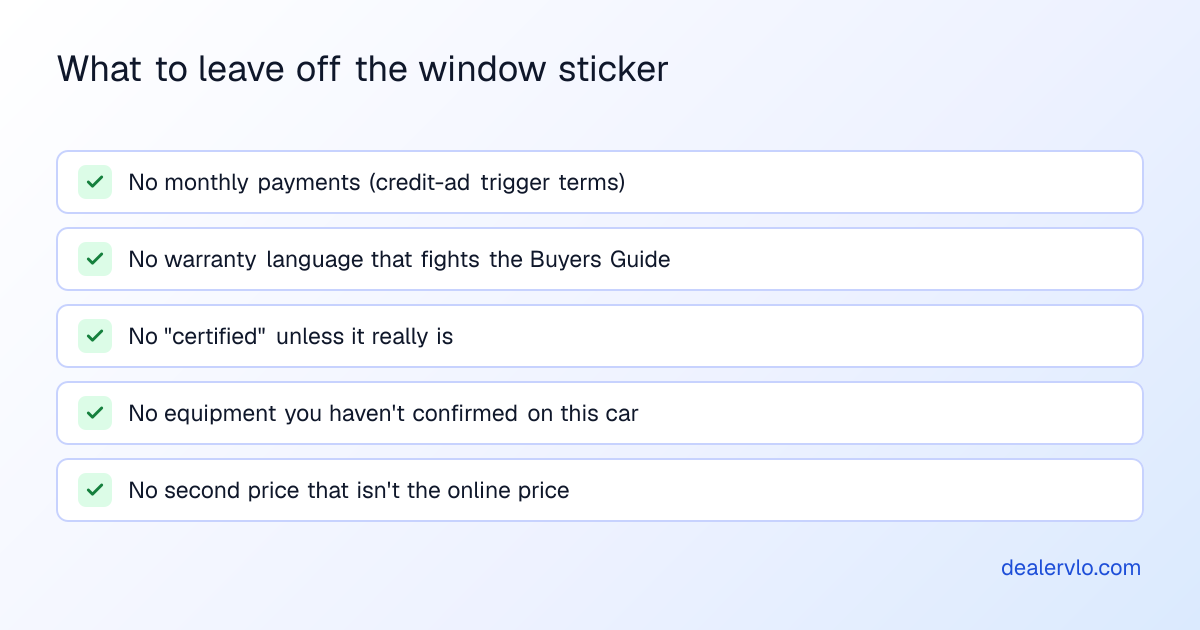
**Monthly payments.** "Only $289/mo!" is tempting. But under the federal Truth in Lending Act's
Regulation Z, stating a payment amount in an ad is generally a "trigger term" that requires more
credit disclosures, such as the down payment, the repayment terms and the APR. A sticker on the
glass can count as an ad. I'd leave payments off the sheet and talk payments at the desk. If you
want them on, have a compliance professional sign off on the exact wording first.
**Warranty language that contradicts the Buyers Guide.** If the Guide says As Is, don't print "runs
great, fully warrantied" on the sheet next to it. The Buyers Guide is the warranty statement. The safest
sheet doesn't mention warranty at all, beyond pointing to the Guide.
**"Certified" unless it is.** If the car isn't in a real manufacturer or third-party certification
program, don't call it certified.
**Anything you can't back up.** Equipment you assumed from the trim level but didn't check on the
car. "One owner" you didn't confirm. "Never in an accident" because the report came back clean. If
a buyer points at a line on your sheet and it's wrong, everything else on the sheet is suspect too.
## Reprice, then reprint the same day
Price sheets go stale. Say you drop a car $500 at 45 days, the website updates, and the sheet on the
glass still shows last month's number. Now the first shopper who compares has caught you with two
prices.
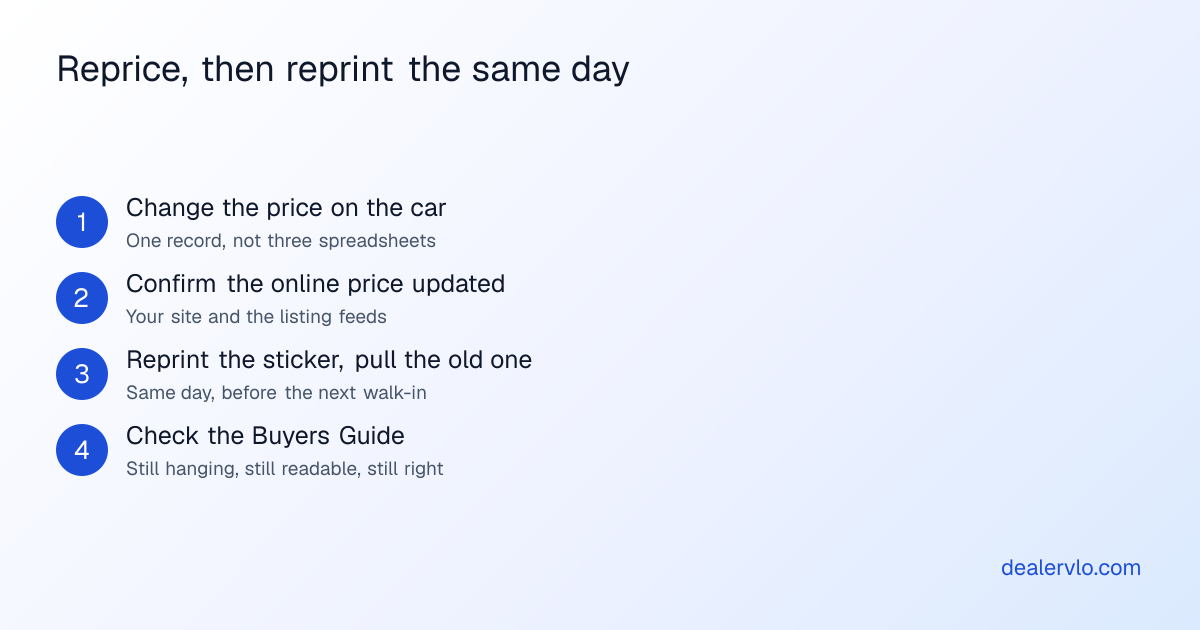
Make the reprint part of the reprice: nobody changes a price without walking out with the new
sheet. If you run a markdown schedule, see the
[inventory aging markdown playbook](/blog/inventory-aging-markdown-strategy). And before you cut,
[re-merchandising an aging car](/blog/remerchandise-aging-inventory-without-discounting) is often
the cheaper fix, and a fresh sheet with better equipment callouts is part of that. If the problem
is the starting price, [how to price used cars](/blog/how-to-price-used-cars-dealer-markup-strategy)
covers comps and markup.
DealerVLO shows days in inventory on every car and flags units at 60+ days as "aging, consider
repricing." It doesn't mark prices down for you or reprint anything on its own. When you change the
price, open the car and print a new sticker from the same page.
## Template options, honestly
You don't need software to make a price sheet. The common options:
- **A Word or Excel template.** Free and flexible. Make one, save it, fill it in per car.
- **Label and sticker vendors.** Pre-printed stock with blanks, or print-on-demand services.
Good-looking, and some include an addendum format.
- **Your DMS.** If it holds the car's price, specs and equipment, it should print the sheet.
The first two work fine. Their weakness is the same: someone retypes each car. A typo in a VIN
means the sheet doesn't match the car. A typo in the price means the sheet doesn't match the ad.
And a template doesn't know when the online price changed. If you go the template route, at least
copy the VIN from a decode rather than reading it off the dash.
## Where DealerVLO fits
DealerVLO prints the window sticker from the car you already entered, so there's nothing to retype.
The price is the car's online price, or "See salesperson" if it isn't priced. The specs, stock
number, VIN, grouped equipment, description and your dealership's name, address and phone all come
from the same record, and the QR code appears only when the car is live on your dealer website.
The footer says what the price leaves out and points to the Buyers Guide on the car for warranty
information.
How the footer handles your doc fee depends on one setting. With no default doc fee in Settings, it
reads "Price excludes tax, title and registration." With a default doc fee set, it names the fee:
"Price excludes tax, title, registration and a $X documentation fee." If you've built the doc fee
into your online price, as FTC staff's FAQs push dealers to do, turn on "My advertised prices
already include the doc fee" next to the doc fee in Settings, and the footer reads "Price includes
the $X documentation fee; excludes tax, title and registration." Check the line matches how you
actually price before you hang the first sheet. Beyond that switch, the footer wording isn't
editable.
What it doesn't do yet: put a photo of the car on the sheet, add your logo, or print the whole lot
at once. It prints one car at a time, from the same vehicle page as the Buyers Guide. It's part of
the [$29 a month flat](/pricing) plan, unlimited users, along with the rest of
[DealerVLO](/used-car-dealer-software).
## Frequently asked questions
### Is a window sticker required on a used car?
The federal requirement is the FTC Buyers Guide, displayed on nearly every used car you offer for
sale. A separate price sheet isn't required by federal law; it's a sales tool. Some states have
their own rules on what goes on a car or how prices are shown, so check yours.
### What's the difference between a window sticker and a Buyers Guide?
The Buyers Guide is the required federal form that says as-is, dealer warranty, or implied
warranties only. Your window sticker is your own sheet with price, mileage, specs and equipment.
Hang them side by side, and never cover the Guide.
### What is a used car addendum sticker?
A sticker listing dealer-added items and their prices, like a protection package or tint. Optional
add-ons have to be truly optional; FTC staff guidance says a charge every buyer pays belongs in the
advertised price.
### How do I make a window sticker for a used car?
Use a one-page template: online price, mileage, year/make/model/trim, key specs, the equipment
buyers filter on, stock number and VIN, a QR code to the live listing, your contact details, and a
line on what the price excludes. Print it from the same record as your listing so nothing drifts.
### Can I put a monthly payment on the window sticker?
Carefully, if at all. A payment amount is generally a Regulation Z trigger term that requires more
credit disclosures, and a sticker can count as an ad. Leave it off, or have a compliance
professional review the wording.
### Does DealerVLO print window stickers?
Yes: a one-page sheet from each vehicle's page, no deal needed, with the online price, specs,
equipment, VIN, your contact details, and a QR code when the car is live on your website. No photo
or logo, and one car at a time.
## Bottom line
The Buyers Guide is the form the FTC requires. The window sticker is the one that sells the car,
and the template is simple: the same price as online, the equipment buyers actually shop for, the
VIN, a QR code that works, and nothing you can't back up. The hard part isn't the layout. It's
keeping a few dozen sheets in sync with prices that change every couple of weeks.
That's the part DealerVLO handles: one record per car, the price your listings read, and a one-page
sticker that prints from the same screen as the Buyers Guide. Try it on your own lot free for 14
days.
Print matching window stickers and Buyers Guides from every car in DealerVLO: start your 14-day free trial
---
## FAQ
### Is a window sticker required on a used car?
The federal requirement is the FTC Buyers Guide. The Used Car Rule (16 CFR Part 455) requires a completed Buyers Guide displayed on nearly every used car a dealer offers for sale. A price sheet or window sticker beyond that isn't required by federal law; it's a sales tool. Some states have their own rules on what a dealer must post on a car or how prices are shown, so check with your state dealer board or association.
### What's the difference between a window sticker and a Buyers Guide?
The Buyers Guide is the required federal form. It identifies the car and says whether it's sold as-is, with a dealer warranty, or with implied warranties only. A dealer's window sticker, or price sheet, is your own sheet: price, mileage, specs, equipment and contact details. They do different jobs, so hang them side by side and never cover the Buyers Guide with the price sheet.
### What is a used car addendum sticker?
An addendum sticker lists dealer-added items and their prices: things like protection packages, tint, or accessories installed by the dealer. On new cars it sits next to the federal Monroney label. On a used car, if you use one, it goes next to the price sheet. If an add-on is optional, the buyer has to be able to say no to it; if every buyer pays for it, FTC staff guidance says it belongs inside the advertised price.
### How do I make a window sticker for a used car?
Start from a one-page template with the online price, mileage, year, make, model and trim, the specs buyers ask about, the equipment buyers filter on, the stock number and VIN, a QR code to the live listing, your dealership's contact details, and a short line on what the price doesn't include. Print it from the same record as your online listing so the price and VIN can't drift. A Word or Excel template works; the risk is retyping each car.
### Can I put a monthly payment on the window sticker?
Be careful. Under the federal Truth in Lending Act's Regulation Z, stating a payment amount in an ad is generally a 'trigger term' that requires additional credit disclosures, such as the down payment, the repayment terms and the APR. A window sticker can count as advertising. Most small lots are better off leaving payments off the glass; if you want them on, have a compliance professional review the wording first.
### Does DealerVLO print window stickers?
Yes. A one-page window sticker prints from each vehicle's page, no deal needed: the car's online price (or 'See salesperson' when no price is set), mileage, specs, stock number and VIN, equipment grouped by category, the description, and your dealership's name and contact details. A QR code to the car's page on your dealer website appears when the car is live on the site. It doesn't add a photo or your logo, and it prints one car at a time.