# Used Car Lot Layout: What Goes on the Front Line and When to Move a Car
> Physical merchandising for independent dealers: which cars earn the front line, how to group inventory, windshield pricing, and rotation strategy.
- Source: https://www.dealervlo.com/blog/used-car-lot-layout
- Published: 2026-10-11
- Updated: 2026-10-11
- Author: Chris Abouraad
- Tags: inventory, merchandising, lot operations, sales
---
Your physical lot is your silent salesperson. Before a customer opens your website, a drive-by decides whether to pull in — and what they see in three seconds determines the rest. A well-merchandised lot signals credibility, variety and value; a cluttered or sparse front line signals desperation or disarray. This isn't about having the biggest space or the newest inventory — it's about arranging what you've got so a walk-in can shop, compare and feel confident enough to step inside.
The routine that works is simple: rotate the front line every Monday using the aging flag and days-in-inventory numbers. The cars that earn the front row aren't the oldest units you're trying to move — they're the ones your market wants to see right now, clean and priced consistently online and on the windshield. The rest get grouped so someone can browse by budget or body style without wandering through recon cars and wholesale junk. This post walks through how to arrange cars on a car lot so every vehicle works for you, when to rotate a car before you cut its price, and how your system should support the routine instead of forcing you to guess.
Track days on lot and flag aging inventory in DealerVLO: start your 14-day free trial
## Which cars earn the front line
The front line is not a dumping ground for your oldest inventory. Putting a 90-day-old sedan with faded paint and a hand-written price sticker out front tells a drive-by that you're desperate — and they'll assume the rest of your stock is the same. Instead, the front line should showcase the cars your market wants to see right now: high-demand body styles, units in the price range you know moves, and vehicles that photograph well and show clean.
Start with demand. If your market buys SUVs and trucks in the $12,000–$18,000 range, put those up front. If you just took in a clean crossover or a popular trim that you know sells in two weeks, it goes on the front line even if you bought it yesterday. The goal is to pull someone in with a car they're already shopping for, then walk them through the rest of your inventory once they're on the lot.
Condition matters as much as model. A car that photographs well — straight panels, good paint, clean wheels, no visible damage — reads as trustworthy from the street. A car with body damage, a cracked bumper or peeling clear coat reads as risk. Save the rough units for the back or side rows where they're visible to a customer who's already engaged, not to someone deciding whether to stop.
Windshield pricing has to be clean, legible and consistent. If a customer sees $12,995 on the windshield and then finds $13,495 on your website, trust evaporates before you've said a word. DealerVLO's website and [listing feeds](/blog/car-listing-sites-for-dealers) read the same price field from each car's record, so if you update the system price and reprint the [window sticker](/blog/used-car-window-sticker-template) at the same time, the windshield and the online listing can't drift. Print a fresh sticker every time you change a price — faded or hand-corrected numbers signal that the car has been sitting.
Federal law requires the FTC Buyers Guide to be displayed prominently on every vehicle offered for sale — it must be in plain sight, with both sides visible. That means hanging it from the rear-view mirror, clipping it to a side-view mirror, placing it under a windshield wiper, or attaching it to a side window. A Guide in the glove compartment, trunk or under a seat doesn't comply because it's not visible. DealerVLO prints the Buyers Guide from each vehicle's page without starting a deal, so you can hang it the moment a car hits the front line. For step-by-step instructions, see [how to fill out the FTC Buyers Guide](/blog/how-to-fill-out-ftc-buyers-guide).
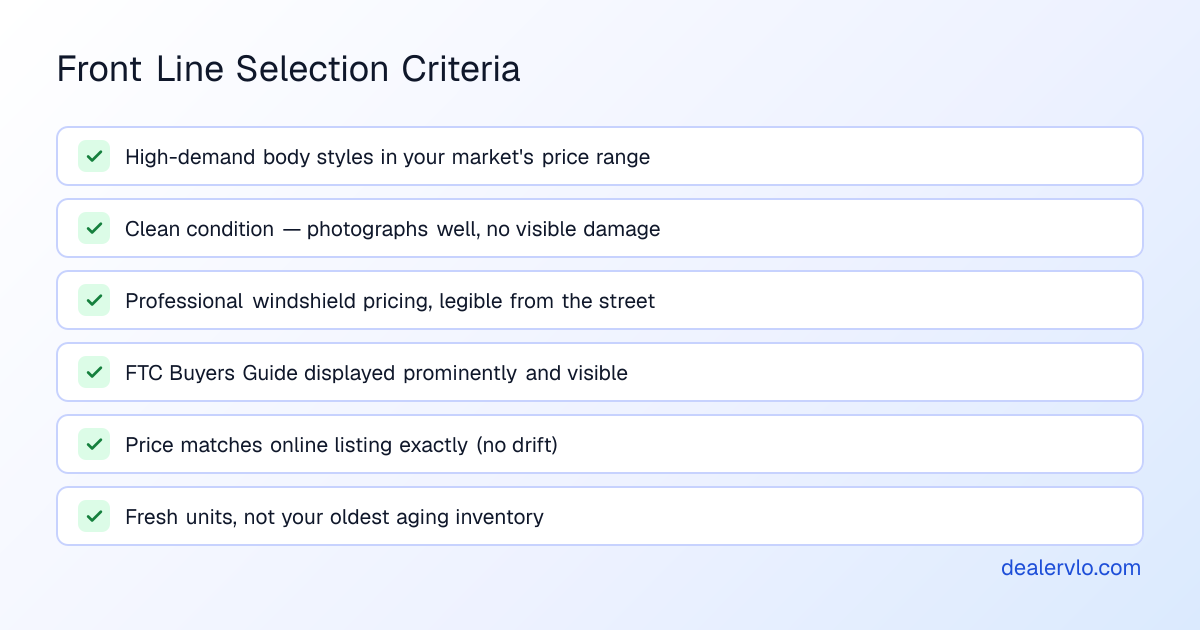
The front line is your first impression. Make it count with cars people want, prices they can read, and compliance paperwork they can see.
## How to group the rest of your inventory
Once the front line is set, the rest of your lot should be arranged so a walk-in can browse without asking for help. The two most effective groupings are by price band and by body style — choose whichever fits your space and your inventory mix.
Price bands work well for small lots where customers shop with a budget in mind. Group cars into brackets: under $10,000, $10,000–$15,000, $15,000–$20,000, and over $20,000. A customer who walks in with $12,000 to spend can see every option in their range without wandering through cars they can't afford. This also keeps your windshield pricing consistent within each row, which reinforces trust.
Body style grouping works when you carry a balanced mix. Put sedans together, SUVs and crossovers together, trucks together. This appeals to customers who know what they want but are comparing models — they can walk one row and see every SUV you've got, then decide. It also makes it easier for you to talk about trade-offs: a customer looking at a Rogue can see the CR-V and the Equinox three spots down.
Keep customer parking and the path to your office clear and obvious. If a walk-in has to weave through inventory to find the door, they'll leave. Designate a few spots near the entrance as customer parking with a simple sign — "Customer Parking" or "Visitors Welcome Here" — and make sure the walkway is wide enough for two people. Some jurisdictions require separate, marked areas for vehicles being repaired, vehicles offered for sale, and customer parking; check your local zoning rules before you paint lines or hang signs.
Keep inventory that's not for sale — cars in recon, units awaiting wholesale pickup, or vehicles being held for a pending deal — in a separate area, preferably out of sight from the street. If your lot layout makes that impossible, mark the section clearly so walk-ins don't waste time (and credibility) looking at cars they can't buy. Mixing for-sale inventory with wholesale junk or broken-down projects signals disorganization.
DealerVLO tracks days in inventory on every car and flags units that have aged past 60 days with a dashboard count. Pull that list each week to decide which cars should stay grouped where they are and which ones need to move — either forward to a higher-visibility spot or off the lot entirely before they cost you more in holding time and depreciation.
## Windshield pricing that matches your website
Consistency between your windshield price and your online price is the simplest way to build trust — and the fastest way to lose it when they don't match. A customer who sees one price on [CarGurus](/blog/is-cargurus-worth-it-for-dealers) or your website and then finds a different number on the windshield assumes you're playing games, and they leave.
Use professional windshield pricing stickers, not hand-written numbers or masking-tape corrections. Vinyl pricers are cheap, legible from the street, and they look like you run a real business. Faded or corrected prices signal that the car has been sitting, which makes customers wonder what's wrong with it.
Update both places at the same time. When you reprice a car in your system, print a fresh windshield sticker before you walk out to the lot. DealerVLO's [syndication feeds](/guide/connect-inventory-autotrader-cars-com) and website read the same internet price or asking price from each vehicle's record, so the online listings update with the next daily feed. If you change the sticker without updating the system, the drift starts immediately.
The same rule applies to your onsite window sticker. DealerVLO prints a one-page sticker from each vehicle's page showing the online price (or "See salesperson" if no price is set), mileage, specs, stock number, VIN, equipment, description and your dealership's contact details. When a default doc fee is set in Settings, the footer notes that the price excludes tax, title, registration and that documentation fee; if you've toggled the setting to include the doc fee in your advertised prices, the footer says the price includes the documentation fee and excludes tax, title and registration. The wording isn't editable, but it's consistent — which is what matters.
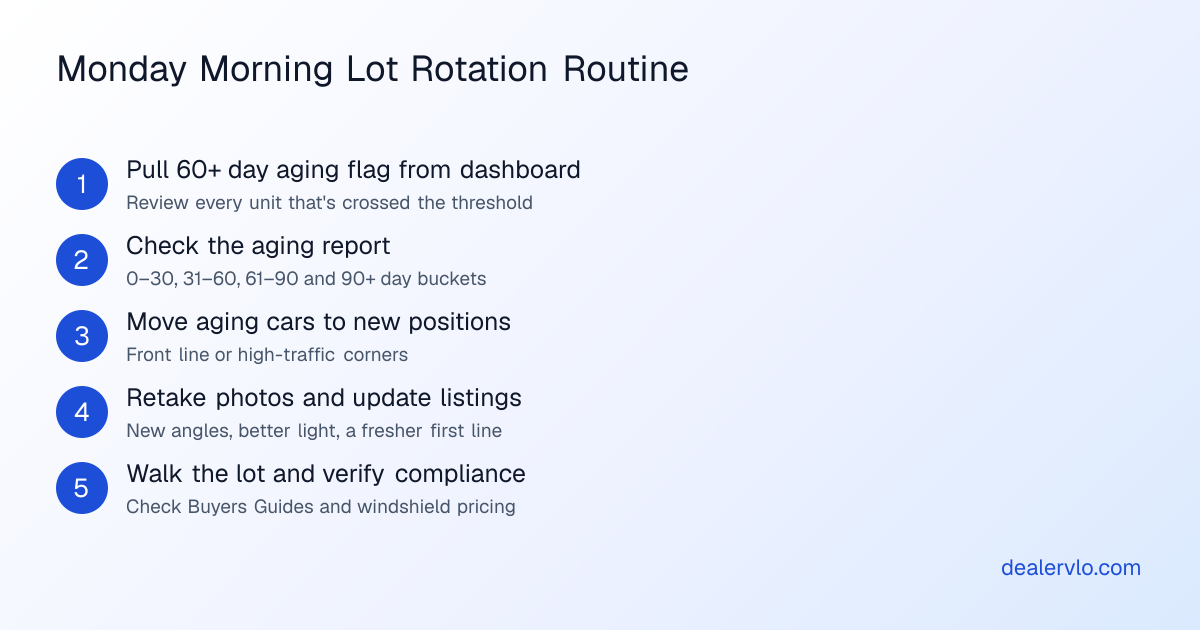
Walk the lot every morning and check that every windshield price is legible, that the Buyers Guide is visible, and that the stickers match your system. This takes ten minutes and catches the problems before a customer does. For a broader daily checklist, see [the used car dealer daily routine](/blog/used-car-dealer-daily-routine).
## When to rotate a car — before you cut its price
Rotation is the most underused tool on a small lot. Moving a car's physical position, refreshing its photos and updating its listing can restart interest without touching the price — but most dealers skip straight to a markdown because it feels faster. The result is that you leave money on the table before you've tried anything else.
Pull your aging list every Monday. DealerVLO shows days in inventory on every vehicle and flags units that have aged 60 or more days in the dashboard "Needs attention" count. Sort the list by days on lot and look for cars that have passed 30 or 45 days without serious interest. Those are your rotation candidates, not your front-line units that are selling fine.
Move the car's position first. If it's been in the back row for three weeks, bring it to the front line or to a higher-traffic corner of the lot. If it's been up front and hasn't moved, swap it with a fresher unit and put it in a side row where it's still visible but not competing for first-impression duty. A new position gives walk-ins a reason to look at it again — they'll assume it just came in.
Refresh the photos next. Retake the pictures in better light, from different angles, or after you've cleaned the car and touched up the detail. If the original photos were shot in the recon bay with clutter in the background, take new ones on the front line with a clean backdrop. DealerVLO's AI [photo enhance](/blog/car-photo-background-removal-for-dealers) cuts the car out and places it on a White, Dark or Showroom backdrop with a soft shadow and floor reflection — the car itself is never altered, just isolated — and the original is always kept. The enhanced photo is marked "Enhanced" and saved as a new image, so you can compare and decide which one leads. New photos give shoppers who scrolled past the old shots a reason to look again.
Update the description and refresh the listing. Rewrite the first line, add a detail you left out the first time, or call out a feature that matters in your market right now. Tweak the listing on every platform — CarGurus, [Cars.com](/guide/connect-inventory-autotrader-cars-com), your own website — so it reads as fresh, not stale.
Rotate aging inventory using days-on-lot tracking in DealerVLO: try it free for 14 days
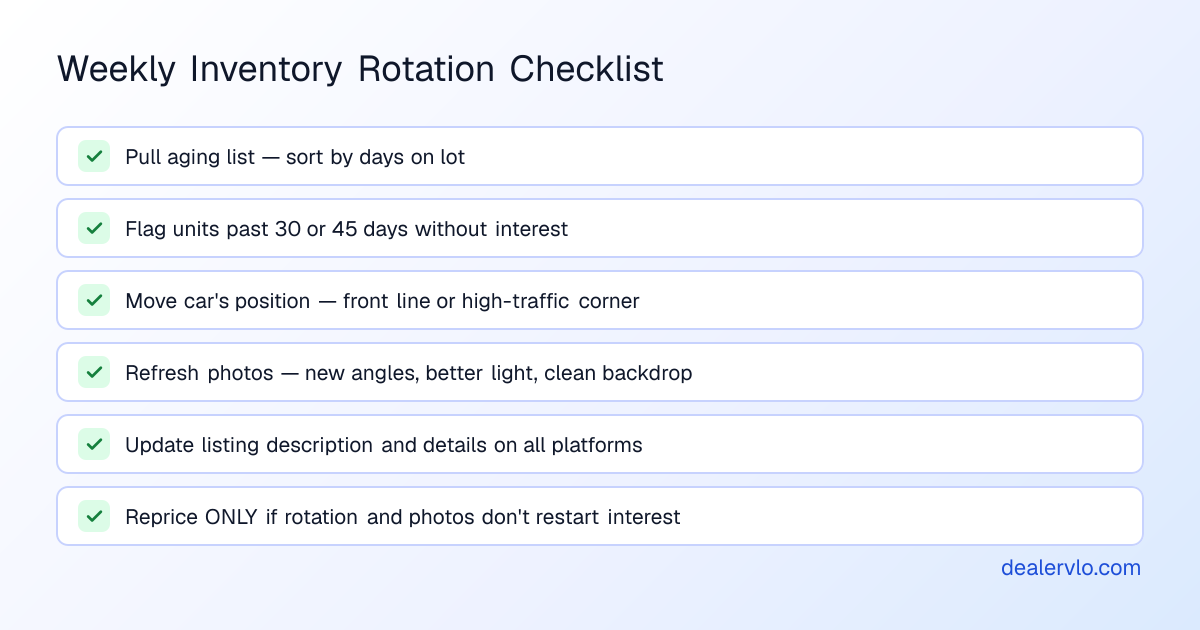
Only after you've moved the car, refreshed the photos and updated the listing should you consider a price cut. If none of that restarts interest, then repricing makes sense — but you've exhausted the free moves first. For a full framework on when to discount and by how much, see [inventory aging markdown strategy](/blog/inventory-aging-markdown-strategy) and [how to remerchandise aging inventory without discounting](/blog/remerchandise-aging-inventory-without-discounting).
DealerVLO does not mark prices down automatically or send aging alerts. The 60-day flag and the days-in-inventory number give you the data to decide when to act — the decision and the timing are yours.
## Small car lot setup ideas: making the most of limited space
If you're running a small lot with fifteen or twenty cars and limited street frontage, every square foot matters. The goal is to make the space feel organized and navigable, not cramped or chaotic.
Park perpendicular to the street when possible. Perpendicular parking shows more of each car's profile to drive-by traffic than parallel parking does, and it lets you fit more units in a smaller frontage. The trade-off is that you lose some depth, so this works best when you have a rectangular lot with good depth and narrow street frontage.
Use the corners and the ends of rows for high-visibility units. The first car someone sees when they pull in and the last car they see when they leave should be strong — clean, in-demand and well-priced. These positions get disproportionate attention, so don't waste them on rough units or wholesale candidates.
Create a clear entrance and a clear path to the office. If customers have to guess where to park or which door to approach, they'll leave. A simple "Entrance" sign, a customer parking area with two or three marked spots, and a visible office door with your hours posted go further than any merchandising trick.
Keep the lot clean. Sweep the pavement, pick up trash, and remove any cars that aren't for sale. A cluttered lot signals that you don't care about the details — and if you don't care about the lot, customers assume you don't care about the cars. This is free and it's the easiest way to separate yourself from the competition.
For dealers just starting out or setting up their first lot, see [how to start a used car dealership](/blog/how-to-start-used-car-dealership) for the full licensing, zoning and setup checklist.
## Track aging inventory and rotation in one system
The rotation routine only works if you can see which cars need it. Spreadsheets fall behind, memory fails, and by the time you notice a car has been sitting for 60 days, you've already lost a month of opportunity.
DealerVLO shows days in inventory on every vehicle in your system, calculated from the date you added it. When a car crosses 60 days, it's flagged in the dashboard "Needs attention" count under "Units aged 60+ days." Pull that count every Monday morning and you'll know exactly which cars need to move, rephotograph or reprice this week.
The aging report buckets your inventory at 0–30, 31–60, 61–90 and 90+ days, so you can see your whole aging curve at a glance: which cars are fresh, which are getting old, and which have crossed into problem territory. Click through to a car's detail page and you'll see its cost, its reconditioning expenses line by line, its all-in cost, and how long it's been sitting — everything you need to decide whether to rotate, reprice or wholesale it.
The [FTC Buyers Guide](/blog/how-to-fill-out-ftc-buyers-guide) prints from each vehicle's page without starting a deal, so you can hang it the moment a car moves to the front line. The one-page window sticker prints alongside it, showing the price, mileage, specs, stock number, VIN, equipment and your dealership's contact details. When the car is live on your website, a QR code to the car's page appears on the sticker so a walk-in can pull up the listing and see more photos on the spot.
The [dealer website](/used-car-dealer-software) is included, and inventory posts to it automatically. Listing feeds to CarGurus, Cars.com and Autotrader go out once a day, so when you update a price or mark a car sold, the syndication sites reflect it with the next feed. The website and the feeds read the same price field — internet price, or asking price if none is set — so windshield pricing and online pricing stay aligned as long as you update the system and reprint the sticker together.
DealerVLO runs in a browser with no software to install, and it's $29 a month flat with unlimited users. You get a 14-day free trial, and you can cancel anytime. Every car you add and every price change you make shows up on your website right away, and on the listing sites with the next daily feed.
## Zoning, signage and local display rules
Zoning, signage size and setback requirements are usually set by your city or county, and your state's dealer licensing rules may add requirements for the display lot and office. Before you paint lines, hang signs or reconfigure your lot, check with your local municipality and your state dealer licensing agency to confirm what's allowed.
Some jurisdictions require separate, marked areas for vehicles offered for sale, vehicles being repaired, and customer parking. The specifics — whether you need painted lines, how many customer parking spots you must provide, how far inventory can sit from the property line, and how large your signage can be — vary by location.
The safest approach is to call your city's zoning office or planning department before you make changes. Ask for the zoning code that applies to used car dealers, any signage ordinances, and whether a site plan approval or inspection is required. If you're setting up a new lot, see [how to start a used car dealership](/blog/how-to-start-used-car-dealership) for the broader licensing and location checklist.
This isn't legal advice, and zoning rules change. Confirm your local requirements before you invest in signs, pavement or lot improvements — an unapproved layout can delay your opening or cost you a variance hearing.
## Frequently asked questions
### What cars should go on the front line of a used car lot?
Put high-demand units in the price range your market buys most, vehicles that photograph well and show clean, and cars with visible, consistent windshield pricing. The front line is not for your oldest inventory — it's for the cars that pull someone in and represent the quality of the rest of your stock. Rotate fresh units to the front line as they arrive, and move aging cars to the side or back rows.
### How should I arrange cars on a small lot with limited space?
Group inventory by price band or by body style so walk-ins can browse without asking for help. Keep customer parking and the path to your office clear and obvious. Park perpendicular to the street when possible to show more of each car's profile to drive-by traffic. Use the corners and the ends of rows for high-visibility units, and keep cars that aren't for sale — recon, wholesale or pending deals — out of sight or clearly marked.
### How often should I rotate cars on the lot?
Pull your aging list every Monday and look for cars that have passed 30 or 45 days without serious interest. Move those cars to a new position on the lot, refresh their photos, and update their listings before you consider a price cut. A new position and new photos can restart interest without touching the price. Units that cross 60 days should either be rotated aggressively or wholesaled before they cost you more in holding time and depreciation.
### Do windshield prices have to match online prices?
Yes. A customer who sees one price on your website and a different number on the windshield assumes you're playing games, and they leave. Update both places at the same time: when you reprice a car in your system, print a fresh windshield sticker before you walk out to the lot. Use professional vinyl pricers, not hand-written numbers, and walk the lot every morning to check that every sticker is legible and matches your system.
### What are the zoning rules for used car lot layout?
Zoning, signage size and setback requirements are usually set by your city or county, and your state's dealer licensing rules may add requirements for the display lot and office. Some jurisdictions require separate, marked areas for vehicles offered for sale, vehicles being repaired, and customer parking. Check with your local zoning office or planning department before you paint lines, hang signs or reconfigure your lot to confirm what's allowed.
### How do I know which cars are aging and need to be moved or repriced?
Track days in inventory on every car and flag units that have aged past 60 days. Pull that list each week to decide which cars should move to a higher-visibility spot, which need fresh photos and updated listings, and which should be wholesaled. Sort your inventory by days on lot so you can see your entire aging curve at a glance and act before a car crosses into problem territory.
## Bottom line
Your physical lot is the first — and often the only — impression a drive-by gets before they decide to stop or keep driving. The cars you put on the front line, the way you group the rest of your inventory, the clarity of your windshield pricing, and your rotation routine all signal whether you run a professional operation or a distressed one. This isn't about having the biggest space or the newest cars — it's about arranging what you've got so a walk-in can shop, compare and trust that the price on the glass matches the one online.
Move a car's position and refresh its photos before you cut its price. Use days-in-inventory data to decide which cars need attention each week, and walk the lot every morning to check that every Buyers Guide is visible and every windshield sticker matches your system. The dealers who turn inventory consistently aren't the ones with the best location — they're the ones with a repeatable weekly cadence and the system to support it.
Run your lot on DealerVLO and track every car's days on lot: start your free 14-day trial
---
## FAQ
### What cars should go on the front line of a used car lot?
Put high-demand units in the price range your market buys most, vehicles that photograph well and show clean, and cars with visible, consistent windshield pricing. The front line is not for your oldest inventory — it's for the cars that pull someone in and represent the quality of the rest of your stock. Rotate fresh units to the front line as they arrive, and move aging cars to the side or back rows.
### How should I arrange cars on a small lot with limited space?
Group inventory by price band or by body style so walk-ins can browse without asking for help. Keep customer parking and the path to your office clear and obvious. Park perpendicular to the street when possible to show more of each car's profile to drive-by traffic. Use the corners and the ends of rows for high-visibility units, and keep cars that aren't for sale — recon, wholesale or pending deals — out of sight or clearly marked.
### How often should I rotate cars on the lot?
Pull your aging list every Monday and look for cars that have passed 30 or 45 days without serious interest. Move those cars to a new position on the lot, refresh their photos, and update their listings before you consider a price cut. A new position and new photos can restart interest without touching the price. Units that cross 60 days should either be rotated aggressively or wholesaled before they cost you more in holding time and depreciation.
### Do windshield prices have to match online prices?
Yes. A customer who sees one price on your website and a different number on the windshield assumes you're playing games, and they leave. Update both places at the same time: when you reprice a car in your system, print a fresh windshield sticker before you walk out to the lot. Use professional vinyl pricers, not hand-written numbers, and walk the lot every morning to check that every sticker is legible and matches your system.
### What are the zoning rules for used car lot layout?
Zoning, signage size and setback requirements are usually set by your city or county, and your state's dealer licensing rules may add requirements for the display lot and office. Some jurisdictions require separate, marked areas for vehicles offered for sale, vehicles being repaired, and customer parking. Check with your local zoning office or planning department before you paint lines, hang signs or reconfigure your lot to confirm what's allowed.
### How do I know which cars are aging and need to be moved or repriced?
Track days in inventory on every car and flag units that have aged past 60 days. Pull that list each week to decide which cars should move to a higher-visibility spot, which need fresh photos and updated listings, and which should be wholesaled. Sort your inventory by days on lot so you can see your entire aging curve at a glance and act before a car crosses into problem territory.