# Switching from DealerCenter: What to Export, What Moves, and How to Cut Over
> A practical playbook for dealers leaving DealerCenter — what to export, what moves by CSV, contract terms to check, and a cut-over checklist.
- Source: https://www.dealervlo.com/blog/switching-from-dealercenter
- Published: 2026-10-01
- Updated: 2026-10-01
- Author: Chris Abouraad
- Tags: dealer software, migration, DealerCenter, inventory management, data export
---
## What switching from DealerCenter actually looks like
If you've been running on DealerCenter and weighing a move, the biggest question is disruption. You still have cars to sell, payments to collect, and title work to finish.
The good news: inventory and customer records move cleanly. The harder truth: past deals, signed contracts, and buy-here-pay-here loan histories don't port into most systems. You need a plan that keeps historical data accessible while you cut over to the new system for everything going forward.
**Legal note**: This article covers operational migration steps, not contract interpretation. Cancellation notice periods, early-termination fees, and data-retention policies vary by agreement. Review your DealerCenter contract and confirm all terms in writing before you begin.
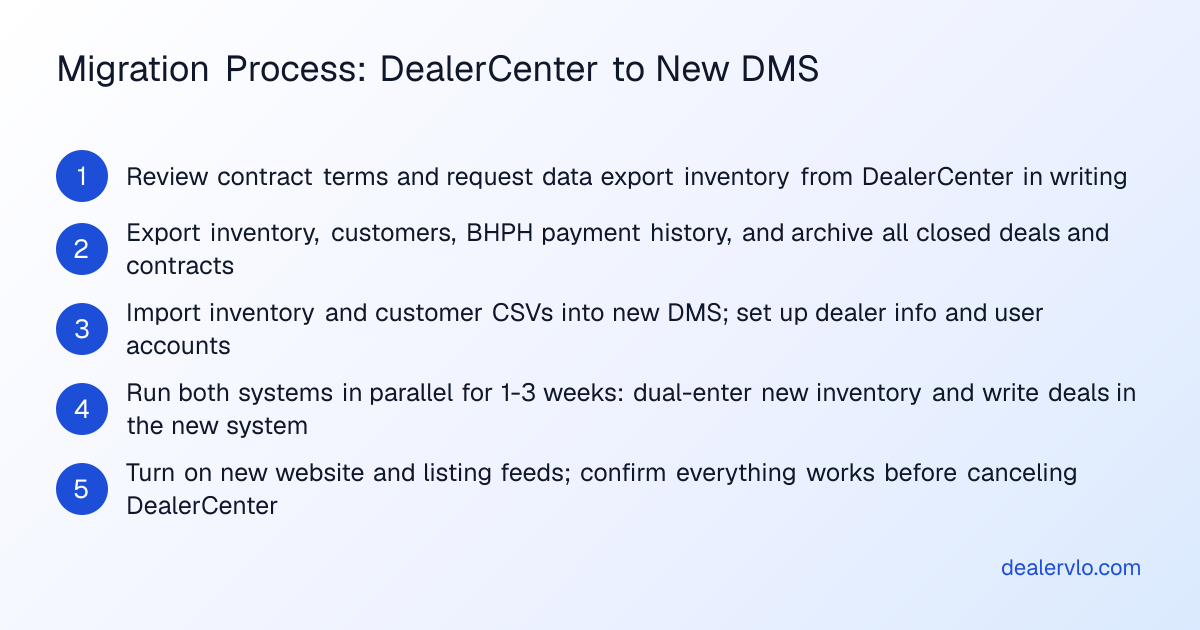
## Check your contract terms first
The terms in your signed agreement control — and you need to know them before you plan a migration date.
Pull your DealerCenter contract or contact DealerCenter directly, in writing, and get clear answers:
- **What notice period is required to cancel?** Some agreements require 30, 60, or 90 days' written notice.
- **Are there early-termination fees?** If you're inside a term commitment, confirm whether you owe a penalty.
- **How long does DealerCenter retain your data after cancellation?**
- **What records can you export, and in what formats?**
Get it in an email or PDF. A phone conversation isn't enough.
## What you can export from DealerCenter
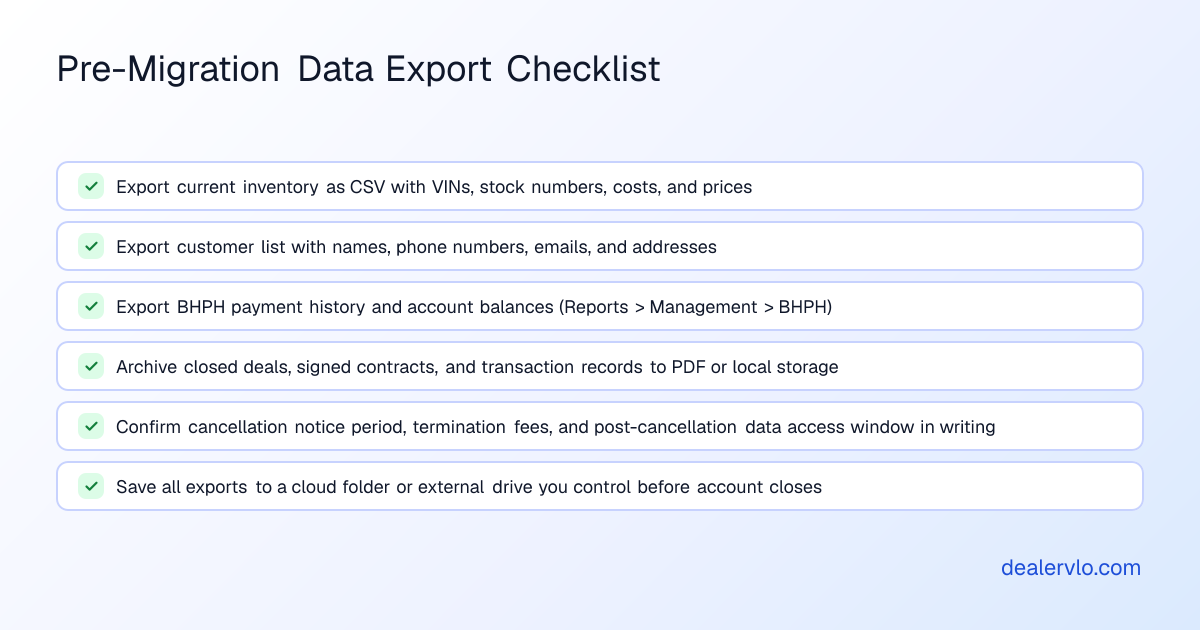
**Inventory**: DealerCenter's support documentation mentions the ability to export and import listings. Generate a sample export to see what's included — at minimum, expect VINs, stock numbers, year/make/model, mileage, asking price, and purchase cost.
**BHPH payment history**: DealerCenter lets you export payment history as a CSV file. There's also a dedicated "Export BHPH Account" report under Reports > Management > BHPH. This is critical if you're running buy-here-pay-here — you'll need that history for your own records, tax filings, and any future collections or charge-off documentation.
**Customer data**: Contact DealerCenter support and ask for a CSV export of your customer list with names, phone numbers, emails, addresses, and any notes.
**Deals and signed contracts**: DealerCenter does not advertise a bulk deal export. You may be able to export a transaction list or print individual deal jackets to PDF, but expect this to be manual.
Move your inventory into DealerVLO in one CSV upload
## What moves into DealerVLO — and what doesn't
DealerVLO imports two record types by CSV: **inventory** and **customer contacts**. Each file can hold up to 500 rows, and DealerVLO recognizes common column names automatically. Duplicate VINs and emails are skipped.
**Inventory**: Export your inventory from DealerCenter as a CSV. Confirm it includes VIN, stock number, year, make, model, mileage, purchase cost, and asking price. DealerVLO decodes the VIN automatically and fills in missing fields. Once imported, each car appears in your inventory list with photos and recon costs ready to add, days on the lot counting from the date you acquired it, and all-in cost and margin calculated automatically.
**Customers**: Upload your customer CSV and contacts are in the system, ready to tag, search, and pull up when a repeat buyer calls.
**What does NOT import**: DealerVLO does not import past deals, signed contracts, deal documents, or buy-here-pay-here loan balances and payment histories. If you have active BHPH accounts in DealerCenter, keep a read-only login, export the data to a spreadsheet, or print each account to PDF before you lose access. Archive those records outside DealerCenter — you'll need them for audits, warranty claims, tax filings, and any buyer who calls later with a title question.
## Running both systems during the overlap
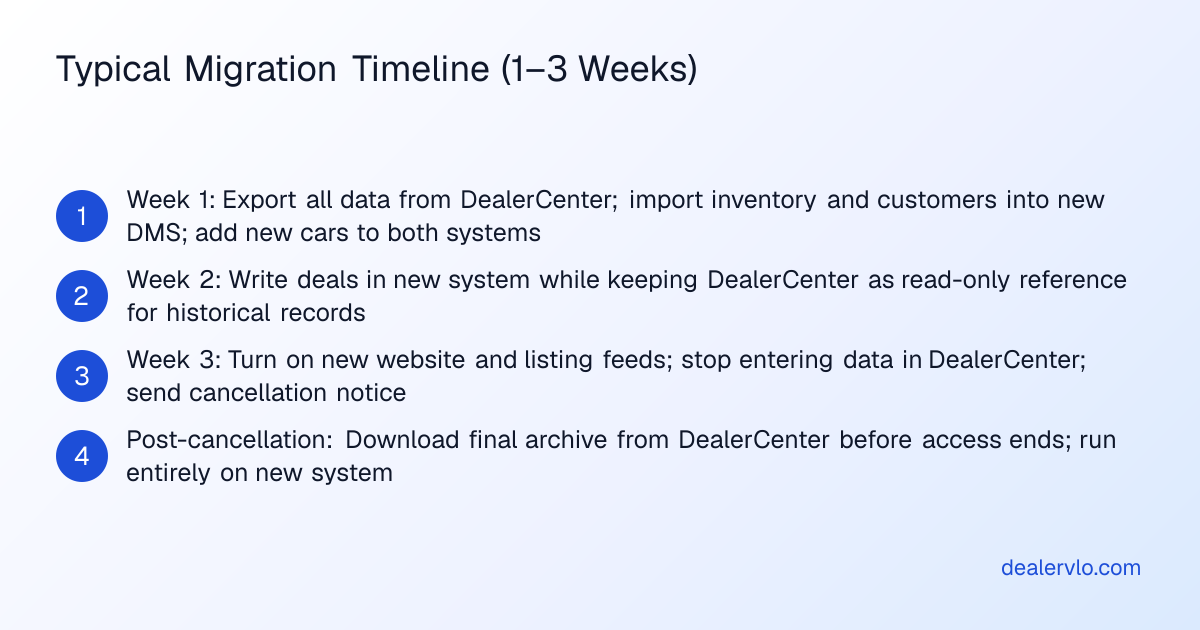
Plan for a brief overlap period — typically one to three weeks — when you're maintaining both DealerCenter and DealerVLO in parallel.
**Week one: add new inventory to both systems**. When you buy a car, enter it in DealerCenter and also add it to DealerVLO. This builds confidence without risking a live deal. You'll see how VIN decode works, how photos upload, and how the pricing suggestion compares to what you'd price it at on your own.
**Week two: write deals in DealerVLO**. When you sell a car, build the deal in DealerVLO. The deal jacket computes the trade equity, totals, payment, and front- and back-end gross as you enter it. DealerVLO fills your state's title application and the FTC Buyers Guide from the deal data — no re-typing. You'll still have DealerCenter open to reference old deals or pull a BHPH payment history, but new transactions happen in the new system.
DealerVLO auto-fills title forms for all 50 states. In states where the DMV issues forms through a portal, DealerVLO generates a worksheet with every field and value from the deal, so you can transcribe it accurately or submit it through the state's system.
**Week three: turn on your new website and listing feeds**. Once your inventory is in DealerVLO and you've written at least one deal, turn on your DealerVLO website. Set up your listing feeds to CarGurus, Cars.com, and Autotrader. For Facebook Marketplace, DealerVLO gives you a one-click download kit for each car because Meta ended automated feeds for dealers in 2021.
By the end of week three, DealerCenter is a read-only archive. You're running on DealerVLO.
## The cut-over checklist
1. **Export everything from DealerCenter** before you cancel. Inventory, customers, BHPH payment histories, and any closed deals or signed contracts you'll need for taxes, audits, or title work.
2. **Import inventory and customers into DealerVLO**. Upload your CSVs. DealerVLO decodes the VINs and skips duplicates. Spot-check a few entries to confirm costs, prices, and contact details carried over correctly.
3. **Set up your state forms and user accounts**. Add your dealership name, address, dealer license number, and owner details in DealerVLO's settings. Invite your sales team — DealerVLO is $29 a month flat for unlimited users.
4. **Turn on your DealerVLO website**. Go to Settings > Website and turn on your site. Your inventory appears automatically.
5. **Enroll with CarGurus, Cars.com, and Autotrader** if you haven't already. Turn on each feed in DealerVLO's settings and your cars go live within 24 hours.
6. **Write your first deal in DealerVLO**. Walk through the deal jacket, add the vehicle, the buyer, any trade-in, financing terms, and F&I products. DealerVLO calculates the totals and gross, fills your state's title form, and generates the Buyers Guide.
7. **Cancel DealerCenter** once you've written a few deals in DealerVLO. Follow the cancellation process in your contract — written notice, to the right email address, with the required lead time.
8. **Download one final archive from DealerCenter** before your access ends.
Start a free 14-day trial of DealerVLO
## What the move costs in time
A realistic timeline, assuming you're a small lot moving 15–30 cars of inventory and a few hundred customer records:
- **Contract review and export requests**: 1–2 hours.
- **Export and archive**: 2–4 hours. If you have a large BHPH portfolio or years of closed deals, budget more time.
- **Import into DealerVLO**: 30 minutes.
- **Setup and first deal**: 1–2 hours.
Total hands-on time: about 5–8 hours spread over three weeks. By week two, the new system is faster than the old one.
## When DealerCenter is the better fit
That install base means deep integrations, established support channels, and a feature set built over two decades.
If your lot is already heavily invested in DealerCenter's module ecosystem and everything works the way you need it to, the cost and disruption of switching may outweigh the benefit.
If you need a feature DealerVLO doesn't offer — SMS messaging, a phone system built into the DMS, or a direct connection to QuickBooks — DealerCenter's add-on catalog may have it. DealerVLO does not send texts or call customers, and it does not sync with outside accounting software.
## Your first week on DealerVLO
**Day one**: Add new inventory. Upload photos, let the AI photo enhance tool put each shot on a clean backdrop if you want, and enter recon costs line by line — DealerVLO rolls them into the car's all-in cost and margin automatically.
**Day two**: Review your dashboard. DealerVLO shows total inventory value, how many units are aged 60+ days, and a count of open leads. Click into the aging inventory view and decide whether any cars need a price cut or a wholesale buyer.
**Day three**: Write a deal. Open a new deal jacket, select the car, add the buyer's name and address, enter any trade-in and financing terms, and the system calculates the totals and gross. DealerVLO fills your state's title application and the Buyers Guide.
**Day four**: Process a BHPH payment. DealerVLO's payment tracker shows every active account, the balance, next due date, and payment history. When a customer pays, you log the payment and the balance updates.
**Day five**: Check your reports. The sales report shows front- and back-end gross per deal, and a salesperson leaderboard if you have a team. The inventory aging report buckets your stock into 0–30, 31–60, 61–90, and 90+ days.
## The data-security angle
DealerVLO's online credit applications are encrypted, only owners, admins, and finance managers can open them, every view is logged, and they're deleted automatically after 25 months. The application doesn't collect Social Security numbers online.
## Frequently asked questions
### How do I export my inventory and customer list from DealerCenter?
DealerCenter's support documentation mentions the ability to export inventory listings, and you can export BHPH payment history as a CSV under Reports > Management > BHPH. For customer records, contact DealerCenter support and request a bulk CSV export.
### Can I import my past deals and BHPH loan balances into DealerVLO?
No. DealerVLO imports inventory and customer contacts by CSV, but it does not import past deal records, signed contracts, or BHPH loan balances. Export those from DealerCenter before you cancel and keep that archive in a spreadsheet or PDF folder.
### How much notice does DealerCenter require to cancel?
The answer depends on your signed agreement. Pull your contract and look for the cancellation notice clause — it may require 30, 60, or 90 days' written notice.
### How long does the migration take if I'm switching to DealerVLO?
Plan for a one-to-three-week overlap period. The hands-on work — exporting data, importing into DealerVLO, setting up your dealer info, and writing your first deal — takes about 5 to 8 hours total, spread over that period.
### What happens to my BHPH payment history when I switch systems?
Your BHPH payment history stays in DealerCenter's records unless you export it before your account closes. Download that data under Reports > Management > BHPH and save it in a spreadsheet or cloud folder — you'll need it for tax filings, collections, and charge-offs.
### When does it make sense to stay on DealerCenter instead of switching?
If you're already using several of DealerCenter's add-on modules and everything works well, the cost and disruption of switching may not be worth it. If you need capabilities DealerVLO doesn't offer, like SMS messaging, a phone system, or a QuickBooks connection, DealerCenter or another platform may be a better fit.
## Bottom line
Switching from DealerCenter takes planning, but it's not a month-long project. Export your data early, confirm your contract terms in writing, and plan for a short overlap period. Inventory and customers move cleanly by CSV; past deals and BHPH loan histories don't, so archive those records before you cancel.
DealerVLO is $29 a month, flat — no per-user fees, no module add-ons, and a 14-day free trial that includes everything. Start your trial at [/signup](/signup), upload your inventory CSV, and write a test deal.
---
## FAQ
### How do I export my inventory and customer list from DealerCenter?
DealerCenter's support documentation mentions the ability to export inventory listings, and you can export BHPH payment history as a CSV under Reports > Management > BHPH. For customer records, contact DealerCenter support and request a bulk CSV export.
### Can I import my past deals and BHPH loan balances into DealerVLO?
No. DealerVLO imports inventory and customer contacts by CSV, but it does not import past deal records, signed contracts, or BHPH loan balances. Export those from DealerCenter before you cancel and keep that archive in a spreadsheet or PDF folder.
### How much notice does DealerCenter require to cancel?
The answer depends on your signed agreement. Pull your contract and look for the cancellation notice clause — it may require 30, 60, or 90 days' written notice.
### How long does the migration take if I'm switching to DealerVLO?
Plan for a one-to-three-week overlap period. The hands-on work — exporting data, importing into DealerVLO, setting up your dealer info, and writing your first deal — takes about 5 to 8 hours total, spread over that period.
### What happens to my BHPH payment history when I switch systems?
Your BHPH payment history stays in DealerCenter's records unless you export it before your account closes. Download that data under Reports > Management > BHPH and save it in a spreadsheet or cloud folder — you'll need it for tax filings, collections, and charge-offs.
### When does it make sense to stay on DealerCenter instead of switching?
If you're already using several of DealerCenter's add-on modules and everything works well, the cost and disruption of switching may not be worth it. If you need capabilities DealerVLO doesn't offer, like SMS messaging, a phone system, or a QuickBooks connection, DealerCenter or another platform may be a better fit.