# Inventory Aging Automation: How to Set Up Alerts & Markdown Rules That Turn Stock 30% Faster
> Set up automated age-triggered pricing rules and alerts in vAuto, DealersLink, or your DMS to turn stock faster and cut carrying costs.
- Source: https://www.dealervlo.com/blog/inventory-aging-automation-alerts-markdown-rules
- Published: 2026-09-24
- Updated: 2026-09-24
- Author: Chris Abouraad
- Tags: inventory management, pricing automation, DMS
---
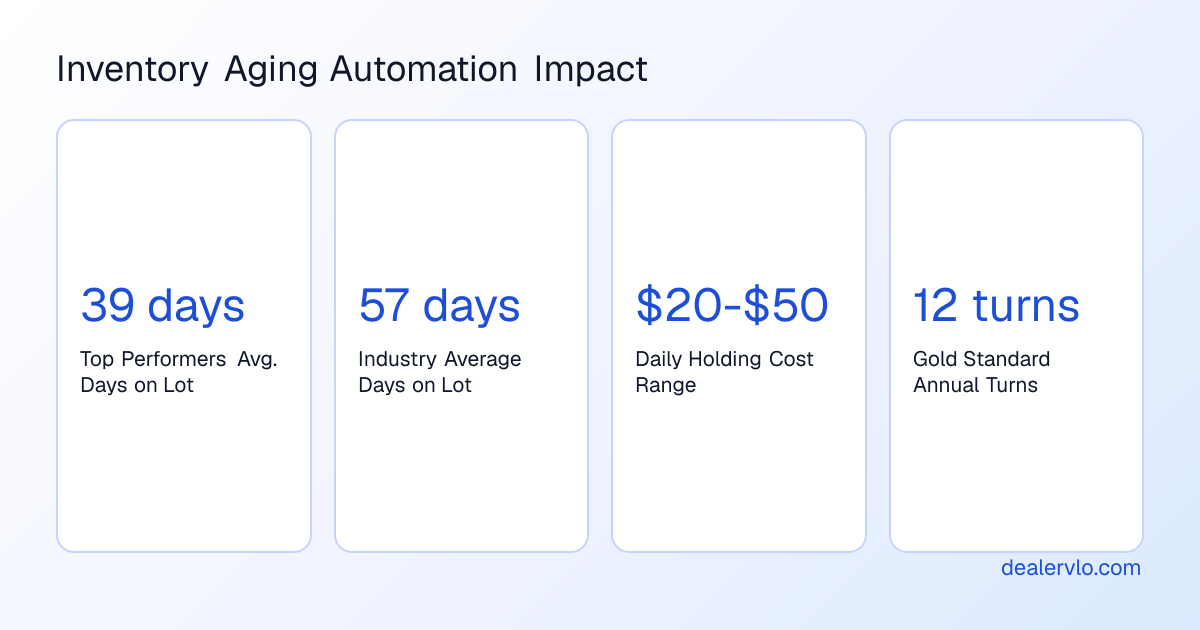
If you're still walking the lot every Monday to eyeball which units are getting old, you're bleeding money. Inventory aging automation means configuring your DMS or pricing software to trigger markdown rules, alerts, and workflow actions the moment a unit crosses day 30, day 45, or whatever threshold you set — no manager memory required. The setup takes an afternoon; the payoff is measurable. Dealers who automate aging workflows average 39 days on lot versus the industry average of 57 days, and that 18-day gap represents between $115,200 and $345,600 in unnecessary annual carrying costs for a 200-unit lot.
This isn't about *strategy* — we've covered [inventory aging markdown strategy](/blog/inventory-aging-markdown-strategy) elsewhere. This is about the software setup: which platforms can actually automate it, what rules to configure first, and how to wire age-triggered pricing into your daily workflow so that aged inventory gets actioned instead of ignored.
**Compliance note:** This article discusses operational software setup, not tax or financial advice. Confirm your floor-plan agreement terms and state disclosure requirements with your lender and attorney before implementing automated repricing rules that affect financed inventory.
## Why inventory aging automation matters in 2026
Carrying costs have spiked and values are dropping faster than they did two years ago. In Q2 2025, net floor-plan expense per vehicle rose by about 39% — roughly $139 more per unit — as higher interest rates and slower turnover pushed up the cost of holding inventory. Used-car values are depreciating faster than they did in 2023–2024, which means gross erodes earlier in the aging cycle, and floor-plan interest rates remain higher than pre-2020 levels. A common floor-plan structure runs about 27 cents per $1,000 financed per day, so a $10,000 unit costs roughly $2.70 per day, or about $162 over 60 days. Industry estimates put total holding costs — interest, lot overhead, depreciation — at $20 to $50 per unit per day for used inventory.
The gap between average dealers and high performers has widened. The top-performing 25% of dealerships average 39 days to sale; the rest sit at 57 days. The gold standard [inventory turn rate](/blog/inventory-turn-rate-used-car-dealers) is 12 turns per year (about 30 days' supply), but the current U.S. average is roughly every 63 days — a ratio of about 5.8 turns. Top-performing dealers on some platforms average 22 annual turns. The difference isn't buying better or pricing smarter at the outset; it's having a system that forces disposition decisions before a unit crosses day 45.
Inventory aging automation doesn't just send you an email when a car hits day 60. It triggers price adjustments, pushes the unit to the top of your website feed, escalates alerts to the GM if no action is taken within 48 hours, and — in the best systems — queues a wholesale appraisal or auction consignment automatically. The difference between awareness and management is whether someone has to *remember* to do something or the system forces the decision.
## What real inventory aging automation looks like
Most DMS platforms will *report* aging. That's table stakes. True automation means conditional workflows: *if* this VIN crosses day 30 *and* price-to-market is above 105%, *then* reduce ask by 3%, update all syndication feeds, and send a Slack alert to the used-car manager. If no action is logged within 72 hours, escalate to the GM and flag the unit for wholesale evaluation.
The platforms that can actually do this fall into three buckets: dedicated pricing engines (vAuto), inventory workflow automation tools (US Tech Automations, DealersLink), and traditional DMS/CRM systems with aging modules bolted on (DealerSocket, CDK Elead, VinSolutions). They are not interchangeable.
### vAuto: best market intelligence, but still manager-dependent
vAuto's Conquest solution lets you create automated pricing rules calibrated to adjust prices as vehicles age and their Market Days Supply changes. It offers the deepest competitive set analysis and longest historical pricing data — 36-plus months — which makes it the best tool for *deciding* what a unit should be priced at. But vAuto provides recommendations and alerts; it doesn't trigger multi-step action sequences automatically. It tells you what to do, but a manager still has to log in, review the alert, approve the markdown, and push the new price to your website and feeds. For a 50-unit lot with five or six units crossing thresholds every day, that's real friction.
vAuto's own operational guidance is to assess the merits of price changes as vehicles hit age-related triggers rather than making them automatically — the assessment should include the vehicle's competitive position, recent shopper activity, and other factors to determine if the time is right for a price adjustment. That's sound advice *if* you have the bandwidth to do that assessment every day. Most single-point dealers don't.
Pricing typically runs $1,500 to $2,500 per month, which is steep for a small lot but justifiable if you're moving 40-plus units a month and the market intelligence saves you from mispricing high-demand segments.
### US Tech Automations: workflow builder for multi-step escalation
US Tech Automations offers the most flexible workflow builder and the best escalation automation. It's a visual drag-and-drop interface where you design custom escalation chains specific to your dealership's management structure. A single-point used-car operation routes differently than a dealer group with a centralized inventory director, and the platform accommodates both without requiring custom development.
The system integrates across departments: aging alerts can be connected to service (did recon finish?), F&I (is the title clear?), and customer follow-up workflows (did we re-engage the three leads who test-drove this unit?). It offers the lowest total cost of ownership and the broadest DMS compatibility in the category.
The trade-off: it's not dealership-specific out of the box, so it requires configuration to match automotive workflows. It has no native market pricing intelligence — you'd integrate a third-party API from vAuto or a similar provider to get competitive pricing data. It's a newer entrant in the dealership space with a smaller automotive-specific customer base, which means fewer pre-built automotive templates than vAuto.
### DealersLink: automated reporting, limited conditional logic
DealersLink will set up automated inventory reporting for customers, building out the report to each dealer's needs with customized columns, options, and frequency. Dealers can configure a custom report and have it delivered by 8:00 a.m. every day. The platform integrates seamlessly with over 185 dealer-management systems, photo providers, and website providers, so data flows without manual export-import.
What it does well: consistent daily visibility into aging, broad compatibility, and hands-off report delivery. What it doesn't do: trigger actions automatically. You get the data; you still have to act on it. For dealers who want a daily aging snapshot without the complexity of workflow automation, it's a solid middle ground.
### DealerSocket, CDK Elead, VinSolutions: aging as a secondary feature
These CRM-first platforms offer aging alerts as a bundled feature. If you're already a DealerSocket or CDK customer, the aging module is probably included in your subscription. The advantage is native DMS integration — inventory data flows without API configuration. The disadvantages: no automated escalation, no automated pricing rules, limited customization of aging thresholds, and weekly digest email format instead of real-time alerts, which reduces urgency.
DealerSocket's aging alerts use fixed day counts regardless of vehicle segment or market demand — a luxury sedan and an economy crossover both get flagged at day 60, even though their optimal turn windows are very different. For a small lot that wants basic aging visibility and already pays for the platform, it's fine. For a dealer serious about automated disposition, it's not enough.
### ELVA DMS and other platforms
ELVA DMS provides real-time stock aging reports and automates alerts for vehicles approaching critical aging thresholds, helping dealerships make informed decisions on markdowns and promotions. Carketa integrates with 40-plus DMS providers, syncing VINs and pricing every 15 minutes for up-to-date dashboards, and offers AI-driven incremental repricing that adjusts prices by small percentages (less than 2%) early in the aging cycle to preserve gross while preventing fire-sale discounts at day 60.
If your current DMS has an aging module, start there — but confirm it can trigger *actions*, not just generate reports.
## How to configure age-triggered markdown rules
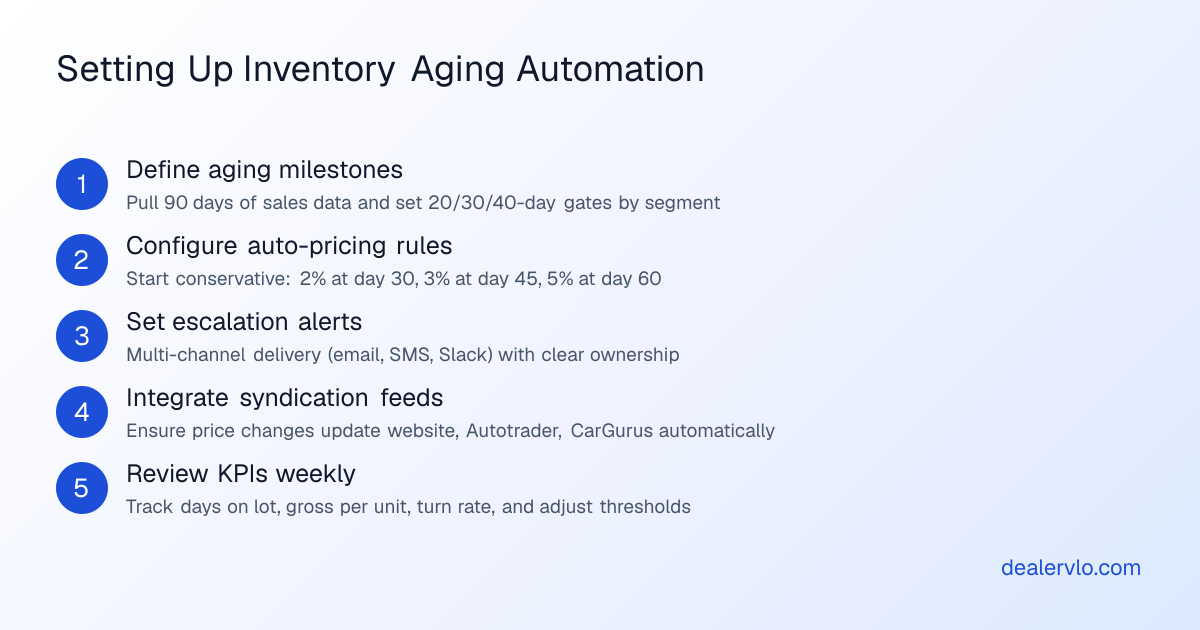
The most common mistake is trying to automate too much on day one. Start with one or two vehicles, test the workflow, then scale. Here's the setup sequence that works.
### Step 1: Define your aging thresholds
Pull your last 90 days of sales data from your DMS and calculate your true average days on lot. If it's above 30 days, you have significant room for improvement. The 30-60-90 day framework is outdated; optimal aging thresholds should be market-adjusted by vehicle segment. Luxury sedans and economy SUVs require different intervention timelines because their depreciation curves and Days Supply in your market are different.
A common tiered alert structure is 10 days (warning), 20 days (action), 30 days (escalation), with clear owners assigned for each alert. Some high-turn dealers use tighter gates: day 15, day 25, day 40. The right thresholds depend on your [inventory turn rate](/blog/inventory-turn-rate-used-car-dealers) and floor-plan costs. If you're paying $35 per day in total holding costs, every extra week costs you $245 per unit — that's real money on a $12,000 car with $1,200 gross.
Configure your system to flag these thresholds differently. Day 10 might be a passive dashboard indicator. Day 20 triggers an email to the used-car manager. Day 30 escalates to the GM and auto-generates a wholesale appraisal task. Day 45 triggers an automatic price drop if no manual action has been logged.
### Step 2: Set up automated pricing rules (start conservative)
Every vehicle should have a predefined aging schedule: if not sold by day 30, reduce by X percent; if not sold by day 45, reduce by Y percent; if not sold by day 60, consider wholesale or auction. Configure automatic price-drop rules at 60 and 90 days instead of relying on a manager to remember.
Start conservative. A 2% reduction at day 30, another 3% at day 45, and a 5% cut at day 60 is a reasonable baseline. AI-driven systems re-price incrementally — for example, –1.2% every 48 hours after day 20 — which preserves gross while preventing fire-sale discounts late in the cycle. Dealerships commonly use pricing software that monitors competitor listings and applies automated rules, such as reducing prices after 45-plus days of unsold inventory.
If your platform supports it, tie markdown triggers to price-to-market ratio, not just age. A unit priced at 110% of market at day 30 needs a bigger cut than one already at 98%. vAuto, Carketa, and similar platforms can layer these conditions; basic DMS aging reports cannot.
Test your rules on five to ten units before rolling them out across your inventory. Track what happens to Days on Lot, gross per unit, and turn rate over 30 days. If turns improve without gross collapse, expand the automation. If you're taking big back-end hits, tighten the thresholds or reduce the markdown percentages.
### Step 3: Configure escalation and multi-channel alerts
According to data from 2025, multi-channel alert delivery is the feature most correlated with high alert response rates. Email-only alerts get buried. Push them to Slack, SMS, or your DMS task manager as well. If your platform allows it, set escalation rules: if the assigned manager doesn't log an action within 48 hours, the alert escalates to the GM or owner.
One recommended approach: day 20 sends an email and a dashboard flag. Day 30 adds an SMS alert and creates a task in your DMS. Day 40 escalates to the GM if the unit is still on the lot with no documented disposition plan. The escalation workflow is what separates "aging awareness" from "aging management" — awareness (knowing that 28% of your inventory is over 60 days) does not reduce aging, but management (ensuring that every aged unit has a documented disposition plan acted upon within 48 hours) does.
Assign ownership clearly. If "everyone" is responsible for aged inventory, no one is. Tag each threshold alert with a specific user role: used-car manager for day 20, GM for day 40, buyer for wholesale evaluation at day 50.
### Step 4: Wire pricing changes into your syndication feeds
An automated markdown is worthless if it only updates your DMS and not your website, Autotrader, CarGurus, Facebook Marketplace, and everywhere else the car is listed. Most modern DMS platforms and inventory management tools push pricing updates to syndication partners automatically, but confirm this before you go live. [What is a vehicle inventory feed](/blog/what-is-a-vehicle-inventory-feed) explains the technical setup; the key point here is that your age-triggered pricing rule should update the feed, not just an internal database.
If you're running [automated dealer paperwork](/blog/automated-dealer-paperwork-by-state) or deal-jacket software like DealerVLO, make sure pricing changes sync to your deal-prep templates as well. You don't want your website showing $11,500 while your buyer's order still references the original $12,200 ask.
### Step 5: Review KPIs weekly and adjust thresholds
Set a recurring 15-minute meeting every Monday to review: average days on lot by segment, total units over your day-30 threshold, average gross on aged units sold in the past seven days, and total carrying costs on inventory over day 45. If the numbers are improving, your thresholds are working. If aged inventory is growing or gross is collapsing, adjust.
A platform genuinely built for this job should surface, at minimum: days in inventory by segment, expected turn versus actual turn, vehicle velocity and aging triggers tied to an automatic price review, price-to-market against current comparables, performance by make and model, and reconditioning-to-listing time. If your current tool doesn't show this, you're flying blind.
Most dealers find they can tighten thresholds after 60 to 90 days of automation. What felt aggressive — a 3% cut at day 25 — becomes normal once you see units moving faster and gross staying stable because you're not panic-selling at day 75.
## What to automate first if you're starting from zero
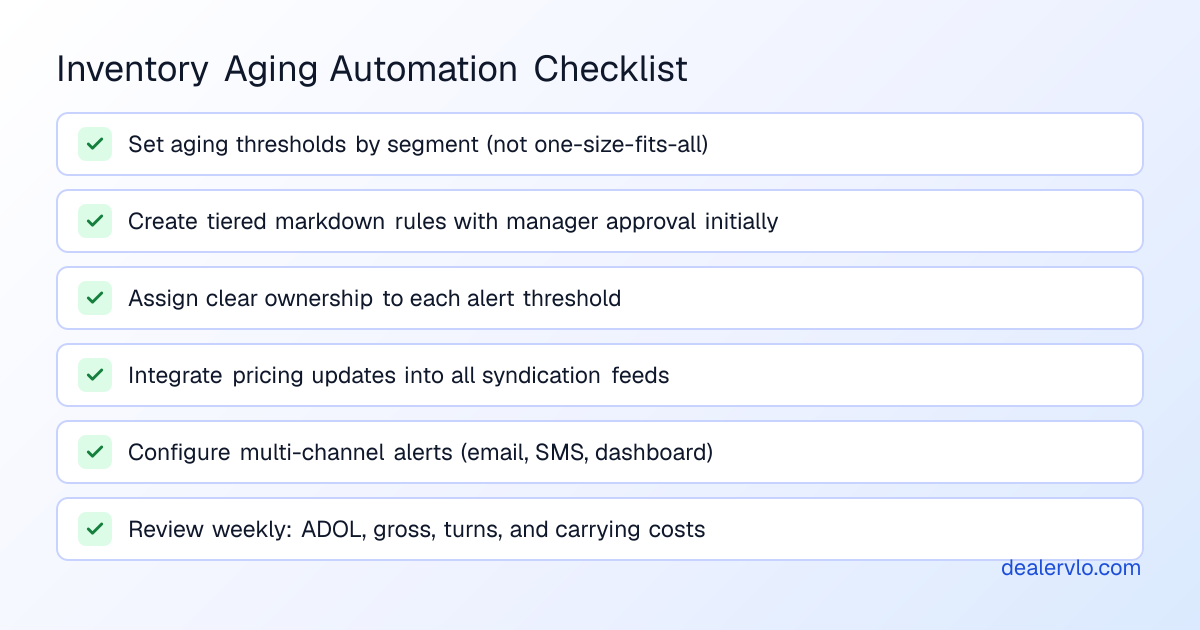
If you don't have *any* aging automation today, don't try to build the entire workflow in week one. Start here:
1. **Day-30 email alert.** Configure your DMS or a free tool like a Google Sheets script to flag any unit that crosses 30 days and email you the VIN, stock number, cost, current ask, and days on lot every morning. That's 90% of the value with 10% of the setup complexity.
2. **Price-to-market dashboard.** Use your pricing tool (vAuto, Black Book, Kelley Blue Book) to see which aged units are priced above market. Those are your first markdown candidates. [How to use MMR Black Book auction pricing](/blog/how-to-use-mmr-black-book-auction-pricing) walks through the lookups.
3. **One fixed markdown rule.** Pick one threshold — say, day 60 — and configure an automatic 5% price drop for any unit that crosses it with no logged activity. Make that the only automated action for the first month. Measure what happens.
4. **Weekly aged-inventory meeting.** Block 20 minutes every Monday. Pull the aged report, assign disposition decisions (re-price, wholesale, send to auction), and log them in your DMS. The meeting becomes shorter as automation takes over the flagging and escalation.
Once those four pieces are running smoothly, layer in day-15 and day-45 thresholds, add SMS escalation, integrate wholesale appraisal automation, and tighten the markdown percentages. But the core loop — flag it, price it, decide it — has to work manually before you can automate it reliably.
## Common mistakes that kill automation ROI
**Setting thresholds and forgetting them.** Your market changes, your [inventory mix](/blog/best-used-cars-to-stock-2026) changes, and your floor-plan rates change. A day-30 threshold that worked in March might be too slow in September when values are falling faster. Review and adjust quarterly at minimum.
**Automating markdowns without wholesaling aged units.** Repricing a 75-day unit from $13,500 to $11,200 doesn't help if it still doesn't sell. At some point the right move is wholesale or auction, not another markdown. Build that decision into your workflow: day 60 triggers a wholesale appraisal; day 75 triggers consignment to auction if appraisal comes back within $500 of your floor.
**Ignoring recon time in your aging calculation.** If a unit sits in the shop for 12 days waiting for a windshield, those 12 days count against your Days on Lot average but they're not *merchandising* days. Track reconditioning-to-listing time separately and adjust your thresholds accordingly. A [3-day recon workflow](/blog/recon-speed-3-day-workflow) keeps this from becoming a problem, but if your shop is slower, account for it in your day-30 trigger — maybe it's really a day-20 alert once the car is live.
**Not training your team on the new workflow.** Automation only works if everyone understands what the alerts mean and who's supposed to act on them. One 10-minute workflow video and a weekly stand-up to review exceptions is usually enough, but skipping that step guarantees alerts will be ignored.
**Using aging automation as an excuse to buy worse.** Faster turns don't fix bad acquisition decisions. If you're consistently buying [cars that don't sell fast](/blog/how-to-buy-cars-that-sell-fast) in your market, automation will surface the problem faster but it won't solve it. The best automation setup in the world can't move a $14,000 luxury sedan in a market that wants $8,000 crossovers.
## How DealerVLO handles aging visibility
DealerVLO doesn't try to be vAuto — it's not a market-pricing engine. But the platform does surface aging clearly in the inventory dashboard: every unit shows days in stock, and you can sort or filter by age to pull your over-30 and over-60 lists in one click. Because DealerVLO auto-fills your title paperwork and deal jackets, any pricing change you make in inventory flows into the documents automatically — no second update required.
If you're running a small lot and you want aging visibility without paying $2,000 a month for enterprise pricing software, the DealerVLO dashboard gets you most of what you need. Pair it with a simple spreadsheet for markdown rules or use your DMS aging report to trigger the decisions, and you're covered.
For deeper market intelligence and automated competitive repricing, you'll want to layer in a dedicated tool like vAuto or Carketa. But the foundational workflow — flag aged units, decide on disposition, update pricing everywhere — can run inside a general-purpose DMS if you configure it correctly.
## Tying it all together: [inventory aging markdown strategy](/blog/inventory-aging-markdown-strategy) execution
We've covered the *how* of automation setup. The *why* — when to markdown, by how much, and what the carrying-cost math looks like — is in our [inventory aging markdown strategy](/blog/inventory-aging-markdown-strategy) guide. The short version: holding a $12,000 unit an extra 30 days costs you somewhere between $600 and $1,500 in interest, overhead, and depreciation. A 5% markdown ($600) on day 30 that moves the car in the next week is almost always better than waiting until day 75 and taking a $1,200 loss plus another month of carry.
The [gross profit vs. holding costs](/blog/gross-profit-vs-holding-costs-aged-inventory) calculator runs the exact breakeven for your lot. Plug in your floor-plan rate, overhead, and typical gross, and it tells you the day count where holding becomes more expensive than selling. For most small independent lots, that break-even lands between day 35 and day 50 — well before most dealers start panicking.
Automation makes that math actionable. You set the thresholds once, the system enforces them every day, and you stop losing money to inertia.
## Frequently asked questions
### What's the difference between aging alerts and aging automation?
Aging alerts tell you a vehicle is old — usually a weekly email or a dashboard report showing units over 30, 60, or 90 days. Aging automation *acts* on that data: it triggers price changes, creates tasks for managers, escalates to leadership if no action is taken, updates your website and syndication feeds, and queues wholesale or auction decisions automatically. Alerts give you awareness; automation enforces the workflow so aged units get actioned instead of ignored. Multi-channel alert delivery and escalation chains are what separate high-performing dealers from those who just run reports and hope someone remembers to follow up.
### Which platform is best for a single-point independent lot?
If you already subscribe to vAuto and you're comfortable with daily pricing reviews, stick with it — the market intelligence is best-in-class. If you want true workflow automation and you don't need deep competitive pricing data, US Tech Automations offers the most flexible escalation builder at the lowest cost, though it requires more upfront configuration. If you just need daily aging visibility and you're handling disposition decisions manually, DealersLink's automated reporting or your existing DMS aging module is probably enough to start. Most small lots should implement basic day-30 email alerts and one fixed markdown rule before paying for enterprise automation; once that's running smoothly, layer in more complexity.
### How do I set the right aging thresholds for my market?
Pull your last 90 days of sales data and calculate your actual average days on lot by segment — luxury sedans, economy SUVs, trucks, and high-mileage units all turn at different speeds. Top-performing dealers average 39 days to sale, so if you're above 50 days you have room to tighten thresholds. Start with a tiered structure: day 10 warning, day 20 action, day 30 escalation. If your floor-plan and overhead costs run high, move those gates earlier — day 15, day 25, day 40. Review your KPIs weekly for the first month and adjust; most dealers find they can tighten thresholds after 60 to 90 days once automation is enforcing consistent disposition decisions.
### Should I let the system markdown prices automatically or require manager approval?
Start with approval required and move to full automation once you trust the logic. Configure the system to *recommend* a markdown and send an alert, but require a manager to click "approve" before the price updates. After 30 days, review the approval log — if the manager is approving 95% of recommendations without changes, switch to automatic execution with a notification sent after the fact. Full automation works best when markdown rules are conservative (2-3% at day 30, not 15%) and tied to price-to-market data, not just age alone. Never automate markdowns on high-value or specialty units without review; a $45,000 diesel truck and a $9,000 sedan should not follow the same automated rules.
### What reports should I review weekly to know if automation is working?
At minimum: average days on lot by segment, total units over your critical threshold (usually day 30 or day 45), average gross profit on units sold in the past seven days that were aged versus fresh, total carrying costs on inventory currently over day 45, and turn rate compared to the prior month. If average days on lot is falling and gross per unit is stable or declining only slightly, your thresholds are working. If aged inventory count is growing or you're taking big losses on aged units, tighten thresholds or reduce markdown percentages. A good dashboard should also show reconditioning-to-listing time so you can separate shop delays from true merchandising aging.
### Can I automate aging rules if my inventory is floor-planned?
Yes, but confirm your floor-plan agreement first — some lenders require notification or approval before reducing the retail price below a certain threshold relative to the amount financed. Most curtailment agreements allow normal markdown activity as long as you're not selling below payoff without notification. The automation itself is lender-agnostic; you're just configuring your DMS or pricing tool to update ask prices and trigger alerts. Where floor-planning matters is in the *thresholds*: higher interest rates and curtailment schedules mean every extra day costs more, so floor-planned dealers often set tighter aging gates (day 20, day 35, day 50) than dealers who own inventory outright. Track your daily carry cost per unit and build that into your markdown logic so you're not holding a unit to preserve $200 of gross while paying $300 in interest.
---
## FAQ
### What's the difference between aging alerts and aging automation?
Aging alerts tell you a vehicle is old — usually a weekly email or a dashboard report showing units over 30, 60, or 90 days. Aging automation *acts* on that data: it triggers price changes, creates tasks for managers, escalates to leadership if no action is taken, updates your website and syndication feeds, and queues wholesale or auction decisions automatically. Alerts give you awareness; automation enforces the workflow so aged units get actioned instead of ignored. Multi-channel alert delivery and escalation chains are what separate high-performing dealers from those who just run reports and hope someone remembers to follow up.
### Which platform is best for a single-point independent lot?
If you already subscribe to vAuto and you're comfortable with daily pricing reviews, stick with it — the market intelligence is best-in-class. If you want true workflow automation and you don't need deep competitive pricing data, US Tech Automations offers the most flexible escalation builder at the lowest cost, though it requires more upfront configuration. If you just need daily aging visibility and you're handling disposition decisions manually, DealersLink's automated reporting or your existing DMS aging module is probably enough to start. Most small lots should implement basic day-30 email alerts and one fixed markdown rule before paying for enterprise automation; once that's running smoothly, layer in more complexity.
### How do I set the right aging thresholds for my market?
Pull your last 90 days of sales data and calculate your actual average days on lot by segment — luxury sedans, economy SUVs, trucks, and high-mileage units all turn at different speeds. Top-performing dealers average 39 days to sale, so if you're above 50 days you have room to tighten thresholds. Start with a tiered structure: day 10 warning, day 20 action, day 30 escalation. If your floor-plan and overhead costs run high, move those gates earlier — day 15, day 25, day 40. Review your KPIs weekly for the first month and adjust; most dealers find they can tighten thresholds after 60 to 90 days once automation is enforcing consistent disposition decisions.
### Should I let the system markdown prices automatically or require manager approval?
Start with approval required and move to full automation once you trust the logic. Configure the system to *recommend* a markdown and send an alert, but require a manager to click "approve" before the price updates. After 30 days, review the approval log — if the manager is approving 95% of recommendations without changes, switch to automatic execution with a notification sent after the fact. Full automation works best when markdown rules are conservative (2-3% at day 30, not 15%) and tied to price-to-market data, not just age alone. Never automate markdowns on high-value or specialty units without review; a $45,000 diesel truck and a $9,000 sedan should not follow the same automated rules.
### What reports should I review weekly to know if automation is working?
At minimum: average days on lot by segment, total units over your critical threshold (usually day 30 or day 45), average gross profit on units sold in the past seven days that were aged versus fresh, total carrying costs on inventory currently over day 45, and turn rate compared to the prior month. If average days on lot is falling and gross per unit is stable or declining only slightly, your thresholds are working. If aged inventory count is growing or you're taking big losses on aged units, tighten thresholds or reduce markdown percentages. A good dashboard should also show reconditioning-to-listing time so you can separate shop delays from true merchandising aging.
### Can I automate aging rules if my inventory is floor-planned?
Yes, but confirm your floor-plan agreement first — some lenders require notification or approval before reducing the retail price below a certain threshold relative to the amount financed. Most curtailment agreements allow normal markdown activity as long as you're not selling below payoff without notification. The automation itself is lender-agnostic; you're just configuring your DMS or pricing tool to update ask prices and trigger alerts. Where floor-planning matters is in the *thresholds*: higher interest rates and curtailment schedules mean every extra day costs more, so floor-planned dealers often set tighter aging gates (day 20, day 35, day 50) than dealers who own inventory outright. Track your daily carry cost per unit and build that into your markdown logic so you're not holding a unit to preserve $200 of gross while paying $300 in interest.